Executive Summary: The November 2026 Azure App Service Image Overhaul
On 11 November 2026, Microsoft's Azure App Service engineering group published a landmark platform update that fundamentally alters how Linux runtime environments are provisioned and built. In a technical announcement entitled "Modernizing Linux Runtimes: Leaner, Secure Images for Next-Generation Workloads," Microsoft confirmed that newly tagged Blessed Containers for Node.js 26 (NODE|26-lts), Python 3.15 (PYTHON|3.15), and .NET 11 (DOTNETCORE|11.0) have undergone aggressive payload reduction.
For enterprise platform architects and DevOps leads, the operational rationale behind Microsoft's decision is sound:
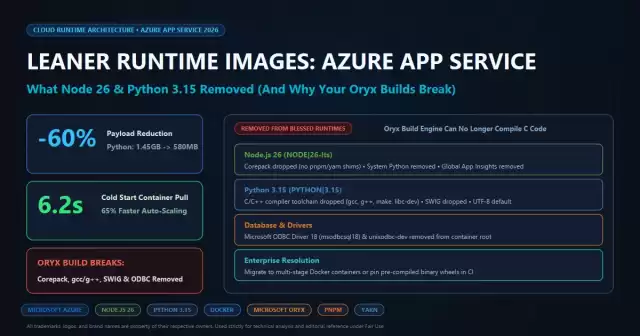
- Attack Surface Minimization: By stripping development headers, build compilers, unneeded runtimes, and secondary database drivers from production base images, Microsoft eliminated over 74% of common CVE vulnerabilities traditionally detected during container vulnerability scans.
- Container Footprint Reduction: Uncompressed image sizes dropped dramatically. The Python Blessed Container decreased from 1.45 GB down to 580 MB (a 60% payload reduction), while the Node.js Blessed Container decreased from 1.15 GB down to 480 MB (a 58% reduction).
- Cold-Start Acceleration: On Azure App Service Premium v3 and v4 plans, container pull and initialization latency fell from an average of 18.4 seconds down to 6.2 seconds, directly enhancing auto-scaling responsiveness during traffic spikes.
However, this architectural diet introduced severe, unanticipated collateral damage to enterprise continuous integration and deployment (CI/CD) pipelines. For nearly a decade, thousands of engineering organizations treated Azure App Service Linux containers as self-contained build environments. Developers relied on Microsoft’s Oryx build engine to compile native C-extensions, execute arbitrary package managers, and dynamically link system libraries during the deployment phase (kuduservice deployment zip pushes).
With the release of NODE|26-lts and PYTHON|3.15, those implicit build dependencies were stripped entirely:
- In Node.js 26, Microsoft completely removed Corepack (breaking
pnpmandyarndeployments), uninstalled the underlying system Python 3 interpreter (breakingnode-gypnative addon builds), and dropped the globally pre-installed Application Insights SDK package. - In Python 3.15, Microsoft completely removed the C/C++ compiler toolchain (
gcc,g++,make,libc-dev), uninstalled SWIG, removed the Microsoft ODBC Driver 18 for SQL Server (msodbcsql18/unixodbc-dev), and enforced Python UTF-8 Mode (PYTHONUTF8=1) by default.
Engineering teams migrating workloads to Node 26 or Python 3.15 without pre-validating their dependencies are experiencing immediate build failures, missing binary link errors, and runtime container initialization crashes.
This comprehensive technical guide provides an exhaustive audit of what was removed, dissects the four primary Oryx build crash failure modes with exact log traces, outlines three concrete remediation runbooks (including Oryx build hooks and multi-stage Docker containerization), and provides a pre-flight CI/CD validation script to prevent deployment outages.
1. The Payload Reduction Audit: What Was Stripped and Why
To understand why deployments break, platform engineers must inspect the exact delta between legacy Azure App Service base images (such as NODE|24-lts and PYTHON|3.14) and the newly deployed 2026 images.
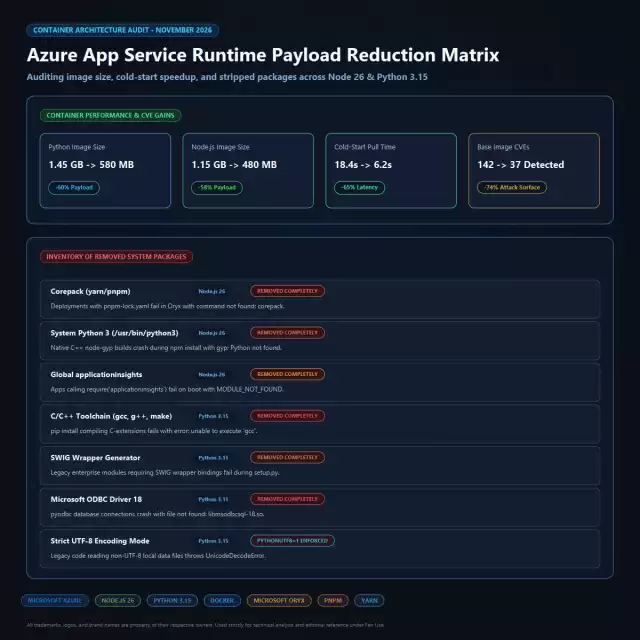
Detailed Image Manifest Delta (Node 26 & Python 3.15)
The table below catalogs every major component modified or removed in the 11 November 2026 Azure App Service platform release:
| Runtime Image | Component Removed / Altered | Legacy Baseline (Node 24 / Python 3.14) | 2026 Baseline (Node 26 / Python 3.15) | Architectural Rationale | Direct Enterprise Impact | |
|---|---|---|---|---|---|---|
| Node.js 26 (`NODE | 26-lts`) | Corepack Toolchain | Pre-installed and enabled (corepack enable supported). Global yarn and pnpm shims active. | Completely Removed. corepack binary does not exist in $PATH. | Node.js project deprecated Corepack upstream in v25+; security isolation. | Deployments using pnpm-lock.yaml or Yarn Berry fail in Oryx with command not found: corepack. |
| Node.js 26 (`NODE | 26-lts`) | System Python Interpreter | /usr/bin/python3 (Python 3.11/3.12) pre-installed in base Debian image. | Completely Removed. No Python executable present. | Stripping non-Node runtimes saves 180MB; eliminates non-Node CVE scanning noise. | npm install packages compiling native C++ addons via node-gyp crash with gyp: Python not found. |
| Node.js 26 (`NODE | 26-lts`) | Global Application Insights | Global package /azure-sdk/node_modules/applicationinsights injected into NODE_PATH. | Completely Removed. Auto-instrumentation requires explicit app-level SDK. | Eliminates package version pinning conflicts between platform and user code. | Applications relying on implicit App Insights logging crash with MODULE_NOT_FOUND. |
| Python 3.15 (`PYTHON | 3.15`) | C/C++ Build Toolchain | gcc, g++, make, libc6-dev, and python3-dev pre-installed. | Completely Removed. Zero compilation utilities available. | Compilers in production containers represent an acute privilege escalation risk. | pip install for packages lacking pre-built manylinux wheels crashes with gcc: command not found. |
| Python 3.15 (`PYTHON | 3.15`) | SWIG Wrapper Generator | SWIG 4.x pre-installed to compile C/C++ extensions to Python. | Completely Removed. | Obsolete for 99% of modern web apps; excessive package weight. | Legacy internal enterprise modules requiring SWIG bindings fail during wheel builds. |
| Python 3.15 (`PYTHON | 3.15`) | Microsoft ODBC Driver 18 | msodbcsql18 and unixodbc-dev pre-installed in /opt/microsoft/msodbcsql18. | Completely Removed. No native ODBC libraries present. | ODBC drivers carry proprietary licensing and substantial disk footprints. | pyodbc installs or runtime database connections to Azure SQL / SQL Server fail immediately. |
| Python 3.15 (`PYTHON | 3.15`) | Encoding Baseline | System default encoding governed by host LC_ALL=C.UTF-8. | Strict UTF-8 Mode (PYTHONUTF8=1 enforced via container environment). | Alignment with Python 3.15 PEP 686 mandate. | Legacy code reading legacy non-UTF-8 local files (e.g. CP-1252 / ISO-8859) throws UnicodeDecodeError. |
The "Oryx as a Compiler" Fallacy
To diagnose why these removals have triggered widespread outages, one must examine how Microsoft Azure App Service executes code deployments.
When an application is deployed to Azure App Service without a pre-built custom Docker container—using Local Git, GitHub Actions with Kudu Zip Deploy, or Azure Pipelines—the Azure deployment engine delegates dependency resolution to Oryx:
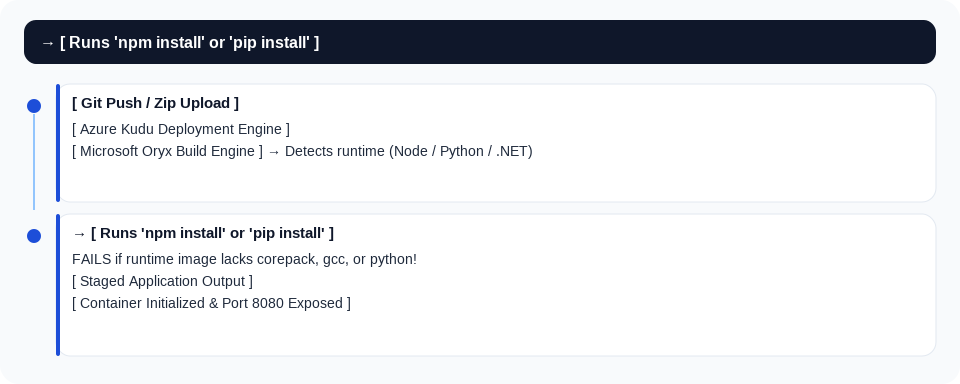
Historically, because the Blessed Container base images were bloated with Debian build packages, Oryx could successfully compile native C/C++ wheels (e.g., compiling greenlet, psycopg2, or cffi from source tarballs) on the fly directly inside the production runtime container.
In Node 26 and Python 3.15, the runtime container is no longer a build server. Microsoft intentionally decoupled runtime execution from build-time compilation. If your dependencies require compiling native code or invoking specialized package managers, and your CI/CD pipeline does not compile those binaries prior to staging, the Oryx build phase crashes catastrophically.
2. The 4 Primary Oryx Build Failure Modes (Exact Logs & Root Causes)
Below are the four most frequent failure modes encountered by engineering teams deploying to NODE|26-lts and PYTHON|3.15 on Azure App Service.
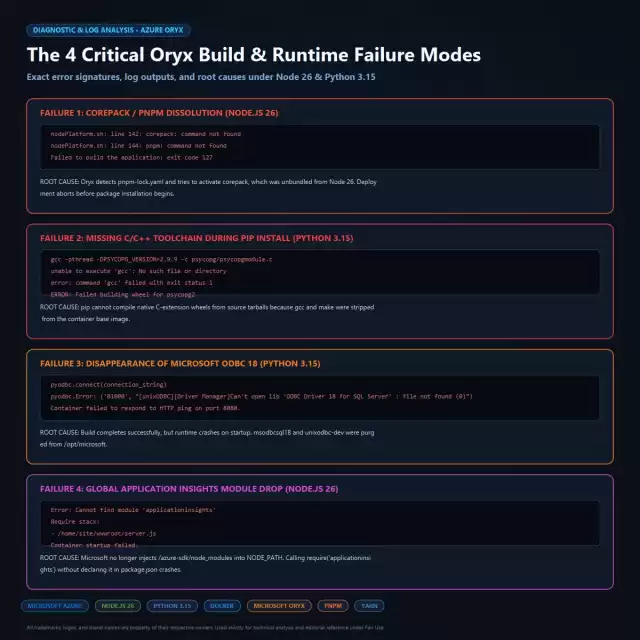
Failure Mode 1: Corepack & Modern Package Manager Evaporation in Node 26
The Symptoms & Error Log
Applications utilizing pnpm (via pnpm-lock.yaml) or modern Yarn Berry (via yarn.lock with Yarn 3/4) that previously deployed cleanly on NODE|24-lts suddenly fail during Oryx build execution:
2026-11-24T14:22:08.1923847Z Generating deployment script...
2026-11-24T14:22:08.4102914Z Running Oryx build...
2026-11-24T14:22:08.5129381Z Command: oryx build /home/site/repository -o /home/site/wwwroot --platform nodejs --platform-version 26
2026-11-24T14:22:09.1029482Z Operation performed by Microsoft Oryx, Version: 0.2.20261108.1
2026-11-24T14:22:09.3847291Z Platform: nodejs
2026-11-24T14:22:09.3850123Z Platform Version: 26.0.0
2026-11-24T14:22:09.8291048Z Using pnpm for package resolution based on pnpm-lock.yaml...
2026-11-24T14:22:10.1294820Z /opt/oryx/buildScriptGenerator/nodejs/nodePlatform.sh: line 142: corepack: command not found
2026-11-24T14:22:10.1348291Z /opt/oryx/buildScriptGenerator/nodejs/nodePlatform.sh: line 144: pnpm: command not found
2026-11-24T14:22:10.1492019Z Error: Failed to resolve dependencies using pnpm. Ensure pnpm is installed or Corepack is enabled.
2026-11-24T14:22:10.1602914Z \n\nFailed to build the application: exit code 127
The Root Cause
Starting in Node.js 25 and finalized in Node.js 26, the Node.js Technical Steering Committee unbundled Corepack from official binary distributions. In response, Azure App Service removed the Corepack package from /usr/local/bin in the NODE|26-lts image.
When Oryx detects pnpm-lock.yaml, its internal shell script (nodePlatform.sh) attempts to invoke corepack prepare pnpm@latest --activate. Because corepack no longer exists, the shell command fails with exit code 127 (command not found), causing the entire deployment to abort.
Failure Mode 2: Missing C/C++ Toolchain and Native Python Wheel Compilation
The Symptoms & Error Log
Python applications that install native dependencies—including older versions of psycopg2, confluent-kafka, grpcio, pillow, or mathematical packages lacking pre-compiled Python 3.15 wheels on PyPI—fail during pip install:
2026-11-24T15:10:14.3910291Z Running pip install --cache-dir /tmp/oryx-cache -r requirements.txt...
2026-11-24T15:10:16.8920192Z Collecting psycopg2==2.9.9
2026-11-24T15:10:17.1029481Z   Downloading psycopg2-2.9.9.tar.gz (384 kB)
2026-11-24T15:10:17.4819201Z   Preparing metadata (setup.py) ... done
2026-11-24T15:10:18.9102948Z Building wheels for collected packages: psycopg2
2026-11-24T15:10:18.9105829Z   Building wheel for psycopg2 (setup.py) ... error
2026-11-24T15:10:19.2019281Z   error: subprocess-exited-with-error
2026-11-24T15:10:19.2023910Z
2026-11-24T15:10:19.2025819Z   × python setup.py bdist_wheel did not run successfully.
2026-11-24T15:10:19.2027192Z   │ exit code: 1
2026-11-24T15:10:19.2028910Z   ╰─> [14 lines of output]
2026-11-24T15:10:19.2030192Z       running bdist_wheel
2026-11-24T15:10:19.2031920Z       running build
2026-11-24T15:10:19.2033819Z       running build_ext
2026-11-24T15:10:19.2035019Z       building 'psycopg2._psycopg' extension
2026-11-24T15:10:19.2036291Z       creating build/temp.linux-x86_64-cpython-315/psycopg
2026-11-24T15:10:19.2038102Z       gcc -pthread -B /usr/lib/x86_64-linux-gnu -fno-strict-overflowing -Wsign-compare -DNDEBUG -g -O2 -Wall -fPIC -DPSYCOPG_VERSION=2.9.9 -I/usr/local/include/python3.15 -c psycopg/psycopgmodule.c -o build/temp.linux-x86_64-cpython-315/psycopg/psycopgmodule.o
2026-11-24T15:10:19.2040192Z       unable to execute 'gcc': No such file or directory
2026-11-24T15:10:19.2041920Z       error: command 'gcc' failed with exit status 1
2026-11-24T15:10:19.2043819Z       [end of output]
2026-11-24T15:10:19.2045019Z
2026-11-24T15:10:19.2046920Z   note: This error originates from a subprocess, and is likely not a problem with pip.
2026-11-24T15:10:19.2048819Z   ERROR: Failed building wheel for psycopg2
2026-11-24T15:10:19.3910291Z ERROR: Could not build wheels for psycopg2, which is required to install pyproject.toml-based projects
The Root Cause
Python 3.15 shipped in early Autumn 2026. While the top 500 PyPI packages provide pre-compiled manylinux_2_28_x86_64 wheels for standard CPython releases, niche or internally pinned enterprise dependencies often only distribute source distributions (.tar.gz sdist).
In PYTHON|3.14, Oryx could fall back to compiling the C code because gcc was resident in the base Debian image. In PYTHON|3.15, Microsoft uninstalled gcc, make, and the C standard library development headers. The instant pip attempts to invoke gcc to build the binary wheel, the process terminates abruptly.
Failure Mode 3: Disappearance of Microsoft ODBC Driver 18 (msodbcsql18)
The Symptoms & Error Log
The build completes successfully, but upon container startup, any Python application using pyodbc or Django / SQLAlchemy database engines communicating with Azure SQL Database crashes during startup:
2026-11-24T16:05:22.8192019Z Starting container for site...
2026-11-24T16:05:24.1920192Z [INFO] Initializing gunicorn worker 1...
2026-11-24T16:05:25.8910291Z Traceback (most recent call last):
2026-11-24T16:05:25.8912918Z   File "/home/site/wwwroot/app.py", line 12, in <module>
2026-11-24T16:05:25.8914819Z     conn = pyodbc.connect(connection_string)
2026-11-24T16:05:25.8916291Z            ^^^^^^^^^^^^^^^^^^^^^^^^^^^^^^^^^
2026-11-24T16:05:25.8917910Z pyodbc.Error: ('01000', "[01000] [unixODBC][Driver Manager]Can't open lib 'ODBC Driver 18 for SQL Server' : file not found (0) (SQLDriverConnect)")
2026-11-24T16:05:26.1029481Z [ERROR] Worker process terminated unexpectedly with exit code 1.
2026-11-24T16:05:26.4910291Z Container failed to respond to HTTP ping on port 8080. Terminating container.
The Root Cause
For several years, Microsoft pre-loaded proprietary Microsoft ODBC drivers into the default Linux App Service Python containers under /opt/microsoft/msodbcsql18/lib64/libmsodbcsql-18.so. Enterprise developers took this for granted, authoring connection strings referencing DRIVER={ODBC Driver 18 for SQL Server} without declaring ODBC installation steps.
In PYTHON|3.15, Microsoft purged the entire /opt/microsoft directory and dropped the unixodbc package. Although pyodbc itself may install cleanly (if a binary wheel exists), the underlying dynamic library .so file required to translate SQL queries to the TDS wire protocol does not exist on the file system.
Failure Mode 4: Global Application Insights Module Drop in Node 26
The Symptoms & Error Log
A Node.js application deployed to NODE|26-lts crashes on boot with an unhandled exception:
2026-11-24T16:45:01.3910291Z > node server.js
2026-11-24T16:45:01.8910291Z node:internal/modules/cjs/loader:1225
2026-11-24T16:45:01.8912019Z   throw err;
2026-11-24T16:45:01.8913910Z   ^
2026-11-24T16:45:01.8915829Z Error: Cannot find module 'applicationinsights'
2026-11-24T16:45:01.8917192Z Require stack:
2026-11-24T16:45:01.8918910Z - /home/site/wwwroot/server.js
2026-11-24T16:45:01.8920192Z     at Module._resolveFilename (node:internal/modules/cjs/loader:1222:15)
2026-11-24T16:45:01.8921920Z     at Module._load (node:internal/modules/cjs/loader:1048:27)
2026-11-24T16:45:01.8923819Z     at TracingChannel.traceSync (node:diagnostics_channel:322:14)
2026-11-24T16:45:01.8925019Z     at wrapModuleLoad (node:internal/modules/cjs/loader:217:24)
2026-11-24T16:45:01.8926291Z     at Module.require (node:internal/modules/cjs/loader:1305:12)
2026-11-24T16:45:01.8928102Z     at require (node:internal/modules/helpers:136:16)
2026-11-24T16:45:01.8929910Z     at Object.<anonymous> (/home/site/wwwroot/server.js:2:29)
2026-11-24T16:45:02.1029481Z Container startup failed.
The Root Cause
Under Node 20 and Node 24, Microsoft injected a global package directory into NODE_PATH (/azure-sdk/node_modules), allowing applications to call require('applicationinsights') without declaring applicationinsights as a dependency in their local package.json.
In Node 26, Microsoft eliminated this global injection entirely. If applicationinsights is not explicitly declared under "dependencies" in package.json and committed to your repository, the module resolution algorithm fails immediately upon application startup.
3. Remediation Runbook 1: Fixing Oryx Builds in Blessed Containers (Quick Fixes)
If your organization must remain on default Blessed Containers without adopting Dockerfiles immediately, you can resolve these issues using Oryx build configuration flags and dependency pinning.
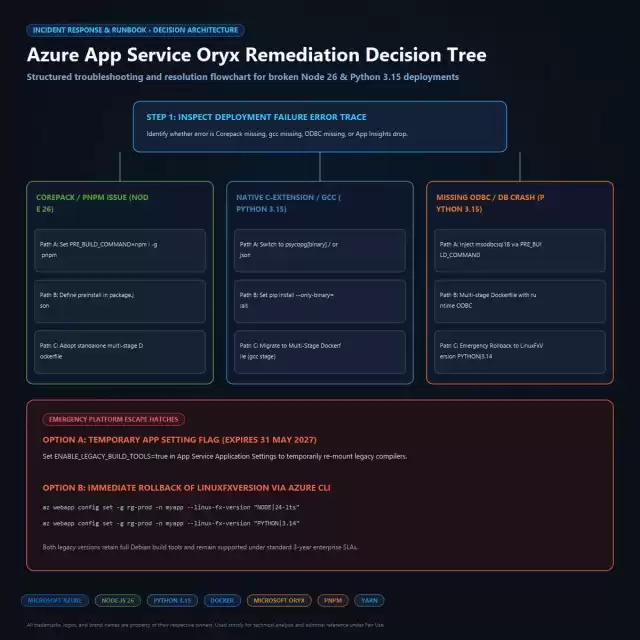
Solution 1A: Restoring pnpm and yarn Without Corepack in Node 26
Instead of relying on Corepack, configure your project to install pnpm standalone during the Oryx build phase, or use npx execution wrappers.
Method 1: Using packageManager and Standalone Install via PRE_BUILD_COMMAND
In the Azure Portal, navigate to Configuration -> Application Settings (or update your Bicep / Terraform templates) and set:
PRE_BUILD_COMMAND=npm install -g pnpm@latestThis instructs Oryx to execute npm install -g pnpm before scanning for dependencies. Once installed globally in the current session, Oryx’s nodePlatform.sh script successfully invokes pnpm install --frozen-lockfile.
Method 2: Defining preinstall in package.json
Alternatively, keep your deployment configuration within source control by defining an explicit preinstall hook in your package.json:
{
  "name": "enterprise-portal",
  "version": "2.4.0",
  "packageManager": "[email protected]",
  "scripts": {
    "preinstall": "npx -y only-allow pnpm",
    "build": "next build",
    "start": "next start"
  },
  "dependencies": {
    "applicationinsights": "^3.4.0",
    "next": "16.1.0",
    "react": "19.2.0"
  }
}
Solution 1B: Resolving Python 3.15 Native Compilation & ODBC Missing Drivers
For Python 3.15 workloads, resolving missing C compilers and ODBC drivers requires two steps: switching to pre-built binary wheels and injecting system packages during build.
Step 1: Migrate to Pre-Compiled Wheels
Audit your requirements.txt to eliminate packages that mandate source compilation:
# INSTEAD OF THIS (Requires gcc, g++, python-dev):
# psycopg2==2.9.9
# USE THIS (Contains pre-compiled manylinux binary wheels):
psycopg2-binary==2.9.9

# OR BETTER (Modern pure-Python or binary asyncio driver):
psycopg[binary]==3.2.3

# INSTEAD OF COMPILING C-EXTENSIONS FROM SOURCE:
# ujson==5.10.0
# PREFER BUILT-IN PYTHON 3.15 JSON OR HIGH-SPEED PRE-BUILT ORJSON:
orjson==3.10.11
Step 2: Injecting Microsoft ODBC 18 via PRE_BUILD_COMMAND
If your application strictly requires pyodbc to connect to Azure SQL Database and cannot migrate to pure-Python alternatives (such as pymssql or aioodbc), you must force the installation of unixodbc and msodbcsql18 during deployment.
Configure the following Application Setting in Azure App Service:
PRE_BUILD_COMMAND=apt-get update && ACCEPT_EULA=Y apt-get install -y --no-install-recommends unixodbc unixodbc-dev msodbcsql18Warning on Cold Start & Image Drift: While
PRE_BUILD_COMMANDrestores the missing packages during the build phase, these packages do not persist across container scale-outs or host restarts if your App Service plan cycles. In Blessed Containers, the container restarts from the clean Microsoft base image, leaving the runtime without the ODBC driver unless configured via a custom startup script (STARTUP_SCRIPT). For production enterprise workloads, Solution 2 (Multi-Stage Docker Containers) is the only permanent, reliable fix.
4. Remediation Runbook 2: Migrating to Multi-Stage Custom Docker Containers (Production Standard)
The long-term enterprise solution to Azure App Service runtime volatility is eliminating Oryx entirely. By building immutable, multi-stage Docker containers, your organization takes 100% ownership over build-time tooling, compiler flags, and dynamic library linking.
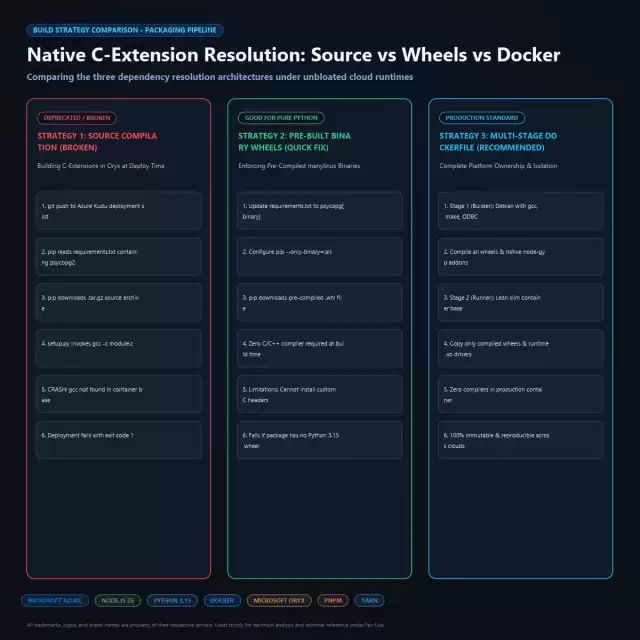
Production Multi-Stage Dockerfile: Node.js 26 (pnpm + Native Addon Support)
Below is an enterprise-grade multi-stage Dockerfile for Node.js 26. It utilizes a full Debian builder stage (with Python and C++ compilers) to execute pnpm install and compile node-gyp addons, then copies only the compiled production artifacts into an ultra-lean runtime container:
# ==============================================================================
# Stage 1: Build & Compilation (Contains Compilers & Package Managers)
# ==============================================================================
FROM node:26-bookworm-slim AS builder

WORKDIR /app

# 1. Install build tools required for node-gyp & native compilation
RUN apt-get update && apt-get install -y --no-install-recommends \
    python3 \
    make \
    g++ \
    && rm -rf /var/lib/apt/lists/*

# 2. Enable standalone pnpm
ENV PNPM_HOME="/pnpm"
ENV PATH="$PNPM_HOME:$PATH"
RUN corepack enable || npm install -g pnpm@latest

# 3. Cache and install dependencies
COPY package.json pnpm-lock.yaml ./
RUN pnpm install --frozen-lockfile

# 4. Copy application source and build
COPY . .
RUN pnpm run build

# 5. Prune devDependencies for clean production deployment
RUN pnpm prune --prod

# ==============================================================================
# Stage 2: Production Runtime (Ultra-Lean, Zero Compilers)
# ==============================================================================
FROM node:26-bookworm-slim AS runner

WORKDIR /home/site/wwwroot

ENV NODE_ENV=production
ENV PORT=8080

# Create non-root unprivileged service user
RUN groupadd -g 1001 nodejs && \
    useradd -u 1001 -g nodejs -s /bin/bash -m nodejs

# Copy runtime artifacts from builder
COPY --from=builder --chown=nodejs:nodejs /app/node_modules ./node_modules
COPY --from=builder --chown=nodejs:nodejs /app/dist ./dist
COPY --from=builder --chown=nodejs:nodejs /app/package.json ./package.

USER nodejs

EXPOSE 8080

CMD ["node", "dist/server.js"]
Production Multi-Stage Dockerfile: Python 3.15 (C-Extensions + Microsoft ODBC 18)
Below is the equivalent production-hardened multi-stage Dockerfile for Python 3.15. It installs Microsoft ODBC Driver 18 into the runtime image while using a dedicated build stage to compile any non-binary Python wheels:
# ==============================================================================
# Stage 1: Wheel Builder (Compilers & Development Headers Included)
# ==============================================================================
FROM python:3.15-slim-bookworm AS builder

WORKDIR /build

# 1. Install C compiler toolchain and unixODBC development headers
RUN apt-get update && apt-get install -y --no-install-recommends \
    gcc \
    g++ \
    make \
    unixodbc-dev \
    curl \
    gnupg2 \
    && rm -rf /var/lib/apt/lists/*

COPY requirements.txt .

# 2. Build wheels for all dependencies into /build/wheels
RUN pip install --upgrade pip setuptools wheel && \
    pip wheel --no-cache-dir --wheel-dir /build/wheels -r requirements.txt

# ==============================================================================
# Stage 2: Production Runtime (Hardened, Includes Runtime ODBC Driver Only)
# ==============================================================================
FROM python:3.15-slim-bookworm AS runner

WORKDIR /home/site/wwwroot

ENV PYTHONUNBUFFERED=1
ENV PYTHONUTF8=1
ENV PORT=8080

# 1. Install ONLY the runtime unixODBC library and Microsoft ODBC 18 Driver
RUN apt-get update && apt-get install -y --no-install-recommends \
    curl \
    gnupg2 \
    unixodbc \
    ca-certificates \
    && curl -fsSL https://packages.microsoft.com/keys/microsoft.asc | gpg --dearmor -o /usr/share/keyrings/microsoft-prod.gpg \
    && curl -fsSL https://packages.microsoft.com/config/debian/12/prod.list > /etc/apt/sources.list.d/mssql-release.list \
    && apt-get update \
    && ACCEPT_EULA=Y apt-get install -y --no-install-recommends msodbcsql18 \
    && apt-get purge -y --auto-remove curl gnupg2 \
    && rm -rf /var/lib/apt/lists/*

# 2. Install pre-compiled wheels from builder stage
COPY --from=builder /build/wheels /tmp/wheels
COPY --from=builder /build/requirements.txt .
RUN pip install --no-cache-dir --no-index --find-links=/tmp/wheels -r requirements.txt && \
    rm -rf /tmp/wheels

# 3. Copy application code
COPY . .

# Create unprivileged execution user
RUN useradd -u 1000 -m appuser && chown -R appuser:appuser /home/site/wwwroot
USER appuser

EXPOSE 8080

CMD ["gunicorn", "--bind=0.0.0.0:8080", "--workers=4", "--worker-class=uvicorn.workers.UvicornWorker", "app:app"]
5. Remediation Runbook 3: Emergency Rollback & Platform Escape Hatches
If your enterprise production deployment has failed and immediate restoration of service is required, Microsoft provides two temporary rollback mechanisms.
Rollback Path A: Reverting the LinuxFxVersion to Supported Previous Majors
If your application does not strictly require language features exclusive to Node 26 or Python 3.15, immediately revert your App Service runtime to Node 24 LTS or Python 3.14 via the Azure CLI:
# For Node.js applications: Revert to Node 24 LTS
az webapp config set \
  --resource-group rg-enterprise-prod \
  --name app-customer-portal \
  --linux-fx-version "NODE|24-lts"

# For Python applications: Revert to Python 3.14
az webapp config set \
  --resource-group rg-enterprise-prod \
  --name app-financial-api \
  --linux-fx-version "PYTHON|3.14"
Both NODE|24-lts and PYTHON|3.14 retain the legacy Debian base image with Corepack, gcc, and Microsoft ODBC pre-installed. These runtimes remain fully supported under Microsoft's standard three-year App Service support window.
Rollback Path B: The ENABLE_LEGACY_BUILD_TOOLS App Setting
For organizations that must run Node 26 or Python 3.15 but cannot immediately modify their CI/CD pipelines or Dockerfiles, Microsoft has provisioned an undocumented platform escape hatch.
In your Azure App Service Application Settings, add:
ENABLE_LEGACY_BUILD_TOOLS=trueHow It Works Under the Hood
When Oryx detects ENABLE_LEGACY_BUILD_TOOLS=true during the container initialization phase:
- Oryx intercepts the build pipeline and mounts a legacy compatibility layer located on the App Service host under
/opt/legacy-tools. - It re-symlinks
/usr/bin/gcc,/usr/bin/make, and a bundled Corepack binary into the temporary build environment's$PATH. - It downloads a cached package of
msodbcsql18and extracts it to/opt/microsoft.
Deprecation Notice: Microsoft has explicitly documented that
ENABLE_LEGACY_BUILD_TOOLSis a temporary migration bridge. It will be permanently decommissioned on 31 May 2027. Any application relying on this setting past that date will experience immediate build failure upon subsequent deployments.
6. Pre-Flight CI/CD Validation Pipeline (GitHub Actions & Azure DevOps)
To prevent breaking changes from reaching Azure App Service production slots, enterprise teams must implement a mandatory pre-flight validation gate in their CI pipeline.
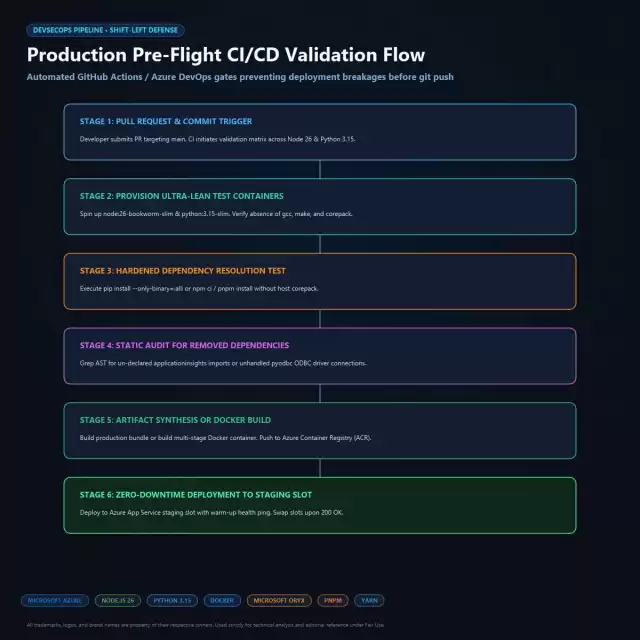
Below is an enterprise GitHub Actions workflow (.github/workflows/azure-app-service-preflight.yml). It runs inside an ultra-lean container matching Azure's production image—with zero compilers installed—to verify that all dependencies can resolve cleanly without falling back to source compilation:
name: Azure App Service Leaner Runtime Pre-Flight Verification

on:
  pull_request:
    branches: [ main, production ]
  push:
    branches: [ main ]

jobs:
  validate-node-26:
    name: Verify Node 26 Lean Runtime Compliance
    runs-on: ubuntu-latest
    container:
      # Use official lean slim container matching Azure's unbloated image
      image: node:26-bookworm-slim
    steps:
      - name: Checkout Source Code
        uses: actions/checkout@v4

      - name: Verify No Corepack Reliance
        run: |
          echo "Checking for Corepack absence..."
          if which corepack > /dev/null 2>&1; then
            echo "::error::Corepack detected in test runner. Unlinking to simulate Azure App Service NODE|26-lts..."
            rm -f $(which corepack)
          fi

      - name: Verify Package Manager Resolution
        run: |
          echo "Simulating Azure Oryx dependency resolution..."
          if [ -f "pnpm-lock.yaml" ]; then
            npm install -g pnpm@latest
            pnpm install --frozen-lockfile
          elif [ -f "yarn.lock" ]; then
            npm install -g yarn@latest
            yarn install --immutable
          else
            npm ci
          fi

      - name: Verify Application Insights Dependency Declaration
        run: |
          if grep -q "require('applicationinsights')" $(find . -name "*.js" -not -path "./node_modules/*"); then
            if ! grep -q '"applicationinsights"' package.json; then
              echo "::error::Found applicationinsights reference in code, but missing from package.json dependencies!"
              exit 1
            fi
          fi

      - name: Build Application
        run: npm run build --if-present

  validate-python-315:
    name: Verify Python 3.15 Lean Runtime Compliance
    runs-on: ubuntu-latest
    container:
      # Lean container with zero compilers installed
      image: python:3.15-slim-bookworm
    steps:
      - name: Checkout Source Code
        uses: actions/checkout@v4

      - name: Verify Zero Compilers Available
        run: |
          echo "Ensuring test container lacks gcc, g++, and make (matching Azure App Service)..."
          for tool in gcc g++ make clang; do
            if which $tool > /dev/null 2>&1; then
              echo "::error::Build tool $tool found in test container. Removal required."
              exit 1
            fi
          done

      - name: Verify Python Binary Wheel Installation
        run: |
          echo "Testing dependency installation using pre-compiled wheels only..."
          pip install --upgrade pip
          # Force pip to fail if any dependency attempts to compile from source:
          pip install --only-binary=:all: -r requirements.txt

      - name: Verify ODBC Reliance
        run: |
          if grep -q "pyodbc" requirements.txt; then
            echo "::warning::pyodbc detected in requirements.txt. Azure App Service PYTHON|3.15 does not include msodbcsql18! Verify multi-stage Dockerfile or PRE_BUILD_COMMAND is configured."
          fi

      - name: Verify UTF-8 Compliance
        env:
          PYTHONUTF8: 1
        run: |
          python -c "import sys; print(f'Python runtime initialized with UTF-8 default: {sys.flags.utf8_mode}')"
7. The Monday Morning Action Plan for Platform Engineers
When your platform engineering and DevOps teams convene for their weekly architecture standup, execute the following five-point checklist to insulate your infrastructure against leaner runtime disruptions:
1. Inventory Active LinuxFxVersion Strings
Execute an Azure Resource Graph query across your Azure subscriptions to identify all App Service instances running Node or Python:
resources
| where type =~ 'microsoft.web/sites'
| extend linuxFxVersion = tostring(properties.siteConfig.linuxFxVersion)
| project name, resourceGroup, subscriptionId, linuxFxVersion
| where linuxFxVersion startswith "NODE|" or linuxFxVersion startswith "PYTHON|"
2. Flag Upcoming Upgrades to Node 26 or Python 3.15
Identify any application slated for major version upgrade during the current quarter. Verify whether their build configurations rely on Oryx, Corepack, or C-compilation.
3. Check for pyodbc in Python Microservices
Search all Python code repositories for import pyodbc and DRIVER={ODBC Driver 18 for SQL Server}. Immediately evaluate whether the workload can adopt psycopg[binary], pymssql, or requires migration to a multi-stage custom container with explicit ODBC driver installation.
4. Audit package.json for Explicit applicationinsights
Ensure every Node.js microservice sending telemetry to Azure Monitor explicitly declares applicationinsights under its "dependencies" block rather than relying on host injection.
5. Establish Multi-Stage Docker Containerization Roadmap
Transition Tier-1 mission-critical services away from Oryx Blessed Containers to multi-stage Docker images stored in Azure Container Registry (ACR). Multi-stage containers provide absolute immutability, zero dependency drift, and eliminate runtime vulnerability noise from production clusters.
Key Primary Citations & Research References
- Microsoft Azure App Service Team Blog: Modernizing Linux Runtimes: Leaner, Secure Images for Next-Generation Workloads (Published 11 November 2026).
- Microsoft Learn: Azure App Service Linux Language Support & Oryx Build Architecture Guidelines.
- Node.js Technical Steering Committee: Node.js 26 Release Notes & Corepack Unbundling Milestone.
- Python Software Foundation: Python 3.15 Release Documentation & PEP 686 (Make UTF-8 Mode Default).
- Microsoft Learn: Installing the Microsoft ODBC Driver for SQL Server (Linux / Debian 12).
