STRATEGIC OVERVIEW
The Context Crisis: Why Large Windows Don't Solve Bad Data We are currently living in the era of the million-token context window. Models can ingest entire codebases in a single request, processing thousands of files simultaneously.
The Context Crisis: Why Large Windows Don't Solve Bad Data
We are currently living in the era of the million-token context window. Models can ingest entire codebases in a single request, processing thousands of files simultaneously. This has led to a common belief among engineering leaders: that context management is a solved problem. The assumption is that we can simply dump our entire repository into the model and let its self-attention mechanism sort out the details.
This assumption is not only incorrect; it is actively degrading developer velocity.
When you feed an IDE agent an unpruned, cluttered codebase state, three systemic failures occur:
- The "Lost in the Middle" Phenomenon: LLMs are highly sensitive to the positioning of information within their prompts. Critical instructions or symbol definitions placed in the middle of a massive context payload are frequently overlooked. The model prioritizes information at the very beginning and very end of the prompt, leading to incomplete or incorrect implementations.
- Context Pollution and Attention Drift: Large context payloads include noise—build logs, temporary scratchpads, compiled vendor files, and duplicate test snapshots. This noise distracts the model's self-attention layers, causing it to drift away from the core architectural constraints of your system and write code that violates established patterns.
- Reasoning Latency and Token Overhead: Model reasoning time scales with context length. Ingesting massive files increases prompt token processing costs and introduces latency that interrupts the flow state of the developer.
To build software efficiently with AI, developers must transition from passive context consumers to active context engineers. We must treat the prompt payload of our IDE agents as a high-value resource that requires structured management, strict pruning, and semantic optimization.
"Feeding an AI agent your entire repository without pruning is the equivalent of handing a junior developer a million pages of undocumented code and asking them to fix a single bug in five minutes. More data does not equal better understanding." — Vatsal Shah
Core Concepts of Context Engineering
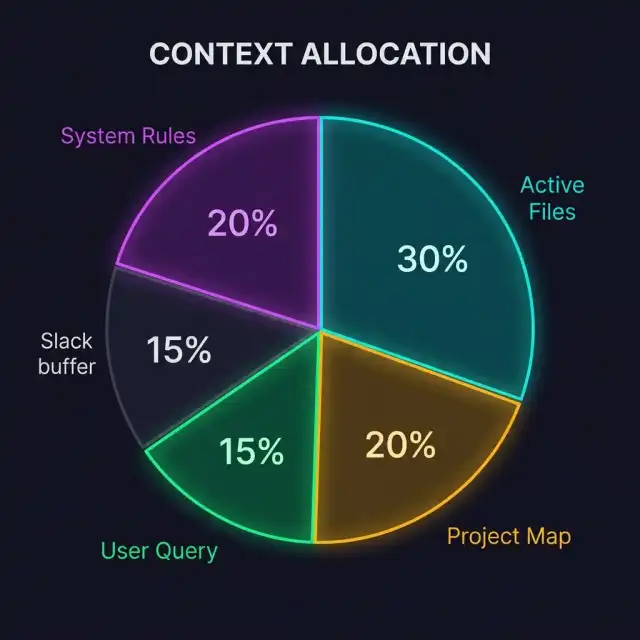
To master context engineering, developers must understand how modern IDE agents compile their prompt payloads. The prompt sent to an LLM during an edit session is a composite document dynamically assembled by the IDE's orchestration layer.
Concept A: The Context Hierarchy
The context payload is structured as a hierarchy of data sources, each serving a specific purpose:
- System Prompts: The base instructions that define the agent's behavior, personality, and default limits.
- Project Rules (e.g.,
.cursorrules): Repository-level constraints that inject coding standards, architectural definitions, and library preferences. - Active Files: The files currently open in your editor tabs, which the model uses to understand your immediate working state.
- Referenced Code Symbols: Definitions of classes, methods, and interfaces imported into the prompt context via LSP (Language Server Protocol) lookups.
- Semantic Search Context (RAG): Relevant code chunks retrieved from the local vector database using keyword or similarity match.
- Runtime State: Compilation errors, terminal outputs, or test results appended to help the model debug.
Understanding this hierarchy allows developers to manipulate the prompt layout. By pinning specific files, clearing unused tabs, or structuring rule configurations, you directly control the model's attention targets.
Concept B: Semantic vs. Structural Retrieval
IDE agents locate relevant files using two distinct retrieval mechanisms:
Semantic retrieval (Vector RAG) converts your codebase into text embeddings and searches for chunks that match your natural language query. While useful for finding conceptual matches (e.g., searching for "where do we handle user authentication"), it lacks architectural precision. It cannot guarantee that it will import all dependencies or trace the exact execution path of a method.
Structural retrieval (AST Parsing) parses your codebase into an Abstract Syntax Tree (AST), resolving class hierarchies, imports, and interface implementations. When you ask an agent to modify a class, structural retrieval automatically resolves and includes the parent class definition and dependent types. This ensures type safety and prevents compilation failures.
Concept C: The Context Budget
Every LLM request has a maximum token capacity. However, the effective context budget is much smaller than the model's theoretical limit. To maintain sub-second response times and high reasoning quality, developers should aim to keep prompt contexts under 30,000 tokens for routine operations.
Managing this budget requires a constant cycle of context assembly and context pruning—adding files relevant to the active task while actively stripping files that have served their purpose.
The AST Indexing Pipeline: How IDEs Map Your Code
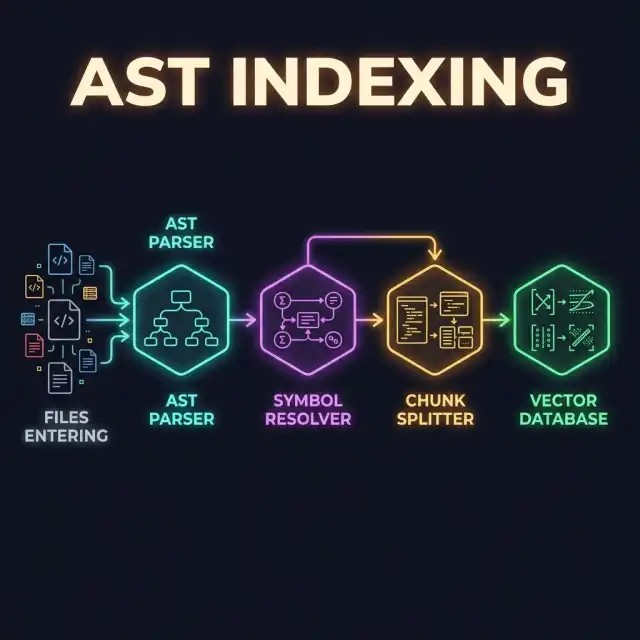
Before an IDE agent can write code for you, it must build a mental map of your repository. This process is handled by a background indexing pipeline that runs locally on your workstation.
Understanding this pipeline is critical for context engineering because it explains how the files you write are transformed into the data structures the model queries.
Step 1: File Parsing and Tokenization
The indexing pipeline monitors your codebase directory for changes. When a file is modified, it parses the source code using tree-sitter or a language-specific parser to generate an Abstract Syntax Tree (AST). This tree represents the syntax structure of the code, identifying functions, class declarations, import statements, and variable scopes.
Step 2: Symbol Resolution
The parser extracts key code symbols and resolves their relationships across files. For example, if a TypeScript file imports UserService from another module, the indexer maps the relationship, ensuring that the model can jump from the consumer to the definition during query resolution.
Step 3: Semantic Embeddings Generation
In parallel with AST parsing, the code is split into logical text blocks (usually class or function declarations) and passed through a local embedding model. The resulting vector embeddings are stored in a local database (such as SQLite or vector databases), allowing the IDE to run semantic searches on your codebase without internet access.
Context Pruning: The Art of Eliminating Noise
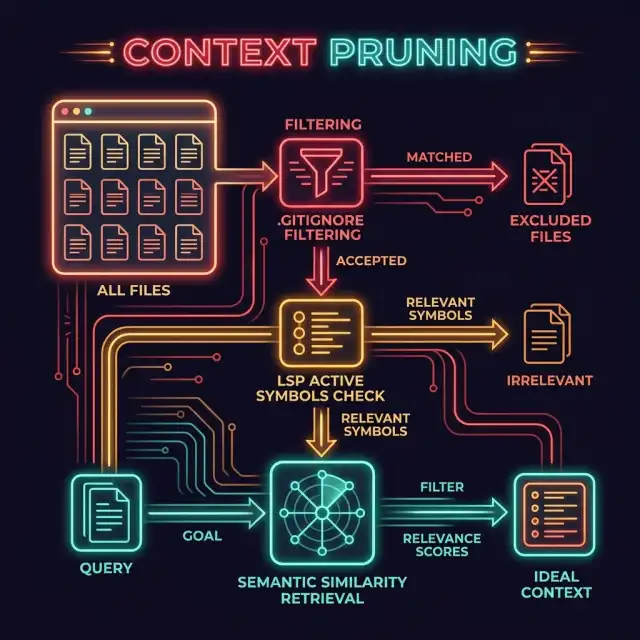
The most important daily practice of context engineering is context pruning—the deliberate removal of unnecessary information from your editor environment to focus the model's attention.
A polluted editor state is the number one cause of AI-introduced regressions. When developers leave twenty files open in their editor tabs, the IDE agent imports all twenty files into the prompt payload of the next request. The model attempts to maintain compatibility with all twenty files, writing verbose code that spans multiple unnecessary classes.
The Clear Tab Rule
The first rule of context engineering is simple: Close every tab that is not directly involved in the current task.
If you are modifying the user registration controller, your open tabs should only include:
- The controller file (
user_controller.py). - The user registration service (
user_registration_service.py). - The user model schema (
user.py). - The registration unit test suite (
test_user_registration.py).
Close your database configuration, your logging utilities, and your front-end components. By closing these tabs, you immediately free up thousands of tokens in the context window and ensure the model focuses on the core implementation logic.
Using .gitignore and .gitattributes for Context Management
Many developers do not realize that IDE agents use your repository configuration files to determine which assets to index. A poorly configured project will cause the indexer to crawl compiled assets, third-party vendor directories, and database dumps, polluting your vector database with noise.
To prevent this, you must expand your project's .gitignore and .gitattributes files to exclude all non-essential assets from the AI's view.
# Exclude third-party vendor directories from AI indexing
vendor/** linguist-documentation=false
node_modules/** linguist-documentation=false
dist/** linguist-documentation=false
build/** linguist-documentation=false

# Mark compiled assets as non-generated to prevent model parsing
public/assets/**/*.css -diff -merge
public/assets/**/*.js -diff -merge
By explicitly tagging these paths, you instruct the IDE's background indexer to ignore them during AST mapping and vector embedding generation, keeping the search index clean.
Repository Structure: Organizing Code for AI Reads
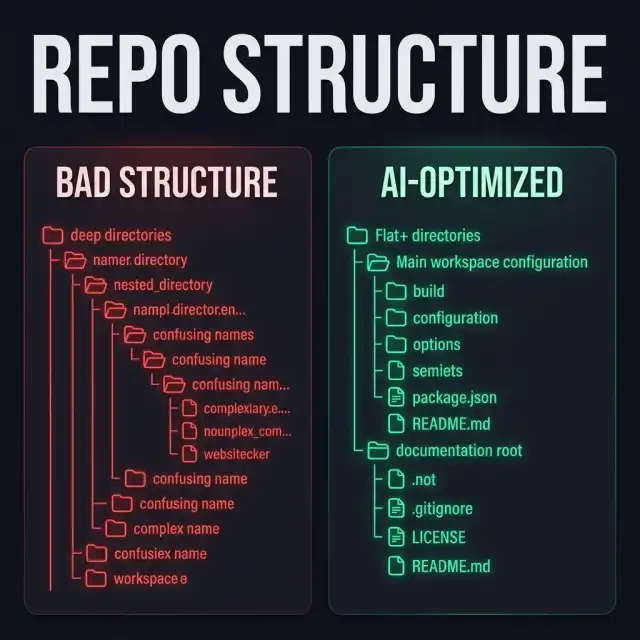
The way you organize your directories and write files has a direct impact on the performance of IDE agents. A codebase designed for human readability is often highly compatible with AI models, but there are specific optimization patterns that make a project significantly easier for an LLM to navigate.
We call this AI-friendly repository structure.
Pattern 1: Flat Over Deep Directory Depths
Deeply nested directories (e.g., src/app/modules/user/controllers/v1/auth/user_auth_controller.py) are difficult for AST indexers to resolve efficiently. They increase path resolution latency and can cause semantic search retrievers to lose tracking.
Aim for a flatter directory structure where related modules are co-located. A modular structure (such as src/users/controllers.py, src/users/services.py, src/users/models.py) is highly performant because it allows the model to see the entire module state in a single folder crawl.
Pattern 2: Explicit Interface and Schema Files
LLMs are highly effective at reading interfaces and database schemas to understand system boundaries. If your codebase relies on implicit dynamic typing, the model will struggle to determine properties and methods, leading to hallucinations.
Ensure that every module has explicit type interfaces (e.g., TypeScript .d.ts files or Python typing annotations) and database schema models. Pinning a single type declaration file to your context is often sufficient for the model to write type-safe code that integrates with the rest of your system, without needing to import the actual implementation code.
Custom Rules: Architecting the prompt with .cursorrules
The most powerful tool for context engineering in modern IDEs is the custom rule file (e.g., .cursorrules or .cursor/rules/). These files act as a "permanent prompt" that is automatically prepended to every request sent to the model.
By writing clear, structured rule files, you can enforce architectural boundaries, prevent common bugs, and ensure the model outputs code that matches your design system.
The Anatomy of an Effective Rule File
A custom rule file should be structured as code—concise, declarative, and free of conversational fluff. Avoid long explanations; instead, use markdown headers and bullet points to outline constraints.
Here is an example of a production-ready .cursorrules configuration for a Next.js 16 project:
# Next.js 16 Project Rules

## Architecture Constraints
- All data fetching must occur in Server Components.
- Use the App Router structure (`/app/page.tsx`, `/app/layout.tsx`).
- Never import server-only logic into Client Components. Ensure `"use client"` is only applied to leaf components.

## State Management
- Use Zustand for global UI state only.
- Prefer React local state (`useState`) for component-specific interactions.
- Avoid global contexts unless explicitly requested.

## Coding Style
- Write TypeScript in strict mode. All types must be explicitly declared; avoid the `any` keyword.
- Prefer functional components with arrow function syntax: `const MyComponent = () => {}`.
- Style exclusively using Vanilla CSS tokens mapped in `styles/tokens.css`.
By placing this file in the root of your project, you ensure that every code generation task inherits these rules, eliminating the need to repeat styling or architectural preferences in every chat query.
Context Synchronization: The Editor-to-LLM Loop
Context engineering is not a static setup; it is a dynamic process that runs continuously as you work. The context synchronization loop maps the real-time interaction between your editor focus, the IDE indexer, and the LLM execution pipeline.
As you move your cursor, open files, or run tests, the IDE updates the active context payload, preparing it for the next query.
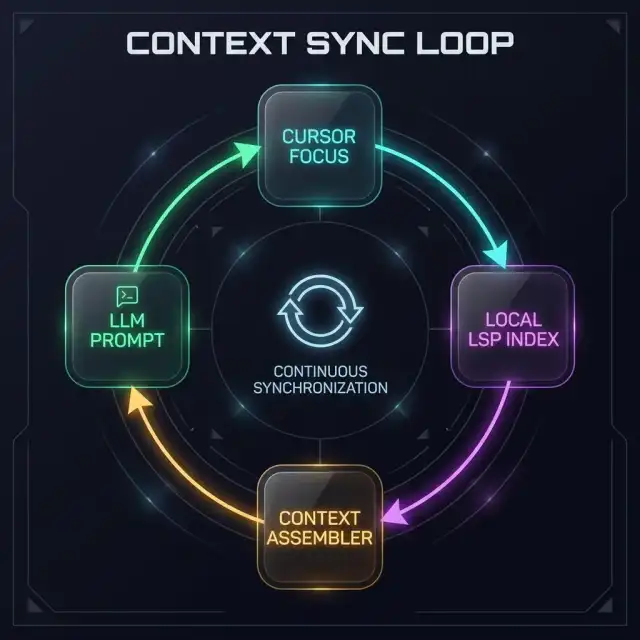
Active Sync Step 1: Cursor Focus Tracking
The IDE tracks which file is currently active and the position of your cursor. The line containing your cursor and the surrounding block (the active function or class) are treated as the highest-priority context targets.
Active Sync Step 2: LSP Code Analysis
The local Language Server Protocol (LSP) analyzer reads the active file, resolving imports, identifying variables, and flagging compilation errors. It matches the symbols under your cursor with the codebase index, preparing to import definitions if requested.
Active Sync Step 3: Prompt Payload Assembly
When you trigger a command (e.g., asking the agent to implement a method), the IDE compiles the prompt payload. It combines the system prompt, project rules, the active file, the lines surrounding your cursor, and any referenced symbols resolved by the LSP. This composite document is then transmitted to the LLM, ensuring that the model has a complete, precise view of your working state.
Comparison Table: Context Assembly Strategies
To compare the effectiveness of different context assembly approaches, let us examine their features and trade-offs.
| Strategy | Retrieval Method | Context Overhead | Accuracy | Best Used For |
|---|---|---|---|---|
| Semantic RAG Only | Similarity searches in vector space | Medium (depends on chunk size settings) | Low (frequent API mismatch errors) | Conceptual searches, exploring new code bases |
| AST Dependency Resolution | Syntax tree symbol parsing (LSP) | Low (highly targeted symbol files only) | High (ensures complete dependency mapping) | Refactoring code classes and type updates |
| Full Repo Dump (No Pruning) | Imports every file in the directory | High (consumes entire token budget) | Low (lost in the middle, attention drift) | Small projects (under 10 files total) |
| Active Context Engineering | AST + Closed Tabs + Custom Rule Files | Low (optimized under 30k tokens) | Very High (strict rules + targeted context) | Enterprise applications and large codebases |
Common Pitfalls in Context Management
Even experienced developers fall into predictable context engineering traps. Here are the three most common pitfalls and how to avoid them:
Pitfall 1: Leaving Dead References in Custom Rule Files
Custom rule files (like .cursorrules) must be kept up to date. If you update your tech stack (e.g., migrating from CSS modules to Tailwind CSS) but forget to update your rule file, the model will continue to generate code using the old styling conventions, creating conflicting codebases.
Treat your custom rules as production code. Review them during sprint transitions and update them whenever your system architecture or libraries change.
Pitfall 2: Pinning Massive Source Files
When working with large legacy files, do not pin the entire file to the context if you only need to reference a single class interface or utility function. Pinning large files consumes your token budget and introduces reasoning noise.
Instead, extract the type interfaces or method headers of the dependency into a separate, clean definitions file (e.g., a .d.ts or interface stub) and pin that lightweight file instead. This gives the model the API definition without the implementation bloat.
Pitfall 3: Failing to Clear Stale Logs and Build Artifacts
If you run test suites or compile builds in your workspace, clean up your directories regularly. IDE agents that search your project directories can easily crawl temporary log outputs or build outputs, leading to confusing error statements and code generation based on compiler artifacts.
Add common build outputs (/build, /dist, *.log) to both your .gitignore and your editor's search exclusion list.
Futuristic Horizon: Context Engineering in the Multi-Agent Era (2027-2030)
As we move toward the end of the decade, context engineering will transition from a manual developer practice to an automated, system-orchestrated process.
Autonomous Context Orchestration Agents
By 2028, IDEs will feature autonomous context orchestrators. Instead of developers closing tabs or writing .cursorrules, a background agent will monitor your task intent and programmatically build the ideal context window.
This orchestrator will dynamically trace execution threads, run automated background test loops, prune irrelevant variables, and inject exact symbol graphs, keeping the prompt context clean without human input.
Real-Time Context Pruning at the LLM Gateway
Future LLM gateways will perform semantic pruning at the neural level. The network will analyze incoming codebase prompts, identify noise nodes using attention heatmaps, and compress the prompt payload before it reaches the reasoning layers, reducing processing cost and latency by up to 90%.
As these capabilities arrive, the role of the developer will shift from writing code to engineering the environments and semantic contexts that allow AI to write it for them.
Key Takeaways
- Context management defines AI performance: Large context windows do not compensate for cluttered, noisy prompts. Focus on pruning your active workspace.
- Enforce the Clear Tab Rule: Keep your open editor tabs focused only on the files directly involved in your active task.
- AST retrieval beats vector search for coding: Use structural symbol mapping (LSP) to ensure type safety and resolve dependency trees.
- Configure project rule files (.cursorrules): Use root-level rule files to establish permanent coding standards and prevent model architectural drift.
- Optimize your repository for AI crawlers: Maintain flat directory structures, write explicit type interfaces, and exclude build artifacts via
.gitattributes. - Treat context as an engineering asset: Manage your prompt tokens like memory allocation to ensure sub-second response times and high-quality outputs.
About the Author
Vatsal Shah is an AI Solutions Architect, DevEx consultant, and Engineering Leadership strategist. He works with scaling technology teams to design, optimize, and automate developer tooling setups, helping software organizations configure their workspaces and workflows to maximize the efficiency of autonomous IDE agents.
