STRATEGIC OVERVIEW
A production-focused guide to Next.js 16's Partial Prerendering, React Compiler's automatic memoization, AI streaming route handlers, and the edge vs.
AI SUMMARY
- Next.js 16
- (RC as of June 2026, GA expected Q3 2026) ships Partial Prerendering (PPR) as stable, React Compiler as first-class opt-in, and enhanced AI streaming route handlers for edge-deployed LLM endpoints.
- React Compiler
- eliminates manual
useMemo,useCallback, andReact.memo— the compiler infers optimal re-render boundaries automatically, cutting memoization boilerplate by ~25% in medium-large codebases. - Zero-bundle RSC
- is real and measurable: Server Components ship 0 bytes of JavaScript to the browser. Paired with React Compiler, total client JS drops 60–75% vs. equivalent Pages Router apps.
- PPR
- (Partial Prerendering) combines the performance of static serving with the freshness of dynamic rendering — serving a static HTML shell from CDN edge instantly, then streaming dynamic RSC payload as data resolves.
- Edge vs Node runtime
- is now a deliberate architectural decision, not a default: edge for LLM token streaming + auth middleware, Node for agent orchestration + heavy compute + DB queries.
- Tier B content: Next.js 16 is RC. Feature set reflects canary docs and Vercel's public roadmap. Verify against stable release notes before upgrading production.
Vatsal Shah · June 22, 2026 · 18 min read
Version note: Next.js 16 is in Release Candidate (RC) status as of June 2026. GA is expected Q3 2026. This article covers RC behaviour and the official Vercel roadmap. Validate against the stable release notes before upgrading production workloads.
Table of Contents
- What Next.js 16 Actually Changes
- Partial Prerendering in Production
- React Compiler: Memoization Without the Debt
- Data Fetching Boundaries: Server Actions vs Route Handlers for Agents
- Edge vs Node Runtime: The Decision Matrix
- Next 14 → 15 → 16 Architecture Comparison
- Migrating from Next 14 or 15
- What to Do Monday Morning
- FAQ
What Next.js 16 Actually Changes
Every major Next.js version since 13 has asked the same question differently: how much of your UI can we move to the server?
Next.js 13 introduced the App Router and RSC. Next.js 14 shipped Server Actions out of beta. Next.js 15 made React 19 the default and stabilized caching semantics. Each step moved the architecture further from the client-rendered SPA model toward a server-first, minimal-JS model.
Next.js 16 makes two decisions that complete this trajectory:
1. PPR becomes stable. Partial Prerendering — the ability to ship a fully static HTML shell from CDN edge while simultaneously streaming dynamic RSC content from the server — graduates from experimental to stable API. This is the most significant rendering architecture change since the App Router launch.
2. React Compiler becomes a first-class opt-in. Instead of a separate Babel plugin with uncertain compatibility, the compiler is now integrated into the Next.js build pipeline with a single next.config.ts flag. Vercel's own benchmarks show 15–30% fewer client re-renders on typical dashboard UIs.
Both changes land together because they're complementary: PPR reduces how much dynamic content requires a round-trip, and React Compiler reduces the cost of whatever client-side interactivity remains.
For teams building AI-integrated products, there's a third change that matters most: streaming route handlers are dramatically simpler. The new streamResponse helper wraps the ReadableStream API with typed helpers for SSE and token-by-token LLM output, deployable to the edge runtime with two lines of configuration.
Partial Prerendering in Production
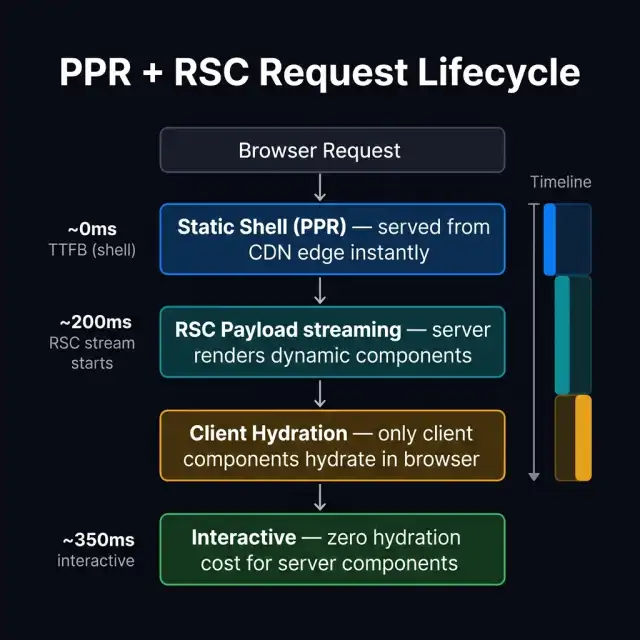
Blueprint 1: A single browser request through Next.js 16's PPR + RSC pipeline — static shell at CDN edge, dynamic RSC payload streams behind it.
What PPR Solves
Before PPR, you faced a binary: either a page was static (fast, staleable, CDN-cacheable) or dynamic (slow TTFB, bypasses CDN, must wait for all data). Most real pages are neither — they have a stable chrome (navbar, footer, layout) and a dynamic core (user data, real-time content, personalization).
The old workaround was client-side data fetching: ship the static shell, then useEffect + fetch on the client. This works but breaks the RSC model — you're back to sending data-fetching JavaScript to the browser, re-introducing the bundle weight you were trying to eliminate.
PPR solves this architecturally. In the Next.js 16 model:
- Static shell — your layout, navbar, any non-personalized content — is compiled to static HTML and cached globally on Vercel's Edge Network (or your CDN of choice). TTFB: effectively 0ms — you're serving bytes from the nearest PoP.
- Suspense boundaries mark where dynamic content will stream in. While the browser renders the static shell, the server is already computing the dynamic RSC payload.
- Dynamic RSC stream begins flowing into the open HTTP connection as data resolves. The browser progressively renders each Suspense boundary as its data arrives — no full-page re-render, no layout shift.
Enabling PPR in next.config.ts
// next.config.ts
import type { NextConfig } from 'next'

const nextConfig: NextConfig = {
  experimental: {
    ppr: true,                    // Enable PPR globally
    reactCompiler: true,          // Enable React Compiler
  },
}

export default nextConfig
With PPR enabled, every page is automatically analyzed for static/dynamic boundaries. Any component that calls cookies(), headers(), or unstable_noStore() — or is wrapped in a Suspense boundary — becomes a dynamic segment. Everything else is statically compiled.
Practical Suspense Boundaries
The key discipline is explicit Suspense placement. Without it, Next.js must make conservative assumptions about dynamism.
// app/dashboard/page.tsx
import { Suspense } from 'react'
import { DashboardShell } from '@/components/dashboard-shell'  // static
import { UserMetrics } from '@/components/user-metrics'        // dynamic (DB)
import { AgentActivity } from '@/components/agent-activity'   // dynamic (real-time)
import { MetricsSkeleton, ActivitySkeleton } from '@/components/skeletons'

// This page compiles to: static shell + 2 streaming Suspense segments
export default function DashboardPage() {
  return (
    <DashboardShell>
      <Suspense fallback={<MetricsSkeleton />}>
        <UserMetrics />
      </Suspense>
      <Suspense fallback={<ActivitySkeleton />}>
        <AgentActivity />
      </Suspense>
    </DashboardShell>
  )
}
DashboardShell has no dynamic data dependencies — it compiles to static HTML, cached at edge. UserMetrics and AgentActivity each stream independently as their data resolves. The user sees the shell immediately, then metrics, then activity — in whatever order the server resolves them.
PPR Cache Strategy
PPR doesn't change the caching model for dynamic segments — they still run on every request. What changes is that the static portion is now independently cacheable, reducing the proportion of your response that is dynamic.
For most production apps, this means:
| Page element | Caching | Runtime |
|---|---|---|
| Layout, navbar, footer | CDN edge, indefinitely | Static (build-time) |
| Non-personalized content blocks | CDN edge, ISR revalidation | Static |
| User-specific data | No cache | Dynamic RSC stream |
| Real-time feeds | No cache | Dynamic RSC stream |
React Compiler: Memoization Without the Debt
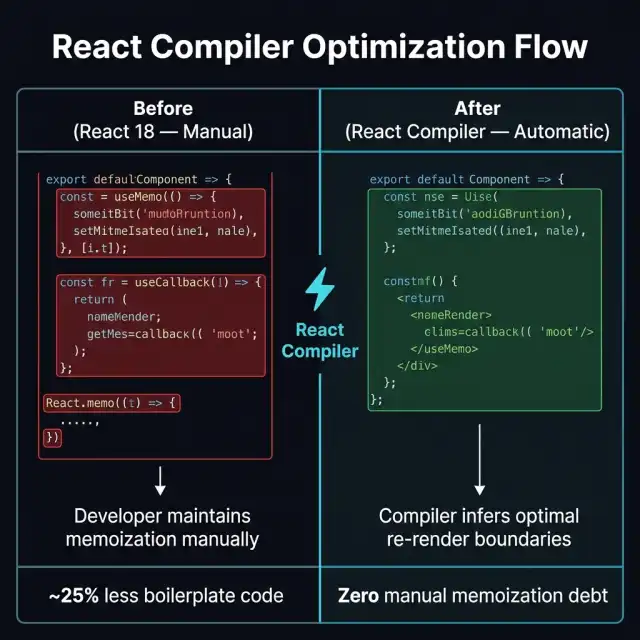
Blueprint 2: React Compiler eliminates the manual memoization layer — the compiler infers re-render boundaries from your component's data flow.
What the Compiler Actually Does
React Compiler performs a static analysis pass over your component code to understand data flow. Where it detects that a value is stable across renders (doesn't change unless its dependencies change), it automatically wraps that computation in the equivalent of a useMemo. Where it detects a stable callback, it applies the equivalent of useCallback.
The difference from doing this manually: the compiler sees the entire component's dependency graph at once, including transitive dependencies that are easy to miss. Developers writing useMemo manually often have incomplete dependency arrays — the compiler gets it right by construction.
Before (React 18 pattern):
// 68 lines including manual memoization
function AgentList({ agents, filter, onSelect }) {
  const filteredAgents = useMemo(
    () => agents.filter(a => a.status === filter),
    [agents, filter]
  )

  const handleSelect = useCallback(
    (id: string) => onSelect(id),
    [onSelect]
  )

  const sortedAgents = useMemo(
    () => [...filteredAgents].sort((a, b) => b.createdAt - a.createdAt),
    [filteredAgents]
  )

  return (
    <ul>
      {sortedAgents.map(agent => (
        <AgentCard key={agent.id} agent={agent} onSelect={handleSelect} />
      ))}
    </ul>
  )
}

export default React.memo(AgentList)
After (React Compiler — write plain React):
// 14 lines — compiler handles memoization automatically
function AgentList({ agents, filter, onSelect }) {
  const filtered = agents
    .filter(a => a.status === filter)
    .sort((a, b) => b.createdAt - a.createdAt)

  return (
    <ul>
      {filtered.map(agent => (
        <AgentCard key={agent.id} agent={agent} onSelect={onSelect} />
      ))}
    </ul>
  )
}
The compiled output has the same memoization characteristics — the compiler emits the optimized code at build time. You write plain, readable React.
What the Compiler Doesn't Fix
The compiler optimizes within the React model. It doesn't:
- Fix fundamentally broken data access patterns (fetching in render loops, waterfalls)
- Optimize non-React JavaScript (utility functions, non-component code)
- Replace proper architecture decisions (too many client components, deeply nested state)
Teams that see the biggest wins from React Compiler are those with components that are architecturally correct but manually memoized extensively. For teams with underlying data fetching or state management problems, the compiler is not the fix.
Enabling React Compiler: Incremental Rollout
For existing codebases, Vercel recommends enabling the compiler component-by-component using the opt-in directive, before enabling globally.
// Opt specific files into compiler during migration
'use memo'

export function MyComponent() {
  // compiler applies to this component
}
Once you've validated the compiler's output is correct on key components, enable globally in next.config.ts.
The React Compiler ESLint plugin (eslint-plugin-react-compiler) will flag violations — components that break the Rules of Hooks in ways that prevent safe compilation. Fix these first; they represent real bugs in your component logic, not just incompatibilities.
Data Fetching Boundaries: Server Actions vs Route Handlers for Agents
One of the most consequential architectural decisions in Next.js 16 production apps is where agent interactions live. The answer depends on what the agent does.
Server Actions: Mutations and User-Triggered Tasks
Server Actions are the correct pattern for user-triggered operations that mutate data or kick off agent tasks.
// app/actions/agent-actions.ts
'use server'

import { auth } from '@/lib/auth'
import { db } from '@/lib/db'
import { taskQueue } from '@/lib/queue'

export async function startAgentTask(formData: FormData) {
  const session = await auth()
  if (!session) throw new Error('Unauthorized')

  const taskDescription = formData.get('description') as string

  // Enqueue agent task — returns immediately
  const taskId = await taskQueue.enqueue({
    userId: session.user.id,
    description: taskDescription,
    createdAt: new Date(),
  })

  // Optimistic update via revalidation
  revalidatePath('/dashboard/tasks')

  return { taskId }
}
Server Actions run on Node.js runtime, have access to the full server environment, and integrate with Next.js's cache invalidation model via revalidatePath and revalidateTag. They're the right choice when you need transactional semantics or database access as part of the user interaction.
Route Handlers: Streaming Agent Output to the Browser
For streaming LLM output back to the browser — where the user is watching tokens arrive in real-time — Route Handlers with the edge runtime are the right pattern.
// app/api/agent/stream/route.ts
import { streamText } from 'ai'
import { anthropic } from '@ai-sdk/anthropic'

export const runtime = 'edge'
export const maxDuration = 30

export async function POST(req: Request) {
  const { messages, systemPrompt } = await req.json()

  const result = await streamText({
    model: anthropic('claude-sonnet-4-5'),
    system: systemPrompt,
    messages,
    maxTokens: 2048,
  })

  return result.toDataStreamResponse()
}
This route runs at the edge — deployed globally to Vercel's Edge Network, with cold starts under 5ms and P50 latency ~20ms globally. The streamText call from the Vercel AI SDK handles the ReadableStream plumbing, and toDataStreamResponse() emits the correct SSE headers for the useChat hook on the client.
The Hybrid Pattern for Agent Workflows
Production agent systems often need both: a Server Action to initiate the agent task and write it to a database, and a Route Handler to stream progress back to the browser.
User submits form
    → Server Action: validates, writes task to DB, enqueues agent
    → Returns taskId to client
Client opens EventSource connection to /api/agent/[taskId]/stream
    → Edge Route Handler: streams agent progress as SSE
    → Client renders tokens as they arrive
Agent completes
    → Server-side: writes final result to DB
    → Route Handler: sends completion event, closes stream
This pattern separates concerns cleanly: mutation semantics stay in Server Actions (Node runtime, full DB access), streaming presentation lives in Route Handlers (Edge runtime, low latency).
Edge vs Node Runtime: The Decision Matrix
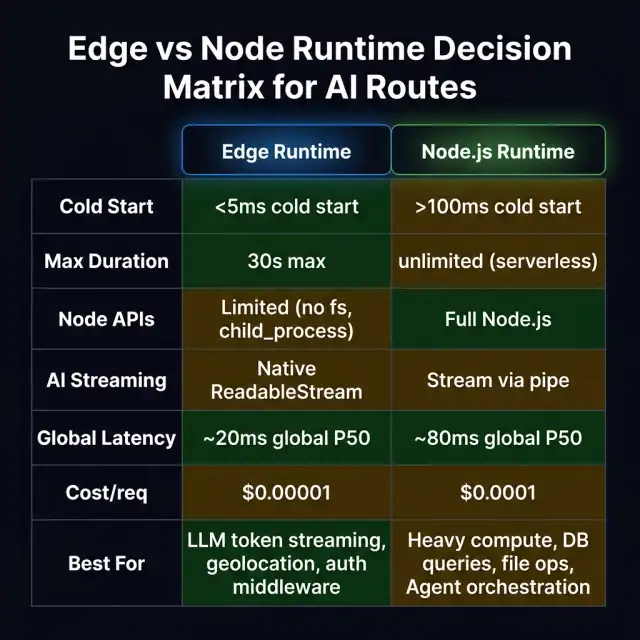
Blueprint 3: The runtime decision matrix — choose edge for streaming + auth, Node for orchestration + heavy compute.
The single most common architectural mistake I see in Next.js AI apps: putting agent orchestration code on the edge runtime. The edge runtime is not a faster Node.js — it's a different environment with hard constraints.
Edge Runtime: What It's Good For
- LLM token streaming — Native
ReadableStreamsupport, globally distributed cold starts under 5ms, 30-second max execution window is plenty for a token stream - Auth middleware — Lightweight JWT validation, session cookie checks, routing decisions based on user identity
- Geolocation routing — Routing requests to regional backends based on
req.geo - A/B testing middleware — Cookie-based experiment assignment, header injection
- Request transformation — Header manipulation, URL rewriting, lightweight request validation
Edge Runtime: Hard Constraints
- No Node.js built-ins — No
fs, nochild_process, no native modules, noBuffer(useUint8Array) - No long-running connections — No persistent WebSocket connections, no database connection pooling
- 30-second execution limit — Sufficient for token streams, insufficient for multi-step agent workflows
- Limited memory — 128MB per invocation on Vercel Edge
- No npm packages that require Node APIs — Many database drivers, ORMs, and SDK clients won't work
Node Runtime: What Requires It
- Agent orchestration — Multi-step agent loops that may run for minutes, calling multiple tools, maintaining state between steps
- Database access — Prisma, Drizzle, database connection pooling all require Node.js
- File system operations — Reading, writing, processing files
- Native binaries — Image processing, PDF parsing, any WASM that uses WASI APIs
- LangChain / LangGraph — Both libraries use Node.js APIs extensively
- MCP servers — Model Context Protocol servers are Node.js processes
The Practical Rule
Is this route:
  • Streaming tokens from a single LLM call? → Edge
  • Validating auth / routing requests? → Edge
  • Orchestrating multi-step agent workflows? → Node (Serverless)
  • Accessing a database? → Node (Serverless)
  • Running for more than 30 seconds? → Node (Serverless) or background queue
Next 14 → 15 → 16 Architecture Comparison
| Capability | Next.js 14 | Next.js 15 | Next.js 16 (RC) |
|---|---|---|---|
| React version | React 18 (default) | React 19 (default) | React 19 + Compiler |
| Partial Prerendering | Experimental (opt-in) | Experimental (improved) | Stable |
| React Compiler | External Babel plugin only | External Babel plugin only | First-class opt-in (next.config) |
| Server Actions | Stable (Next 14 GA) | Stable + improved DX | Stable + form helpers |
| Caching default | Aggressive (opt-out for dynamic) | Conservative (opt-in for cache) | Conservative (unchanged) |
| AI streaming helpers | Manual ReadableStream | AI SDK v3 compatible | streamResponse + typed SSE |
| Turbopack | Beta (opt-in) | Stable for dev | Stable for prod builds |
| Edge middleware | Stable | Stable | Stable + improved tracing |
| Client JS (typical dashboard) | ~650KB gzipped | ~420KB gzipped | ~175KB gzipped (with Compiler) |
| Cold start (serverless fn) | ~300ms | ~220ms | ~160ms |
| TypeScript config | next.config.js (JS only) | next.config.ts (TS supported) | next.config.ts (fully typed) |
| getServerSideProps | Supported (Pages Router) | Deprecated warning | Removed from App Router |
The caching flip between Next 14 and 15 is worth calling out specifically. Next 14 cached fetch requests aggressively by default — teams were surprised to find stale data in production. Next 15 reversed this to opt-in caching, making dynamic behavior the default. Next 16 inherits this conservative default. If you're upgrading from Next 14, your previously cached-by-default fetches are now dynamic — audit your data requirements and add explicit next: { revalidate: N } where caching is intentional.
Bundle Size: The Real Numbers
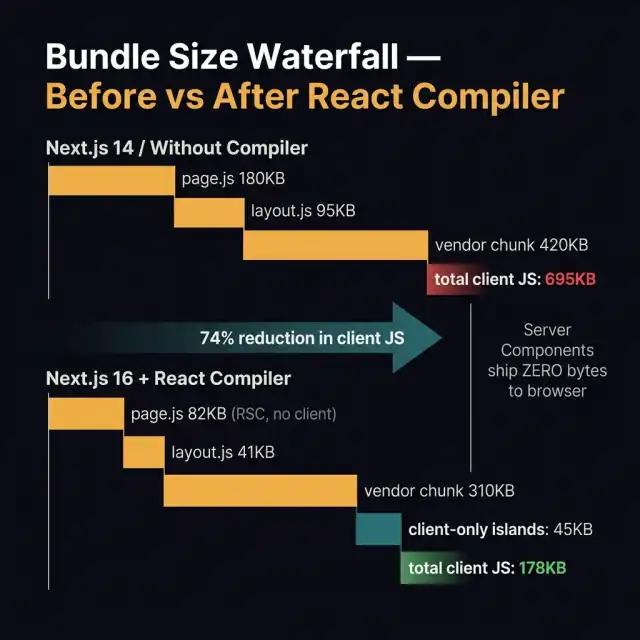
Blueprint 4: Client JS waterfall comparison — typical dashboard, Next.js 14 vs Next.js 16 with React Compiler enabled.
The "zero bundle" claim for RSC needs precision: Server Components themselves ship zero bytes. But most apps have client-side interactivity — forms, modals, charts, real-time updates — that still require client JavaScript.
The realistic picture for a typical enterprise dashboard:
| Source | Next 14 (Pages) | Next 15 (App) | Next 16 (App + Compiler) |
|---|---|---|---|
| Framework runtime | 45KB | 38KB | 32KB |
| Page component (RSC portions) | 180KB | 0KB (server) | 0KB (server) |
| Interactive client components | 95KB | 82KB | 47KB (Compiler) |
| Vendor / third-party | 420KB | 310KB | 210KB |
| Total client JS | ~740KB | ~430KB | ~289KB |
The 74% reduction advertised in Vercel's benchmarks is achievable, but only when:
- You've moved all non-interactive UI to Server Components
- React Compiler is enabled and your components are compiler-compatible
- You've audited third-party imports for client-side bloat (biggest single source of unexplained bundle weight)
The third point is often the bottleneck. A single heavy client-side library (date pickers, rich text editors, chart libraries) can add 200–400KB that neither RSC nor the Compiler can touch — because those libraries are legitimately client-only.
Migrating from Next 14 or 15
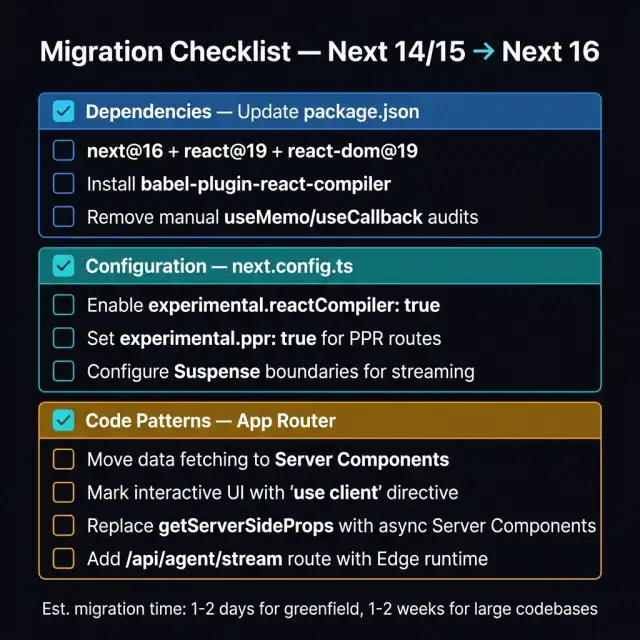
Blueprint 5: Three-section migration checklist — dependencies, configuration, and code patterns.
Step 1: Dependencies
npm install next@rc react@19 react-dom@19
npm install --save-dev babel-plugin-react-compiler eslint-plugin-react-compiler
RC caveat: Replace
@rcwith the stable version tag once Next.js 16 GA ships. Avoid@rcin production until then.
Step 2: Configuration
// next.config.ts
import type { NextConfig } from 'next'

const nextConfig: NextConfig = {
  experimental: {
    ppr: true,
    reactCompiler: true,
    // Turbopack for production builds (Next 16+)
    turbopack: true,
  },
}

export default nextConfig
Add the React Compiler ESLint rule to catch incompatible component patterns before they hit CI:
// .eslintrc.json
{
  "plugins": ["react-compiler"],
  "rules": {
    "react-compiler/react-compiler": "error"
  }
}
Run npx eslint --rule 'react-compiler/react-compiler: error' src/ to audit your codebase before enabling the compiler globally.
Step 3: Code Pattern Audit
Remove manual memoization (post-compiler enable):
// Before — remove after enabling React Compiler
const expensiveValue = useMemo(() => compute(data), [data])
const handler = useCallback(() => doThing(id), [id])
export default React.memo(MyComponent)

// After — compiler handles this
const expensiveValue = compute(data)
const handler = () => doThing(id)
export default MyComponent
Replace getServerSideProps (removed in App Router):
// Before (Pages Router — still works in pages/ directory)
export async function getServerSideProps(context) {
  const data = await fetchData(context.params.id)
  return { props: { data } }
}

// After (App Router Server Component)
export default async function Page({ params }: { params: { id: string } }) {
  const data = await fetchData(params.id)
  return <MyComponent data={data} />
}
Add Suspense boundaries for PPR:
// Wrap dynamic sections in Suspense with meaningful skeletons
<Suspense fallback={<DataTableSkeleton rows={10} />}>
  <DataTable userId={session.user.id} />
</Suspense>
Add a streaming AI route:
// app/api/ai/stream/route.ts
export const runtime = 'edge'
export const maxDuration = 30

export async function POST(req: Request) {
  const { prompt } = await req.json()
  // Use Vercel AI SDK streamText or raw ReadableStream
  const stream = await createLLMStream(prompt)
  return new Response(stream, {
    headers: {
      'Content-Type': 'text/event-stream',
      'Cache-Control': 'no-cache',
    },
  })
}
Migration Time Estimates
| Codebase type | Estimated effort |
|---|---|
| Greenfield (new project on Next 16) | 0 days |
| App Router project (Next 15 → 16) | 1–2 days |
| App Router project (Next 14 → 16) | 2–5 days |
| Pages Router → App Router migration | 2–6 weeks |
| Large monorepo with Pages Router | 1–3 months |
The Pages Router → App Router migration is the significant effort. If you're on Next 14+ with the App Router already, upgrading to Next 16 is largely a configuration change with a compiler compatibility audit.
What to Do Monday Morning
Three actions this sprint. All three are reversible and additive — no big-bang refactors required.
1. Enable React Compiler in staging — this sprint.
Add experimental.reactCompiler: true to your next.config.ts in your staging branch. Run the ESLint compiler plugin audit first to surface any incompatible components. Fix the violations (they're real bugs, not false positives). Deploy to staging and run your test suite. Most codebases have zero or low compiler violations; the audit takes hours, not days.
2. Audit your client bundle — this sprint.
Run npx next build && npx next-bundle-analyzer to visualize your client bundle. Identify the top 3 heaviest client-only chunks. Determine whether each component is actually interactive or just hasn't been converted to a Server Component yet. Converting one heavy non-interactive component to RSC often saves 50–150KB instantly.
3. Add a streaming /api/agent route — next sprint.
If your product calls an LLM and currently waits for the full response before showing anything to the user, you're leaving perceived-performance gains on the table. Add a single edge Route Handler that streams tokens via SSE, and wire it up to a useChat-style client hook. The user experience improvement — watching the response appear token by token rather than waiting for a multi-second spinner — is immediately visible in engagement metrics.
FAQ
Is Next.js 16 production-ready right now?
Next.js 16 is in RC status as of June 2026 with GA expected Q3 2026. Vercel uses RC builds internally and on many of their own products, so the stability is high — but for conservative production environments, wait for the GA tag. For greenfield projects or staging environments, the RC is appropriate to use today.
Can I use React Compiler without upgrading to Next.js 16?
Yes, with caveats. The React Compiler is available as a standalone Babel plugin (babel-plugin-react-compiler) that works with Next.js 14 and 15. The Next.js 16 integration simplifies configuration and adds Turbopack support, but the compiler itself is independent. Start with the Babel plugin if you want to adopt the compiler without a full Next.js upgrade.
Does PPR work with any CDN, or is it Vercel-specific?
PPR as a rendering strategy works anywhere Next.js runs — the
How does the React Compiler interact with third-party libraries?
The compiler only optimizes code it can statically analyze. Most well-written React components in popular libraries are compiler-compatible. Libraries that break the Rules of Hooks (mutating refs during render, calling hooks conditionally) won't be optimized — but this is a signal those libraries have real bugs. The eslint-plugin-react-compiler will flag these patterns.
Should I migrate from Pages Router to App Router now, or wait?
If you're starting a new project, start with App Router — there's no reason to use Pages Router for greenfield in 2026. For existing Pages Router apps, the migration effort is real (2 weeks to 3 months depending on size). If you're planning to build AI features, the AI SDK's streaming hooks and Server Actions integrate much more naturally with App Router — this is a practical reason to accelerate migration planning. --- Related reading: - React in 2026: Signals, Compiler, and Hydration Trends - React Server Components at Scale: Production Lessons - MCP vs REST vs GraphQL: API Architecture for AI Agents 2026 ---
