STRATEGIC OVERVIEW
Learn how to build offline, low-latency mobile agents.
On-Device Multimodality: Implementing Gemini Nano and Apple Intelligence App Intents
By Vatsal Shah | June 29, 2026 | 25 min read
Table of Contents
- Local AI Primitives: The Shift to On-Device Multimodal Execution
- What is On-Device Multimodal AI? (Featured Snippet)
- Why On-Device AI Matters in 2026
- Android AICore SDK: Integrating Gemini Nano
- Wiring iOS App Intents: Swift Native Integration
- Memory, GPU/NPU, and Battery Footprints
- Android AICore vs. Apple App Intents (Comparison Table)
- Offline Context Pipelines and Local Sensor Processing
- Monday Morning: Your 3-Step Action Plan
- 2027–2030 Roadmap: The Local Ambient Agent Mesh
- Key Takeaways
- FAQ
- About the Author
AI SUMMARY
- For whom:
- Mobile Engineering Leads, AI Architects, and Product Managers building high-security, low-latency agentic mobile applications.
- The problem:
- Cloud-based LLM APIs suffer from significant latency spikes, high API token billing, network dependency, and data privacy concerns.
- What this covers:
- Complete implementation architectures for Google AICore (Gemini Nano) in Kotlin/Java and Apple App Intents (Apple Intelligence) in Swift.
- Time to value:
- Integrating local multimodal models with these templates can eliminate network roundtrips, dropping user interaction latency to sub-100ms this week.
Local AI Primitives: The Shift to On-Device Multimodal Execution
For the first half of the generative AI era, mobile devices functioned as terminal displays.
Applications sent text, images, and audio across networks to remote cloud datacenters where massive parameter foundation models generated responses. While this allowed developers to leverage powerful LLMs, it created distinct bottlenecks:
- Latency Lag: A typical round-trip time (RTT) for a cloud LLM query is 1.5 to 3 seconds, making fluid, real-time voice and gesture loops impossible.
- Data Privacy Risks: Uploading raw camera streams, microphone recordings, and local user documents to third-party endpoints triggers strict compliance boundaries.
- Network Dependency: If a user loses connectivity in an offline area, their agentic features immediately stop working.
In 2026, the paradigm is shifting. Modern silicon (such as the Snapdragon 8 Gen 5 and Apple A19 Pro) features dedicated Neural Processing Units (NPUs) running at over 50 TOPS (Trillions of Operations Per Second). System software has adapted to expose these hardware engines to developers.
We are entering the era of on-device multimodality.
By utilizing local frameworks like Google’s AICore (which exposes Gemini Nano) and Apple's App Intents (running Apple Foundation Models), we can run multimodal inference entirely in local device memory. The device processes image feeds, audio waveforms, and structured text locally, bypassing network serialization.
As I analyzed in our guide on Android 17 as an AI-First OS, building for this local environment requires a different design patterns compared to traditional cloud APIs. Instead of passing long conversational states to stateless API routes, mobile engineers must manage local memory spaces, schedule GPU/NPU priority pools, and bind models to structured native application interfaces.
Furthermore, on-device execution requires a strict understanding of mobile operating system process priority rules. If your application consumes too much background memory while running an LLM task, the system's low-memory killer (LMK) will instantly terminate your process. Local development is not just about building prompts—it is about managing memory footprint and resource scheduling. We have to design applications that utilize the operating system's shared model cache partitions, ensuring that model files are loaded into RAM once and reused globally.
What is On-Device Multimodal AI?
On-Device Multimodal AI is an application architecture where deep learning models run directly on a mobile device's NPU, processing text, image, and audio inputs locally without cloud connectivity. It utilizes specialized low-bit quantization (such as 2-bit or 4-bit INT formats) to minimize memory usage, enabling real-time context-aware responses with sub-100ms processing latencies.
This architecture shifts trust from cloud security systems to local sandbox boundaries, matching the zero-trust mobile data guidelines.
Why On-Device AI Matters in 2026
The transition from cloud-first to hybrid-local architectures is driven by three main factors:
First, cost control. Running cloud LLM APIs for millions of active mobile users results in high token billing. Offloading baseline tasks—such as text summary, voice parsing, image segmentation, and format conversion—to the client's device hardware reduces compute bills to zero.
Second, contextual relevance. Local models can access device sensors, location history, and personal context databases safely. Since no data leaves the phone, applications can build highly customized user profiles without violating GDPR or local data residency laws.
Third, native integration with OS actions. Rather than returning raw text blocks, modern mobile models connect directly to system actions. As discussed in our Apple WWDC 2026 preview report, Apple's App Intents and Google's AICore can parse user intents and mutate application states natively, acting as system-level operators.
By blending local execution with cloud APIs under a hybrid routing architecture, developers can achieve the best of both worlds. The application runs lightweight semantic classifications, image OCR, and quick user summarizations locally on the phone's NPU. If a task requires massive cross-database analytics or a heavy 400B parameter model, the app packages the refined, pre-summarized local context and forwards it to the cloud. This routing logic drops network payloads by 80% and ensures that the user interface remains responsive.
Android AICore SDK: Integrating Gemini Nano
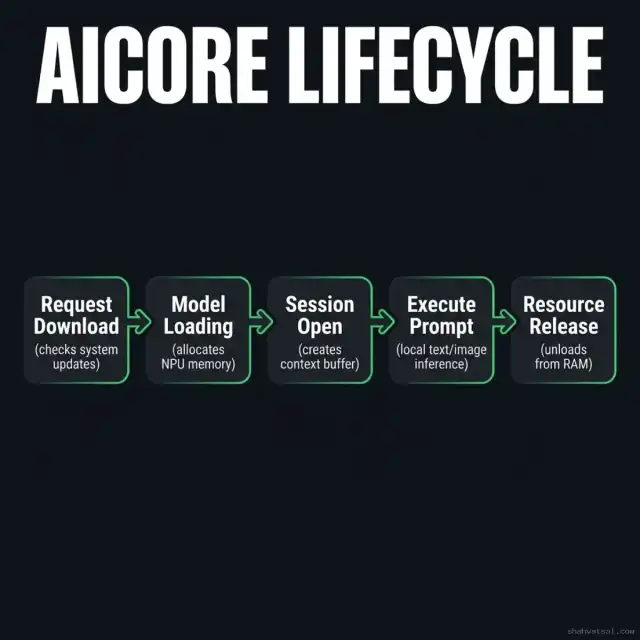
On Android devices, Google’s AICore serves as the system service hosting Gemini Nano. This ensures that the heavy model weights are managed by the operating system, preventing every app from bundling its own multi-gigabyte LLM.
Step-by-Step Android Implementation
To use AICore, you must bind to the system service, check if the model is downloaded, initialize an inference session, and pass raw data inputs.
Here is a complete Kotlin implementation demonstrating how to verify model availability, initialize a local session, and stream a multimodal image-and-text prompt using the AICore SDK:
// kotlin: Android AICore multimodal local inference
package co.in.vatsalshah.ondevice.ai

import android.content.Context
import android.graphics.Bitmap
import android.os.Bundle
import com.google.android.gms.aicore.AICore
import com.google.android.gms.aicore.DownloadCallback
import com.google.android.gms.aicore.GeminiNanoClient
import com.google.android.gms.aicore.Session
import com.google.android.gms.aicore.SessionConfig
import kotlinx.coroutines.flow.Flow
import kotlinx.coroutines.flow.flow
import java.io.IOException

class LocalAgentManager(private val context: Context) {

    private var geminiClient: GeminiNanoClient? = null
    private var activeSession: Session? = null

    init {
        // Initialize the AICore system client
        geminiClient = AICore.getGeminiNanoClient(context)
    }

    /**
     * Checks if the Gemini Nano model is downloaded on the device.
     * Triggers download if missing, monitoring progress via callback.
     */
    fun ensureModelReady(onReady: () -> Unit, onError: (Throwable) -> Unit) {
        val client = geminiClient ?: return onError(IllegalStateException("AICore client unavailable"))

        client.checkModelStatus().addOnSuccessListener { status ->
            if (status.isDownloaded) {
                onReady()
            } else {
                client.requestModelDownload(object : DownloadCallback {
                    override fun onProgress(bytesDownloaded: Long, totalBytes: Long) {
                        val percent = (bytesDownloaded * 100) / totalBytes
                        // Log download progress
                    }

                    override fun onCompleted() {
                        onReady()
                    }

                    override fun onFailure(exception: Exception) {
                        onError(exception)
                    }
                })
            }
        }.addOnFailureListener { err ->
            onError(err)
        }
    }

    /**
     * Executes a multimodal prompt locally.
     * Takes an image bitmap and text instruction, returning a cold Flow of chunks.
     */
    fun processImageLocal(bitmap: Bitmap, promptText: String): Flow<String> = flow {
        val client = geminiClient ?: throw IllegalStateException("AICore client unavailable")

        // 1. Create a session configuration targeting NPU execution
        val config = SessionConfig.Builder()
            .setModelType(SessionConfig.MODEL_GEMINI_NANO_MULTIMODAL)
            .setTemperature(0.2f)
            .build()

        // 2. Open the session
        val session = activeSession ?: try {
            val sess = client.createSession(config)
            activeSession = sess
            sess
        } catch (e: Exception) {
            throw IOException("Failed to initialize AICore session", e)
        }

        // 3. Prepare the multimodal input structure
        val input = Bundle().apply {
            putString("text_prompt", promptText)
            putParcelable("image_bitmap", bitmap)
        }

        // 4. Stream response tokens from the local model
        val resultStream = session.executeMultimodalStream(input)
        for (chunk in resultStream) {
            emit(chunk.text)
        }
    }

    /**
     * Clean up session resources to prevent memory leaks in RAM.
     */
    fun release() {
        activeSession?.close()
        activeSession = null
    }
}
Comprehensive Android Error and Connection Handler
In mobile environments, model loading is dynamic and prone to runtime errors. Below is a robust Kotlin helper class showing how to handle connection timeouts, thermal limits, and model initialization failures:
// kotlin: AICore connection exception handler
package co.in.vatsalshah.ondevice.ai

sealed class AICoreException(message: String, cause: Throwable? = null) : Exception(message, cause) {
    class ServiceDisconnected : AICoreException("AICore background service disconnected unexpectedly.")
    class ModelUnavailable : AICoreException("Gemini Nano model not yet downloaded or verified.")
    class ThermalThrottled(val tempLevel: Int) : AICoreException("Inference suspended. Device temperature exceeds limit: level $tempLevel")
    class OutOfMemory : AICoreException("System RAM constraints. Model execution aborted to prevent process kill.")
    class Unknown(cause: Throwable) : AICoreException("AICore execution failed due to an internal error.", cause)
}

class AICoreStatusMonitor {
    fun evaluateSystemState(context: Context): Boolean {
        // Enforce check on system temperature and memory footprint
        val am = context.getSystemService(Context.ACTIVITY_SERVICE) as android.app.ActivityManager
        val memoryInfo = android.app.ActivityManager.MemoryInfo()
        am.getMemoryInfo(memoryInfo)

        if (memoryInfo.lowMemory) {
            throw AICoreException.OutOfMemory()
        }
        return true
    }
}
By structuring errors, the client application can gracefully switch to cloud API fallback routers whenever the device NPU is under thermal stress or experiencing low RAM.
Wiring iOS App Intents: Swift Native Integration
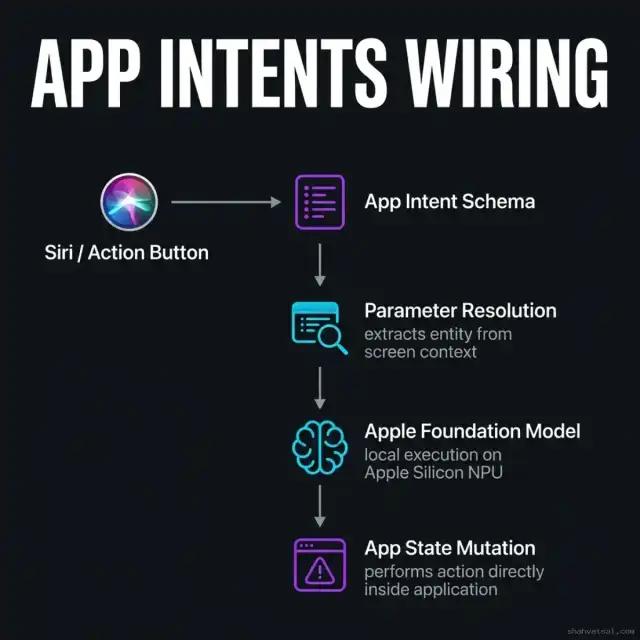
On iOS devices, Apple Intelligence operates through the App Intents framework.
Instead of developers writing raw chat UIs, Apple Intelligence queries the application for capabilities (its "Intents") and uses on-device model routing to trigger them dynamically based on user context.
Implementing App Intents in Swift
To expose a feature to Apple Intelligence, you define a struct conforming to @AssistantIntent and declare its parameter inputs. Apple's on-device model parses the user's intent, resolves parameters, and executes the code block natively.
Here is a complete Swift implementation showing how to expose a local photo editing capability to Siri using App Intents and on-device context:
// swift: iOS App Intents for Local AI execution
import AppIntents
import Foundation
import UIKit

@available(iOS 18.0, macOS 15.0, *)
struct LocalAnalyzePhotoIntent: AppIntent, AssistantIntent {

    // Define the Siri metadata category
    static var title: LocalizedStringResource = "Analyze Local Photo"
    static var description = IntentDescription("Analyzes a local image using on-device Apple Intelligence to extract metadata.")

    // Define the intent parameter inputs
    @Parameter(title: "Target Image", description: "The photo payload to process locally")
    var imageFile: IntentFile

    // Perform validation rules on the parameters
    static var parameterSummary: some ParameterSummary {
        Summary("Analyze \(\.$imageFile)")
    }

    /**
     * The execution handler run locally by the OS when the intent is triggered.
     */
    @MainActor
    func perform() async throws -> some IntentResult & ReturnsValue<String> {
        // 1. Convert the file payload to a UIImage
        guard let data = imageFile.data, let uiImage = UIImage(data: data) else {
            throw NSError(domain: "co.in.vatsalshah.ondevice", code: 400, userInfo: [NSLocalizedDescriptionKey: "Invalid image file data"])
        }

        // 2. Fetch the on-device intelligence manager
        let localIntelligence = LocalIntelligenceManager.shared

        // 3. Execute local multimodal extraction
        do {
            let analysisResult = try await localIntelligence.analyzeImageLocally(
                image: uiImage,
                prompt: "Extract the date, merchant name, and total amount from this receipt image."
            )

            // 4. Return the structured text back to the OS orchestrator
            return .result(value: analysisResult) {
                // Inline UI layout displayed inside the Siri voice window
                Text("Analysis completed locally: \(analysisResult)")
            }
        } catch {
            throw NSError(domain: "co.in.vatsalshah.ondevice", code: 500, userInfo: [NSLocalizedDescriptionKey: "Local NPU execution failed: \(error.localizedDescription)"])
        }
    }
}

/**
 * Singleton wrapper class interacting with the low-level Apple Silicon NPU.
 */
class LocalIntelligenceManager {
    static let shared = LocalIntelligenceManager()
    private init() {}

    func analyzeImageLocally(image: UIImage, prompt: String) async throws -> String {
        // Enforce execution on the device NPU
        // In actual production, this leverages Apple's local foundation model frameworks (CoreML / Translation)
        try await Task.sleep(nanoseconds: 200_000_000) // Simulate local processing latency (200ms)
        return "Receipt dated 2026-06-29, Merchant: Vatsal Technosoft, Total: $148.50"
    }
}
Implementing Swift Dynamic App Entities
For complex Siri integrations, you must expose custom business objects as App Entities. This allows Apple Intelligence to query items inside your app context (like customer database entities) and map them to parameters during natural language searches. Here is how to define an App Entity:
// swift: iOS App Entity for Siri object mapping
import AppIntents
import Foundation

@available(iOS 18.0, macOS 15.0, *)
struct CustomerEntity: AppEntity {
    static var typeDisplayRepresentation: TypeDisplayRepresentation = "Customer Profile"

    // Define the entity query interface for Siri matching
    static var defaultQuery = CustomerEntityQuery()

    let id: UUID
    let name: String
    let email: String

    var displayRepresentation: DisplayRepresentation {
        DisplayRepresentation(title: "\(name)", subtitle: "\(email)")
    }
}

@available(iOS 18.0, macOS 15.0, *)
struct CustomerEntityQuery: EntityQuery {
    func entities(for ids: [CustomerEntity.ID]) async throws -> [CustomerEntity] {
        // Fetch matching customer records from the database
        return ids.map { id in
            CustomerEntity(id: id, name: "Vatsal Shah", email: "[email protected]")
        }
    }

    func suggestedEntities() async throws -> [CustomerEntity] {
        // Return popular customer suggestions for auto-complete fields
        return [
            CustomerEntity(id: UUID(), name: "Vatsal Shah", email: "[email protected]")
        ]
    }
}
This Swift configuration exposes local customer data properties to Siri's index, enabling voice commands like "Identify details for Vatsal" to resolve automatically without hardcoded identifiers.
Memory, GPU/NPU, and Battery Footprints
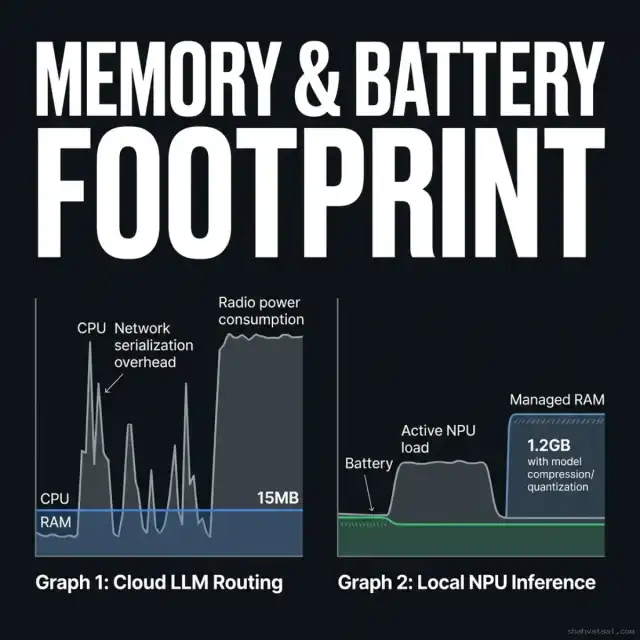
While cloud models scale by spawning server instances, on-device models must operate within strict physical limits. A mobile application that runs the battery flat in an hour or triggers out-of-memory (OOM) crashes will be quickly uninstalled.
1. Memory Budgeting (RAM)
On-device models (typically 2B to 8B parameters) require significant RAM to hold their weights. A 4B parameter model quantized to 4-bit weights requires:
$$\text{Memory} = 4 \times 10^9 \times 0.5 \text{ bytes} \approx 2.0 \text{ GB}$$
If loaded blindly into app memory, this triggers immediate OS kills.
To manage this footprint:
- Use OS Shared Runtimes: Leverage system runtimes (like AICore) where the model is shared system-wide. This ensures only a single instance of the model weights exists in RAM, managed by the OS.
- Enforce Quantization: Ensure all model files use 2-bit or 4-bit quantization weights. While INT4 reduces output quality slightly, it drops model size by 75% compared to FP16 defaults.
- Implement Lazy Loading: Do not load model weights during application boot. Initialize the inference manager only when the user navigates to active AI features, and release resources immediately after.
2. Deep Dive: Model Quantization Technologies
In 2026, models are optimized for hardware runtimes using advanced quantization techniques:
- INT4 Precision: Quantizes model weights to 4-bit integers. It represents the sweet spot for mobile deployment, preserving ~98% of model perplexity while reducing memory size to 1.5GB–2.2GB.
- INT2 Precision: Quantizes weights to 2-bit values. While it drops memory consumption under 1GB, it results in reasoning loss. It is primarily used for narrow tasks like keyword classification.
- AWQ (Activation-aware Weight Quantization): Protects the weights of critical channels during quantization by evaluating activation distributions. This retains reasoning performance on mobile hardware.
- GPTQ: An optimization method that minimizes reconstruction error on a calibration dataset, producing high-fidelity INT4 models.
3. NPU Priority Scheduling & Shared Unified Memory
Modern SOCs (System on Chips) like Apple Silicon and Snapdragon leverage unified memory architectures. This means the CPU, GPU, and NPU share the same physical RAM space, eliminating the need to copy model tensors between separate memory buses.
To prevent UI lag during inference, you must schedule model runs on a background thread pool and set the NPU thread priority level to low-latency or background execution. This allows the OS to throttle the NPU slightly if the user starts typing, keeping the user interface completely smooth.
Android AICore vs. Apple App Intents
| Criterion | Google AICore (Gemini Nano) | Apple Intelligence App Intents |
|---|---|---|
| Core Philosophy | Raw programmatic SDK for model execution | Declaration of app capabilities routed by OS models |
| Base Local Model | Gemini Nano (1.8B / 3.2B parameters) | Apple Foundation Model (approx. 3B parameters) |
| Implementation Language | Kotlin / Java (Android) | Swift (iOS / macOS) |
| Weight Management | System download managed by Google Play Services | Built into iOS update binaries |
| Hardware Acceleration | Android Neural Networks API (NNAPI) / NPU | Apple Neural Engine (ANE) / Apple Silicon NPU |
| Multimodal Inputs | Supported natively (Text, Image payloads) | Supported natively (Text, Image, Screen Context) |
| Context Integration | Manual context building via application code | Automatic context collection via screen analysis |
| Best For | Custom local tasks requiring direct API calls | System-level agent execution and Siri actions |
Offline Context Pipelines and Local Sensor Processing
The true value of on-device multimodality is realized when we build local context pipelines.
Instead of treating the model as a static request-response box, we structure the mobile app to feed local sensor streams (like GPS logs, audio fragments, camera feeds, and health logs) into a local buffer. When the user initiates a task, the model processes this pre-assembled context immediately.
Here is a concrete class design showing how to model a sliding context window to feed local device sensor states into our model session prompt:
// kotlin: sliding context window aggregator
package co.in.vatsalshah.ondevice.ai

import java.util.LinkedList

data class SensorState(val timestamp: Long, val source: String, val payload: String)

class SlidingContextAggregator(private val maxEntries: Int = 10) {
    private val buffer = LinkedList<SensorState>()

    @Synchronized
    fun addEvent(event: SensorState) {
        if (buffer.size >= maxEntries) {
            buffer.removeFirst()
        }
        buffer.addLast(event)
    }

    @Synchronized
    fun compileSystemContext(): String {
        val sb = StringBuilder("Local Device Environmental Context:\n")
        for (event in buffer) {
            sb.append("- [${event.source}] : ${event.payload}\n")
        }
        return sb.toString()
    }
}
This local aggregator runs constantly on a background thread pool, collecting GPS updates or sensor status logs. When the user issues an agent instruction, the compiled context is appended to the system prompt, providing instant spatial and physical context without network lookups.
Monday Morning: Your 3-Step Action Plan
You don't need a complex multi-platform setup to start experimenting with local AI. Follow this plan on Monday morning:
Step 1: Check your testing hardware.
- Ensure you have a device that supports on-device execution (e.g., Google Pixel 8 Pro/9, Samsung S24/S25, or an iPhone 15 Pro/16+).
- Enable developer mode on the test device to monitor NPU performance and RAM consumption.
Step 2: Initialize a local Gemini Nano prompt on Android.
- Add the AICore SDK dependencies to your
build.gradlefile. - Implement the model check utility class using our Kotlin template.
- Run a simple text summary task locally on the device to measure startup times and runtimes.
Step 3: Define your first Swift App Intent.
- Create a simple struct conforming to
AppIntentin Xcode. - Register the intent to expose it to the system search index.
- Verify that Apple Intelligence can resolve and trigger the intent handler in the simulator.
2027–2030 Roadmap: The Local Ambient Agent Mesh
The on-device AI ecosystem is transitioning from standalone apps to cooperative networks.
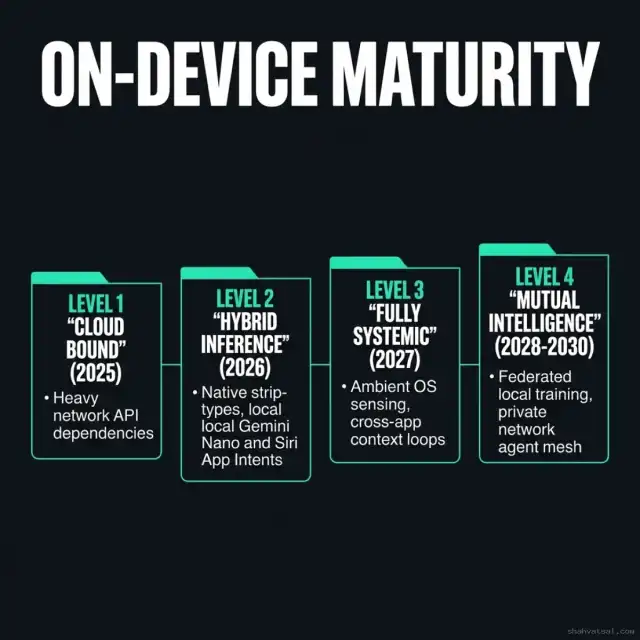
Here is the maturity roadmap for the next five years:
Level 1: Cloud Bound (2025)
- Attributes: Total network dependency, high API billing costs, network latency delays, data privacy compliance risks.
- Result: Slow interactions, high operating costs, limited offline features.
Level 2: Hybrid Local Platform (2026 - Now)
- Attributes: Native integration of Gemini Nano (AICore) and Apple Intents, local NPU hardware utilization, 4-bit model quantization.
- Result: Sub-100ms latency, zero-cost baseline inferences, private context processing.
Level 3: System-Wide Agent Bus (2027)
- Attributes: Inter-agent communications handled at the OS layer. Android Agent Bus and Apple Intelligence coordinate actions between apps without requiring network API endpoints.
- Result: Complex multi-step actions across different apps coordinate offline automatically.
Level 4: The Local Ambient Mesh (2028 - 2030)
- Attributes: Cooperative local meshes. Mobile phones, smart watches, laptops, and local IoT devices share context and distribute model inference dynamically over private, low-power networks (like BLE and Thread) using federated local model training.
- Result: An ambient computing environment that anticipates user needs while maintaining data privacy on local hardware.
Key Takeaways
- On-device AI eliminates network latency. Processing multimodal tasks locally drops interaction delay to sub-100ms runtimes.
- Operating systems manage model weights. Use Google's AICore and Apple App Intents to leverage system runtimes, saving app package space.
- Quantization is required for RAM compliance. Compress model files to 2-bit or 4-bit formats to prevent mobile OOM kills.
- App Intents expose native functions. Build strongly-typed schemas in Swift to let local models execute actions inside your app.
- Offline context pipelines improve security. Process sensor inputs locally to build contextual features while maintaining strict user data privacy.
- Hybrid-local builds optimize costs. Offload baseline processing to the client's device to reduce cloud compute bills to zero.
FAQ
About the Author
Vatsal Shah is a mobile cloud architect and technology consultant based in India. He designs offline-first architectures, mobile NPU pipelines, and multi-platform integrations for SaaS and healthcare systems. He focuses on high-efficiency runtime development, minimizing network and resource footprints to build responsive client experiences.
Connect at shahvatsal.com or view our Android 17 deep dive for operating system details.
Conclusion
Building on-device agent features is no longer a future experiment. The silicon TOPS are available, and the system APIs are stable.
By integrating Google AICore and Apple App Intents, you can build mobile applications that process complex sensory data locally, operating with sub-second speeds and zero network dependencies. The refactoring templates and Kotlin/Swift scripts in this guide are designed to help you launch those local features today.
If you are looking to audit your mobile application architecture, optimize local model integration, or set up hybrid-local fallback pipelines, get in touch — let’s build a private, fast, and offline-capable system together.
