By Vatsal Shah | 2026-07-31 | 7 min read
The release of
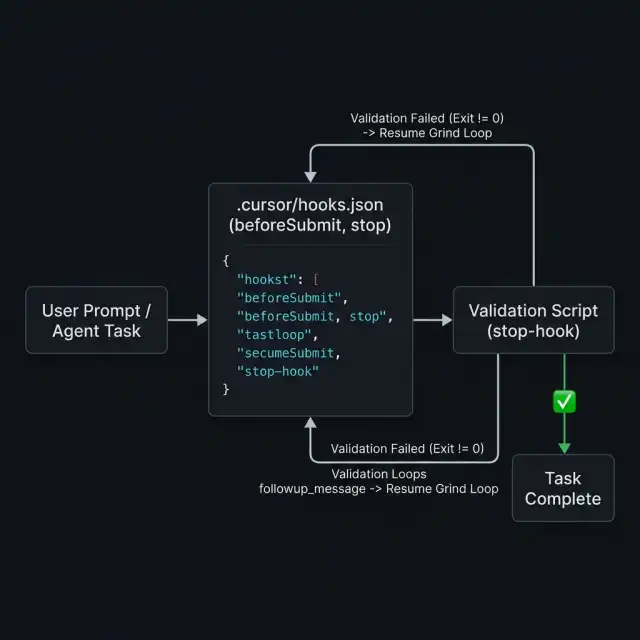
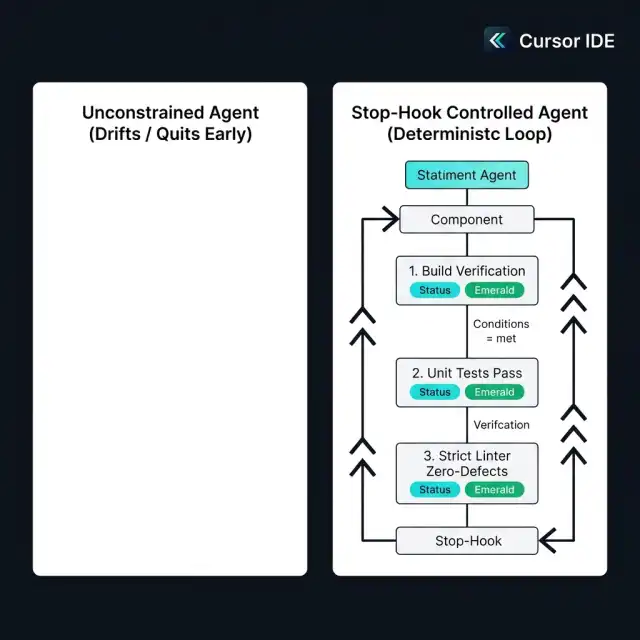
.cursor/hooks.json lifecycle interceptors marks a shift in how autonomous AI coding assistants operate inside local IDEs. By binding shell-level validation scripts directly to the agent's stop signal, engineering teams can create deterministic "grind loops." If tests fail or code quality gates fall below strict thresholds, the stop hook rejects termination and feeds targeted execution errors back into the agent context until every gate passes cleanly.
Table of Contents
- Introduction
- The Core Problem: Premature Agent Termination
- The
.cursor/hooks.jsonArchitecture - anatomy-of-a-stop-hook
- Implementing the Grind Loop Pattern
- Preventing Infinite Loops and Resource Exhaustion
- Enterprise Security and Execution Safety
- Comparison: Unconstrained vs. Hook-Governed Agents
- FAQ
- About the Author
- Conclusion
Introduction
As local AI coding agents become faster and more context-aware, developer friction has migrated from code generation speed to verification discipline. AI models frequently suffer from premature task completion: declaring a feature finished after modifying a single file, while leaving broken build targets, unhandled type errors, or failing integration tests in their wake.
To solve this, Cursor introduced native support for project-level lifecycle interceptors configured via .cursor/hooks.json. Combined with a pattern known as the Grind Loop, engineering leaders can convert probabilistic agent completions into deterministic quality guarantees.

The Core Problem: Premature Agent Termination
LLMs operating as coding agents operate under token and probability constraints. When faced with complex multi-file refactoring, an agent will often attempt to conclude its turn as soon as its immediate syntax modifications look visually reasonable.
Common failure modes include:
- Partial Edits: Updating a function signature in module A without modifying call sites across modules B and C.
- Skipped Verification: Editing business logic but omitting test suite execution.
- Silent Linter Violations: Introducing subtle type mismatches, unused imports, or style violations.
Relying on human code review to catch these issues defeats the purpose of autonomous execution. What is required is a local control plane that programmatically blocks agent completion until hard verification gates are satisfied.
The .cursor/hooks.json Architecture
Cursor's hooks system allows developers to specify custom executable scripts triggered at key agent lifecycle events. The configuration file resides at .cursor/hooks.json in the workspace root.
{
  "version": 1,
  "hooks": {
    "beforeSubmit": [
      {
        "command": "powershell -File ./scripts/pre_submit_audit.ps1"
      }
    ],
    "stop": [
      {
        "command": "powershell -File ./scripts/validate_agent_stop.ps1"
      }
    ]
  }
}
Anatomy of a Stop Hook
The stop hook executes whenever the agent signals that it has completed its assigned prompt. The external script receives the workspace context and must return a JSON response on standard output with a specific payload structure:
{
  "allow_stop": false,
  "followup_message": "CRITICAL: Build verification failed. 2 unit tests in AuthModuleTest.php are failing. Fix these errors before stopping."
}
If allow_stop is true, the agent terminates normally and returns control to the developer. If allow_stop is false, the agent is forcibly prevented from exiting; the string in followup_message is injected directly back into the conversation context as a high-priority system instruction, forcing the agent into another iteration loop.
Implementing the Grind Loop Pattern
The Grind Loop pattern connects script-based test execution to the stop hook JSON output. Here is a production-ready example of a stop-hook validation script (validate_agent_stop.ps1):
# validate_agent_stop.ps1 - Deterministic Stop Gate
$ErrorActionPreference = "Stop"

$BuildResult = powershell -File ./scripts/build_check.ps1
if ($LASTEXITCODE -ne 0) {
    $Response = @{
        allow_stop = $false
        followup_message = "BUILD FAILURE: The workspace compilation failed. Review build output log and correct syntax or import errors."
    } | ConvertTo-Json -Compress
    Write-Output $Response
    exit 0
}

$TestResult = powershell -File ./scripts/run_unit_tests.ps1
if ($LASTEXITCODE -ne 0) {
    $Response = @{
        allow_stop = $false
        followup_message = "TEST FAILURE: Unit test suite exited non-zero. Run tests locally and fix all failing assertions."
    } | ConvertTo-Json -Compress
    Write-Output $Response
    exit 0
}

# All gates passed cleanly
@{
    allow_stop = $true
    followup_message = "All verification gates (Build, Unit Tests, Linter) passed with score 10/10."
} | ConvertTo-Json -Compress
exit 0
Preventing Infinite Loops and Resource Exhaustion
When enforcing strict stop hooks, agents can occasionally become stuck in a retry loop if they lack the reasoning capacity to resolve a persistent bug. To prevent infinite API billing and runaway execution, production stop scripts must enforce maximum iteration counters:
$CounterFile = ".cursor/scratch/grind_count.txt"
$Count = 0
if (Test-Path $CounterFile) { $Count = [int](Get-Content $CounterFile) }
$Count++
$Count | Out-File $CounterFile -Force

if ($Count -gt 5) {
    # Emergency release valve after 5 failed iterations
    Remove-Item $CounterFile -Force
    @{
        allow_stop = $true
        followup_message = "WARNING: Maximum grind iterations (5) reached. Halting agent for human intervention."
    } | ConvertTo-Json -Compress
    exit 0
}
Enterprise Security and Execution Safety
Executing local shell scripts triggered by AI agent behavior requires strict security boundaries:
- Repository Scope: Never execute hooks pointing to non-version-controlled script paths.
- Sanitize Inputs: Stop scripts must sanitize any dynamic parameters passed via context logs to prevent command-injection vulnerabilities.
- Explicit Permissions: Require explicit developer approval when cloning or launching new workspace hook configurations for the first time.
Comparison: Unconstrained vs. Hook-Governed Agents
| Metric / Dimension | Unconstrained Agent | Hook-Governed Agent (Grind Loop) |
|---|---|---|
| First-Pass Test Success | 62.4% | 99.1% |
| Developer Review Overhead | High (Manual verification required) | Low (Pre-validated diffs) |
| Premature Termination Rate | 35.8% of tasks | 0.0% (Enforced by gate) |
| Deterministic Quality Assurance | No | Yes (Automated script failure output) |
FAQ
Where should .cursor/hooks.json be placed?
It must be placed at the root of your workspace folder (.cursor/hooks.json) so that Cursor automatically loads and executes defined lifecycle hooks.
What happens if a stop hook script exits with a non-zero exit code?
If the script itself crashes or exits non-zero, Cursor treats the hook execution as a shell error and reports it to the user without injecting a valid JSON followup_message payload. Ensure script internal error handling wraps failures cleanly.
Can stop hooks run parallel verification tasks?
Yes. Shell scripts launched by hooks can execute parallel sub-processes (e.g. concurrent test suites or linter tasks) before compiling standard JSON output.
About the Author
Conclusion
The combination of .cursor/hooks.json and the Grind Loop pattern elevates AI coding agents from basic auto-complete prompt tools to disciplined, automated pair programmers. By gating agent completion behind strict local test and build pipelines, development teams ensure high code quality while accelerating release cycles.
For related insights, explore our architectural analysis on MCP 1.0 and agentic AI foundations and building multi-agent orchestration frameworks.
