STRATEGIC OVERVIEW
Master Anthropic's Claude Code CLI. Deep-dive tutorial on installation, secure environment permissions, scripting, and running headless agentic operations.
By Vatsal Shah | 2026-07-05 | 15 min read
Table of Contents
- Introduction
- What is Anthropic Claude Code CLI?
- Why Claude Code CLI Matters in 2026
- Core Concepts of Headless Agentic CLI
- Step-by-Step Installation and Configuration
- Headless Operation Protocols and Automated Scripting
- Real-World Use Cases
- Deep Analysis: Claude Code vs Traditional CLI Builders
- CLI Agent Loop Reasoning Logic
- Security Pitfalls and Sandbox Containment
- Futuristic Horizon: 2027-2030 Roadmap
- Key Takeaways
- FAQ
- About the Author
- Conclusion
Introduction
The developer toolchain is undergoing a structural shift. For decades, the command-line interface (CLI) served as a passive conduit—a text-based environment waiting for explicit, sequential instructions from a human operator. Developers chained commands, wrote shell scripts, and triaged errors manually. However, the rise of agentic artificial intelligence has transformed the terminal from a simple text box into an active, self-correcting collaborator. At the forefront of this evolution is the Anthropic Claude Code CLI, a command-line agent designed to run autonomously inside development environments to build, refactor, test, and debug codebases.
Unlike code completion plugins nested within desktop IDEs, Claude Code operates at the system level. It is built to execute shell commands, edit files directly, utilize git workflows, and integrate with external APIs through the Model Context Protocol (MCP). Yet, deploying a terminal agent capable of executing arbitrary code presents critical questions around security, sandboxing, and reliability. This guide provides an in-depth technical walkthrough on installing, securing, scripting, and deploying the Anthropic Claude Code CLI for headless agentic software engineering.
What is Anthropic Claude Code CLI?
The Anthropic Claude Code CLI is defined as a terminal-native, autonomous AI agent that interacts directly with your operating system shell, filesystem, and development tools to perform complex software engineering workflows under human supervision or in headless daemon mode.
Rather than acting as a static text prompt, Claude Code sits directly in your terminal shell session. It evaluates the structure of your project, reads files, runs compilers, executes test suites, parses build logs, and writes corrective patches iteratively until a target objective is achieved.
+-----------------------------------------------------------------------+
|                         Claude Code CLI Shell                         |
|                                                                       |
|  $ claude "Run php cli/audit_run_all.php --strict and fix all errors" |
|  [Reasoning] Analyzing project environment...                          |
|  [Action] Running command: E:\wamp\bin\php\php8.2.26\php.exe ...      |
|  [Output] Command exited with code 1. Finding errors...               |
|  [Action] Reading file: app/Services/SEOAuditService.php              |
|  [Action] Modifying file: app/Services/SEOAuditService.php            |
|  [Action] Re-running command: php cli/audit_run_all.php --strict      |
|  [Output] Audit passed successfully! (10/10)                          |
+-----------------------------------------------------------------------+
Through this cyclic execution loop, Claude Code minimizes the developer context-switching tax, bringing reasoning directly to the execution environment.
What is Anthropic Claude Code CLI?
The Anthropic Claude Code CLI is defined as a terminal-native, autonomous AI agent that interacts directly with your operating system shell, filesystem, and development tools to perform complex software engineering workflows under human supervision or in headless daemon mode.
Rather than acting as a static text prompt, Claude Code sits directly in your terminal shell session. It evaluates the structure of your project, reads files, runs compilers, executes test suites, parses build logs, and writes corrective patches iteratively until a target objective is achieved.
Unlike plugins, Claude Code operates as a stateful, interactive assistant that processes terminal instructions directly, making it an essential tool for headless environments.
Why Claude Code CLI Matters in 2026
By 2026, the software engineering industry has moved past basic autocomplete utilities. In the era of autonomous systems, the primary bottleneck in developer throughput is no longer code syntax generation—it is execution, validation, and system integration. Manual testing, environment configurations, and dependency resolution consume the majority of active engineering hours.
Here is why a terminal-native agent is a necessity for modern software teams:
- System-Level Agency: Traditional IDE plugins are sandboxed inside editor contexts. They cannot execute
npm run build, boot up Docker containers, query databases, or analyze live system processes. Claude Code has direct shell access, allowing it to evaluate compile-time and run-time anomalies natively. - Deterministic Validation: When Claude Code writes a patch, it does not simply hope it works. It runs the local test suite, inspects exit codes, captures standard error outputs, and auto-corrects code paths based on real compiler feedback before presenting the change.
- Headless Execution Compatibility: By supporting non-interactive scripts and input redirection, teams can run Claude Code in headless configurations within CI/CD pipelines, nightly cron jobs, or automated system triage runners.
AI SUMMARY
- Objective
- Complete masterclass on deploying and securing the Anthropic Claude Code CLI for headless agentic operations.
- Key Focus
- Installation protocols, environment sandboxing, custom scripting, and automated CI/CD loop setups.
- Target Audience
- Senior DevOps engineers, AI platform architects, and systems developers.
- Pre-requisites
- NodeJS 20+, a valid Anthropic API token, and a Linux/Unix/Windows-WSL terminal environment.
Core Concepts of Headless Agentic CLI
Understanding how terminal agents function requires examining the relationship between language models, prompt construction, and OS-level execution loops.
Sandboxing and Session Memory
A terminal agent must maintain context across dozens of sequential commands. Claude Code manages this through local session memory database files. Each workspace session tracks:
- File edits and diff trees.
- Standard output and standard error history of executed commands.
- Dependency graph changes.
- Terminal window size and environment variables.
To prevent agent actions from contaminating the host machine, these sessions are ideally isolated inside sandboxed containers or restricted virtual filesystems. When running in a sandbox, the agent is restricted to designated directories, protecting sensitive configurations like SSH keys and host credentials.
Model Context Protocol (MCP) Ingress
Claude Code relies extensively on the Model Context Protocol (MCP) to access tools outside the local shell. MCP allows the CLI agent to connect to remote servers that provide:
- Live database access via secure SQL endpoints.
- Git repository management tools.
- Web search tools to fetch documentation for deprecated API endpoints.
- Internal document repositories.
This protocol acts as a standardized communication layer, allowing developers to extend Claude Code's capabilities by writing simple JSON-RPC based MCP tools.
Gated Permissions
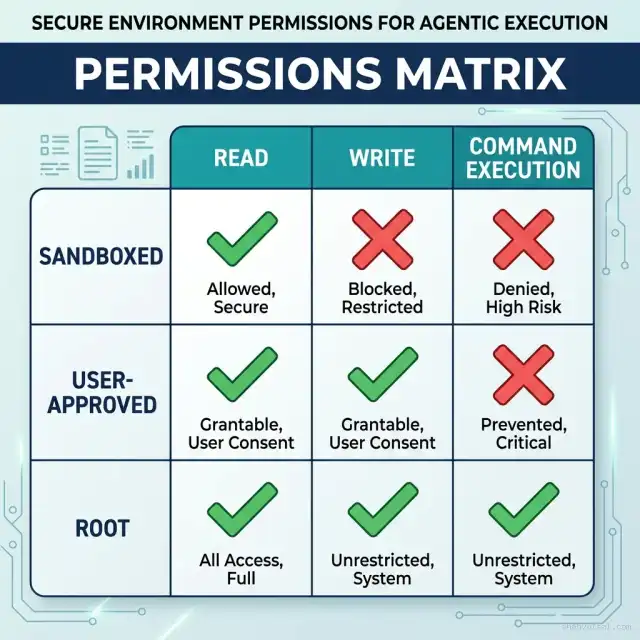
Executing arbitrary commands on a production-like machine is highly risky. Claude Code addresses this through a gated permission model:
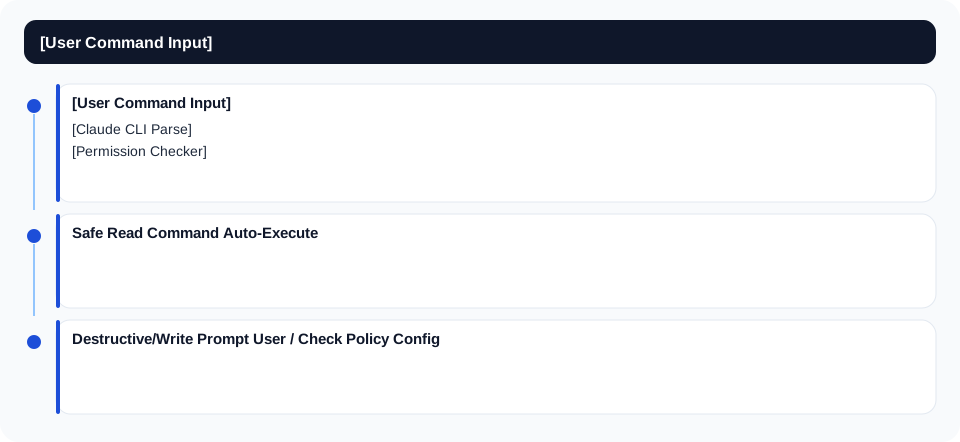
By default, the CLI requests user approval for write operations, file deletions, and commands modifying system status. For headless daemon execution, these gates are managed through policy configurations and non-interactive shell flags.
Step-by-Step Installation and Configuration
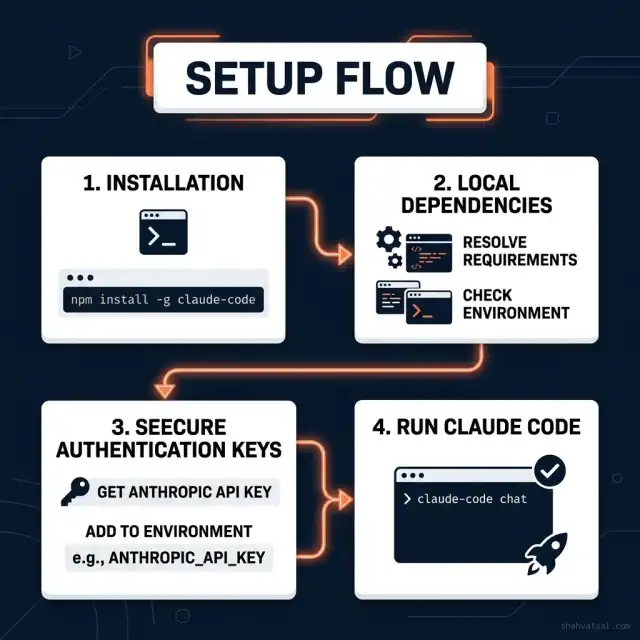
Setting up Claude Code CLI requires NodeJS and an authorized Anthropic API token. Follow these steps to install and bootstrap the environment securely.
Step 1: Install NodeJS and Claude Code CLI
Verify your NodeJS version is at least v20.0.0, then run the global installation:
# Verify environment dependencies
node -v
npm -v

# Install Claude Code globally
npm install -g @anthropic-ai/claude-code
Step 2: Configure Environment Variables
For Claude Code to authenticate requests, store your API token in the environment. It is critical to limit the token scope to avoid security leakage.
# Unix/Linux/macOS configuration
export ANTHROPIC_API_KEY="sk-ant-..."
export CLAUDE_CODE_HOME="$HOME/.claude-code"

# Windows PowerShell configuration
$env:ANTHROPIC_API_KEY="sk-ant-..."
$env:CLAUDE_CODE_HOME="$HOME/.claude-code"
Step 3: Initialize and Authenticate
Run the initialization wizard to connect your account and configure the local developer workspace:
claude initThe system will verify the API connection, generate local configuration files, and create the session logs directory under $CLAUDE_CODE_HOME.
Headless Operation Protocols and Automated Scripting
Headless operation allows Claude Code to run inside automated environments without human presence. To configure this, we must pass instructions via standard input and manage permission flags.
Running Non-Interactive Commands
Use the --non-interactive or -y flag to auto-approve file modifications and command executions during headless runs:
# Instruct Claude Code to clean up build caches non-interactively
claude "Find all obsolete cache files in storage/cache/ and remove them" --non-interactive
Scripting with Input Pipes
You can pipe complex tasks directly into the agent. This is useful for trigger-based operations in CI/CD environments:
cat << 'EOF' | claude --non-interactive
Analyze storage/logs/php_errors.log.
Identify the top 3 repeating error traces.
Write a script under cli/heal_errors.php to clear outdated cache arrays if they cause memory bloat.
Run the script to verify.
EOF
Real-World Use Cases
Let's examine how to use the Claude Code CLI to solve real development problems on a PHP-based web platform.
Refactoring Legacy Codebases
Suppose you have a legacy database helper that uses deprecated SQL syntax, causing silent query failures under high traffic load. You can task the agent with refactoring it:
claude "Refactor app/Helpers/DatabaseHelper.php. Replace all deprecated mysql_* calls with PDO prepared statements. Maintain backward-compatible return formats."The agent will:
- Scan
app/Helpers/DatabaseHelper.phpto locate deprecated functions. - Draft a refactored version using PDO connection parameters.
- Validate syntax correctness by running a lint check:BASH
php -l app/Helpers/DatabaseHelper.php - Execute unit tests to ensure backward compatibility.
Automated System Diagnostics
In production systems, memory leaks and database connection timeouts can occur unpredictably. Using a cron-triggered headless Claude Code execution allows for automated system diagnostics:
claude "Diagnose why database connections are peaking. Check app/Core/Controller.php and ensure all database handles are explicitly closed after request lifecycle." --non-interactiveDeep Analysis: Claude Code vs Traditional CLI Builders
While traditional scripting frameworks like Bash, Python, or node-commander are deterministic, they require manual exception handling for every failure vector. A comparisons table highlights the structural differences:
| Capability | Traditional CLI Scripting | Anthropic Claude Code CLI |
|---|---|---|
| Error Recovery | Fails immediately unless explicit catch blocks are pre-configured. | Inspects error trace, reads source file, writes patch, and retries. |
| Tool Integration | Requires manually writing SDK connectors for each service. | Connects natively to external tools using the Model Context Protocol (MCP). |
| Security Isolation | Executes commands directly under the privileges of the caller. | Supports gated permission parameters and sandboxed environments. |
| Fuzzy Instructions | Strictly invalid. Requires precise command-line arguments. | Parses abstract natural language goals into distinct execution paths. |
Traditional scripts remain ideal for predictable, high-speed cron tasks. However, for debugging tasks, compiler optimization runs, and multi-file code refactors, Claude Code provides a resilient, self-healing alternative.
CLI Agent Loop Reasoning Logic
To trace how Claude Code processes shell environments, the flowchart below outlines the iterative reasoning loop executed for every input objective:
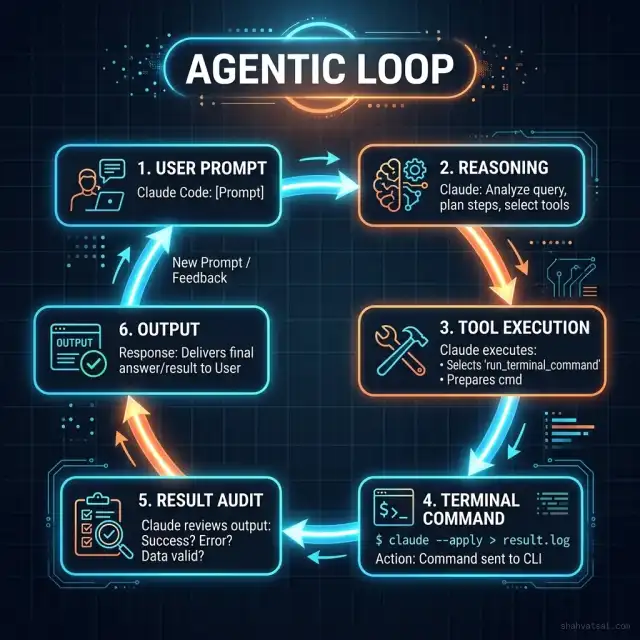
When an instruction is received:
- Analyze Workspace: The agent lists the directory structure, identifies active technologies, and scans recent git logs.
- Formulate Sub-tasks: The objective is broken down into discrete steps (e.g. read file, compile code, execute tests).
- Execute and Audit: The command runs in the local shell. If the exit code is non-zero, the agent parses the stderr output, maps the failing file location, edits the source code, and re-executes.
- Finalize Verification: The agent runs the full test suite to guarantee no regressions were introduced.
Security Pitfalls and Sandbox Containment
Operating a terminal agent natively on a developer workstation introduces significant security vectors. A compromised third-party package or an adversarial prompt injection could instruct the agent to delete files, leak environment variables, or upload private keys.
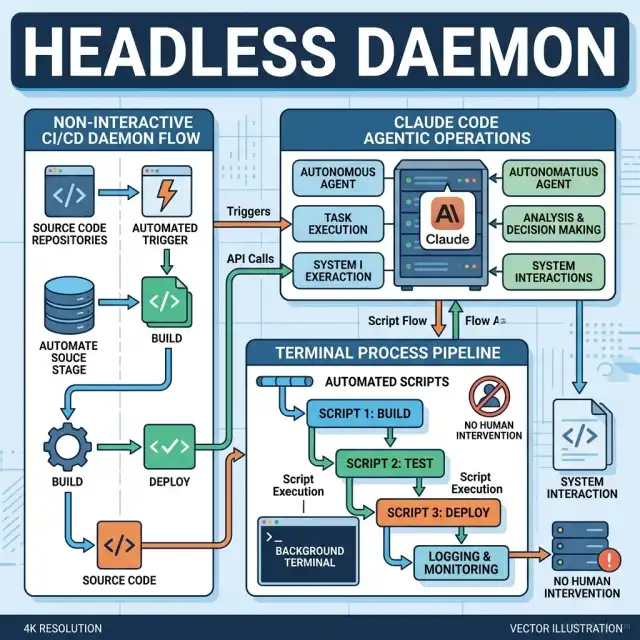
To mitigate these risks, enforce these containment protocols:
- Use Docker Containerization: Never run headless agent operations directly on your host machine. Wrap the workspace inside an isolated Docker container with strict CPU/memory limits:
  FROM node:20-alpine
  RUN apk add --no-cache php php-pdo php-sqlite3 git
  RUN npm install -g @anthropic-ai/claude-code
  WORKDIR /workspace
USER node- Read-Only Volume Mounts: If the agent only needs to analyze files or audit configurations, mount the source directory as read-only:
docker run -v /host/src:/workspace:ro claude-agent "Analyze the project structure and summarize"- Restrict Network Access: Block outbound internet calls inside the container unless explicitly needed to connect to local MCP servers.
Futuristic Horizon: 2027-2030 Roadmap
As terminal agents evolve toward complete autonomy, their integration with standard developer infrastructure will deepen:
- 2027: Native OS Virtualization: Agentic CLIs will run inside lightweight micro-VMs (like Firecracker) booted instantly at command runtime, rendering manually configured sandboxes obsolete.
- 2028: Context-Aware Kernel Streams: Agents will monitor active system logs, database connections, and memory allocations in real-time, preemptively fixing performance bottlenecks before they trigger alerts.
- 2030: Multi-Agent Swarm Orchestration: Software engineering will shift to swarm management. A lead controller CLI will coordinate sub-agents tasked with independent feature implementation, validation, and production deployments.
Key Takeaways
- Active Automation: Claude Code CLI shifts the terminal interface from a passive command runner to an active, self-correcting agent.
- Gated Security: Enforcing Docker containment and limiting API token scopes are mandatory practices to prevent destructive commands and credential leakage.
- Non-Interactive Execution: Running the CLI with
--non-interactiveflags enables headless operations inside CI/CD pipelines. - Deterministic Verification: The agent leverages local compilers and test suites to validate code correctness before finalizing edits.
FAQ
About the Author
Vatsal Shah is a Principal Architect and Enterprise AI Consultant specializing in agentic automation, cloud engineering, and database scalability. He builds and deploys custom AI tools that optimize developer operations and streamline continuous integration pipelines for high-growth technical organizations.
Conclusion
The Anthropic Claude Code CLI represents a step forward in developer productivity. By combining natural language reasoning with direct shell access, it bridges the gap between software planning and software execution. When deployed inside secure sandboxes and connected to automated testing suites, it acts as a reliable assistant, helping developers build faster, debug smarter, and automate legacy codebase tasks with high precision.
