Mastering CLAUDE.md, AGENTS.md, and SKILL.md: Anthropic's 7-Method Steering System for Claude Code
By Vatsal Shah | August 2, 2026 | 14 min read
Table of Contents
- The Problem Nobody Talks About
- What Is the 7-Method Steering System?
- Method 1: CLAUDE.md — The Session Foundation
- Method 2: Rules — Scoped Enforcement
- Method 3: SKILLS — On-Demand Intelligence
- Method 4: Subagents — Isolated Specialist Contexts
- Method 5: Hooks — Event-Driven Automation
- Method 6: Output Styles — Response Shaping
- Method 7: System Prompt Appends — Persistent Directives
- CLAUDE.md vs AGENTS.md vs SKILL.md: The Architecture Decision
- Deep Analysis: 7-Method Comparison Matrix
- Advanced Patterns: Specialist Pool and Gatekeeper
- Pitfalls and Anti-Patterns
- 2027–2030 Roadmap: Where Steering Goes Next
- Key Takeaways
- FAQ
- About the Author
- Conclusion
The Problem Nobody Talks About
Here's a thing I see constantly in engineering teams trying to adopt Claude Code: they write one enormous CLAUDE.md, dump every rule, procedure, architecture note, and team convention into it, and then wonder why the model starts ignoring the bottom half of the file after two hours.
They're not doing anything wrong, exactly. They're just using one tool where seven exist.
Anthropic published a definitive steering guide in June 2026 that most developers missed because they were busy shipping. It documents a complete hierarchy of seven methods for controlling Claude Code's behavior — each with different load timing, context compaction behavior, and token costs. Get the mapping wrong and you'll spend tokens keeping alive instructions the agent rarely needs. Get it right and you'll have a predictable, cost-efficient, high-performance AI development workflow.
The AGENTS.md format has already been adopted in over 60,000 open-source repositories as a cross-tool standard. That number alone tells you this isn't experimental territory anymore.
This guide covers all seven methods, the exact architectural differences between CLAUDE.md, AGENTS.md, and SKILL.md, and the advanced patterns — specialist pool and gatekeeper — that separate production-grade agent setups from hobby experiments.
AI SUMMARY — This article explains Anthropic's complete 7-method Claude Code steering system, covering: (1) when each method loads context, (2) how token costs differ across methods, (3) what CLAUDE.md, AGENTS.md, and SKILL.md each contain, (4) the scope hierarchy for monorepos, and (5) two advanced orchestration patterns for deployment workflows.
What Is the 7-Method Steering System?
Definition — The 7-Method Steering System is defined as Anthropic's official framework for controlling Claude Code agent behavior. It classifies all instruction mechanisms by three variables: load timing (when the agent reads them), compaction behavior (whether they persist during long context window compression), and token cost (how much each method consumes per session).
The system exists because one file can't do everything well. CLAUDE.md is great for persistent session-wide facts. It's terrible for a 40-step release checklist you only run twice a month. A 40-step checklist that lives in CLAUDE.md is forty steps sitting in active context and burning tokens every single turn, even when you're just fixing a CSS bug.
The seven methods address this by letting you match instruction type to context strategy:
| Instruction Type | Best Method |
|---|---|
| Architecture + build commands | CLAUDE.md |
| Code style enforcement | Rules |
| Release procedures, deploy workflows | Skills |
| Complex multi-step parallel tasks | Subagents |
| Pre/post commit validation | Hooks |
| Response format control | Output Styles |
| Core security constraints | System Prompt Appends |
That mapping isn't intuitive the first time. Let's build it from scratch.
Method 1: CLAUDE.md — The Session Foundation
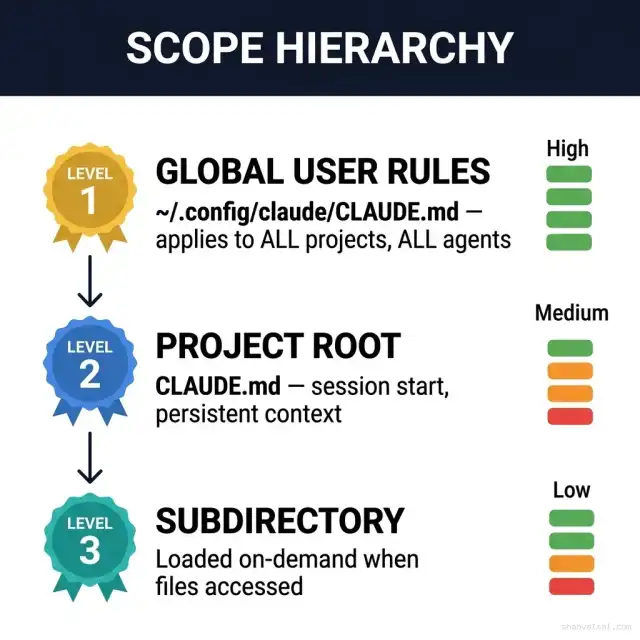
CLAUDE.md is the foundation. It loads at session start and stays in context throughout. That's its superpower. That's also its constraint.
Three loading tiers:
Tier 1 — Global user scope: ~/.config/claude/CLAUDE.md applies to every project and every agent session. Use it for identity-level preferences: preferred languages, default response style, personal workflow conventions that follow you across all codebases.
Tier 2 — Project root scope: /project-root/CLAUDE.md loads at session start. This is where project-specific facts live: build commands, architecture overview, team conventions, critical file paths. It persists through the entire session, surviving context window compaction.
Tier 3 — Subdirectory scope: /project-root/packages/auth/CLAUDE.md loads on-demand when the agent accesses files in that directory. Perfect for monorepos where the payments module needs completely different context than the frontend module.
What goes in each tier:
# Good CLAUDE.md content (persistent, foundational)
## Build
- `npm run build` — TypeScript compilation
- `npm run test` — Jest with coverage
- `npm run lint` — ESLint + Prettier

## Architecture
- API layer: Express 5 with Zod validation on all routes
- Auth: JWT RS256, no refresh tokens in localStorage
- Database: PostgreSQL 16, Drizzle ORM, no raw SQL in controllers

## Team Norms
- PRs require 2 reviews; never merge on Friday
- Migration files are immutable once merged
What does NOT belong in CLAUDE.md: step-by-step release procedures, deployment checklists, code review workflows, anything procedural that runs infrequently. That belongs in Skills.
Token cost reality: A 200-line CLAUDE.md costs roughly 400–600 tokens per turn when Claude is actively reasoning about it. That's not catastrophic, but multiply by a 200-turn debugging session and you've spent 100,000 tokens on standing instructions — most of which were irrelevant to 90% of those turns.
Practitioner observation: The best CLAUDE.md files I've seen are under 80 lines. Every time a team complains their CLAUDE.md "isn't working," I look at the file and find 300+ lines including onboarding procedures and troubleshooting runbooks. Those belong in Skills.
Method 2: Rules — Scoped Enforcement
Rules are specific constraints that need to fire reliably. Where CLAUDE.md provides ambient context, Rules provide enforcement logic.
Two flavors:
User-level rules — load at session start, apply globally. Example: All TypeScript must use strict mode. Never use 'any' without an explicit suppression comment.
Path-scoped rules — load when the agent touches files in a specific directory. This is where monorepo governance gets interesting. You can have stricter rules in your payments module than in your internal admin panel.
# Rule file location for path-scoped enforcement
.agents/rules/
  payments-strict.md   # loads when /packages/payments/* is touched
  admin-relaxed.md     # loads for /packages/admin/*
  api-contracts.md     # loads for /api/**
Path-scoped rules are loaded on relevance trigger and dropped when the scope shifts. They don't sit permanently in context like CLAUDE.md. That makes them an efficient choice for domain-specific constraints.
Token behavior: User rules stay in context (like CLAUDE.md). Path-scoped rules are contextual — loaded on demand, dropped when irrelevant. Choose based on how broadly you need enforcement.
Method 3: SKILLS — On-Demand Intelligence
SKILL.md is defined as the instruction file inside a Skill folder. A Skill is a complete procedural package — the SKILL.md file plus optional scripts/, resources/, and examples/ directories — that loads only when invoked. It is the primary mechanism for keeping procedural knowledge out of persistent context.
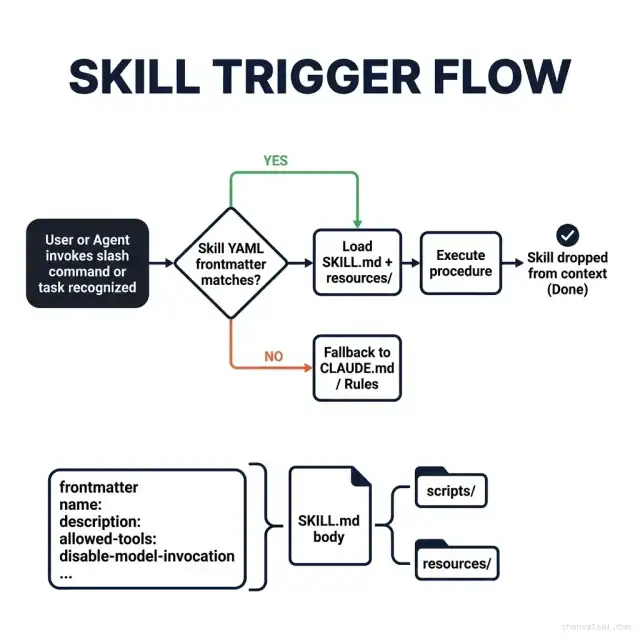
This is the most underutilized method. Most teams using Claude Code don't know Skills exist beyond simple slash commands.
SKILL.md frontmatter structure:
---
name: deploy-production
description: >
  Complete production deployment checklist: pre-flight validation,
  staging smoke tests, blue-green cutover, rollback procedure.
  Use when deploying any service to production environment.
allowed-tools:
  - bash
  - read_file
  - write_file
disable-model-invocation: false
---
The description field is what the agent uses to auto-trigger the skill. Write it to match the natural language your team uses. "I need to deploy to prod" should match your deploy skill without needing an explicit slash command.
Token efficiency is the point. A 60-step deploy checklist in CLAUDE.md = 60 steps burning tokens every single turn. The same checklist in a Skill = zero tokens until the deploy command fires, then the skill loads, executes, and disappears.
Skill folder anatomy:
skills/
  deploy-production/
    SKILL.md              ← Instructions + frontmatter
    scripts/
      pre-flight.sh       ← Validation scripts
      smoke-test.js       ← Staging smoke tests
    resources/
      rollback-runbook.md ← Reference material loaded on demand
    examples/
      successful-deploy.log
The agent can access scripts/ and resources/ programmatically during skill execution. Nothing in those folders loads unless the skill is active.
Three trigger mechanisms:
- Explicit slash command:
/deploy-production - Natural language match to frontmatter
description - Manual agent identification of a relevant task pattern
Method 4: Subagents — Isolated Specialist Contexts
Subagents are where multi-step complex tasks live. The core value isn't capability — it's context isolation.
When you run a security audit as a subagent, it operates in its own context window. The vulnerability scan output, the file trees it traversed, the intermediate reasoning — none of that "noise" enters your main conversation. When the subagent reports its findings, you get a clean structured summary, not 8,000 tokens of scan output polluting your working context.
What qualifies as a subagent use case:
- Long-running code review requiring analysis of dozens of files
- Security scanning that needs to read sensitive config files
- Data migration scripts that need isolated execution
- Parallel research tasks running simultaneously
Context isolation math: A subagent scanning 50 files might consume 50,000 tokens in its own context. Your main session sees 500 tokens of structured output. That's a 100× context efficiency gain on the right tasks.
The tradeoff: subagents have higher orchestration overhead and latency. Don't spawn a subagent to check a single file. Use them when the task complexity justifies the isolation cost.
Method 5: Hooks — Event-Driven Automation
Hooks move enforcement out of the model and into the harness. This is a fundamentally different trust model.
Every other method relies on the LLM to honor instructions. Hooks fire deterministically based on events, regardless of what the model says or thinks.
Supported hook events (Claude Code 2026):
PreToolUse   # fires before any tool call
PostToolUse  # fires after any tool call completes
Stop         # fires when agent signals completion
Real-world hook example — schema validation:
#!/bin/bash
# .claude/hooks/pre-tool-use-validate-schema.sh
# Fires before every write operation

if [[ "$CLAUDE_TOOL_NAME" == "write_file" ]]; then
  npx zod-schema-check "$CLAUDE_TOOL_INPUT_PATH"
  if [ $? -ne 0 ]; then
    echo "BLOCK: Schema validation failed"
    exit 1
  fi
fi
The model can't override this. The hook either passes or blocks. For compliance-sensitive workflows — financial services, healthcare, regulated infrastructure — hooks are the only acceptable enforcement mechanism.
Token cost: zero. Hooks run in the harness, not the context window. They're the most cost-efficient enforcement method in the entire system.
What actually happens in practice: Teams underestimate hooks until they have their first incident where Claude Code wrote to a file it shouldn't have. After that incident, hooks get implemented in the first 10 minutes of the next sprint. Build the guardrails before the incident, not after.
Method 6: Output Styles — Response Shaping
Output styles are lower stakes than the other methods but meaningfully affect productivity. They control how Claude Code presents information.
Common configurations:
# Output style rules (in CLAUDE.md or user-level Rules)
- Respond to code review requests with GitHub review format (comments on specific lines, not prose summaries)
- For architecture questions, always include a section-by-section breakdown before recommendations
- Never produce unsolicited refactoring suggestions during debugging sessions
- Error messages: always include the exact command to reproduce and the exact error string
These shape agent behavior without touching logic. The efficiency gain is subtle but compounds over thousands of interactions. Consistent output format reduces the cognitive overhead of reading every response.
Method 7: System Prompt Appends — Persistent Directives
System prompt appends inject directives that persist at the foundational reasoning level. They load at session start and can't be overridden by mid-conversation instructions.
Use these for security constraints, ethical guardrails, and organizational non-negotiables:
# Appropriate system prompt append content
- Never write code that stores plaintext credentials to disk
- Always flag when a requested change would reduce test coverage below 80%
- Refuse to generate SQL without parameterized queries, regardless of stated urgency
These aren't style preferences. They're hard constraints meant to survive context pressure — the situations where a user says "just do it quickly, we can fix it later." A system prompt append means the agent flags the concern even under that pressure.
Token cost: Medium-high. System prompt content persists and compacts with the session. Keep it short, non-negotiable, and security-critical.
CLAUDE.md vs AGENTS.md vs SKILL.md: The Architecture Decision
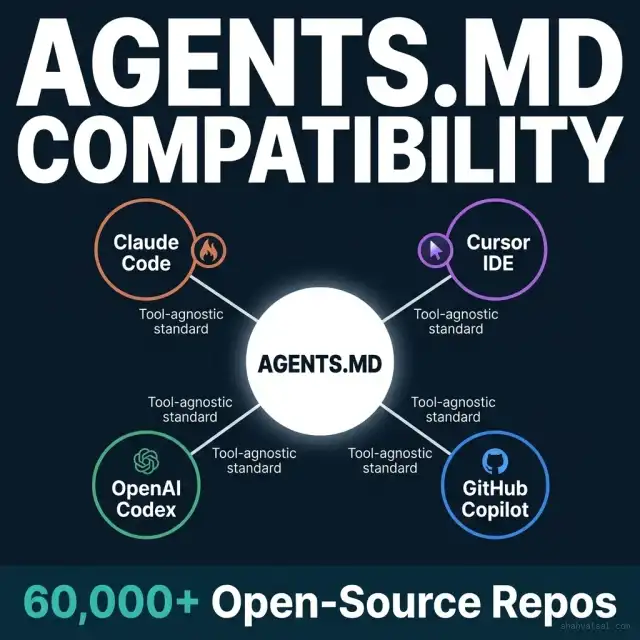
The three-file naming question trips up almost every team adopting Claude Code seriously. Here's the clean architecture:
CLAUDE.md — Claude Code's native format. Prioritized by Claude Code over all other formats. Project-level facts, build commands, architecture summaries, team conventions. This is the "always on" foundation.
AGENTS.md — The cross-tool standard. Adopted by 60,000+ open-source repositories. Works with Claude Code, Cursor, OpenAI Codex, GitHub Copilot, and future tools. Because Claude Code prioritizes CLAUDE.md, teams in multi-IDE environments typically symlink AGENTS.md → CLAUDE.md or use Claude's @import directive to pull AGENTS.md content in. This avoids instruction duplication when your team uses multiple AI tools.
SKILL.md — The Skills system instruction file. Located inside a Skill folder (skills/deploy/SKILL.md). Loaded only when the Skill is invoked. Never persistent. Pure procedural content.
Monorepo scope hierarchy — the practical setup:
/monorepo-root/
  CLAUDE.md              ← Project-wide facts (Tier 2 — session start)
  AGENTS.md → CLAUDE.md  ← Symlink for cross-tool compatibility
  .agents/
    skills/
      deploy/SKILL.md    ← Deploy procedure (on-demand)
      review/SKILL.md    ← Code review checklist (on-demand)
      audit/SKILL.md     ← Security audit (on-demand)
    rules/
      payments.md        ← Path-scoped (loads for /packages/payments/*)
      api.md             ← Path-scoped (loads for /api/**)
  packages/
    payments/
      CLAUDE.md          ← Subdirectory scope (Tier 3 — on-demand)
    frontend/
      CLAUDE.md          ← Subdirectory scope (Tier 3 — on-demand)
This structure means: global facts always available, domain context loads when needed, procedures load only when invoked. Total persistent token burn: the root CLAUDE.md only.
Deep Analysis: 7-Method Comparison Matrix
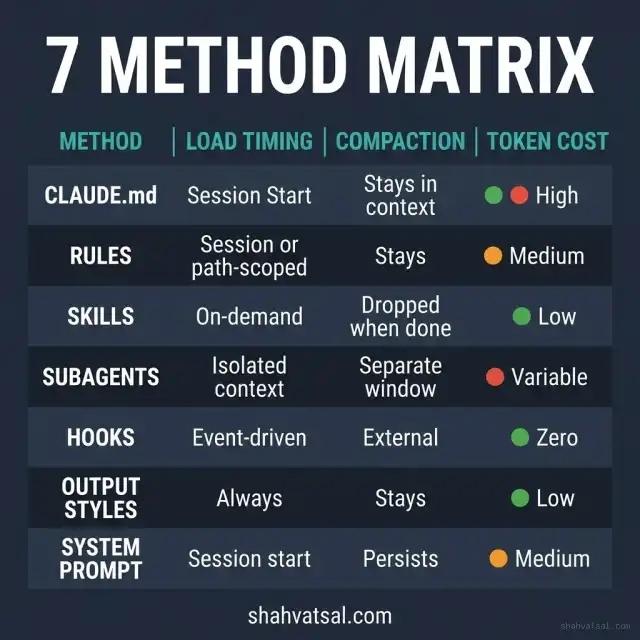
| Method | Load Timing | Compaction | Token Cost | Override Risk | Best For |
|---|---|---|---|---|---|
| CLAUDE.md | Session start | Stays in context | High | Medium | Project facts, build commands, architecture |
| Rules | Session start or path-scoped | Stays or drops | Medium | Medium | Code style, domain constraints |
| Skills | On-demand (invoke) | Dropped when done | Low | Low | Release procedures, workflows, checklists |
| Subagents | Isolated session | Separate window | Variable | Low | Complex parallel tasks, security scans |
| Hooks | Event-driven | External (harness) | Zero | None | Compliance validation, deterministic gates |
| Output Styles | Always active | Stays | Low | Medium | Response format, presentation conventions |
| System Prompt | Session start | Persists | Medium-High | None | Security constraints, organizational non-negotiables |
The key insight in this table: token cost and override risk are inversely correlated. Hooks have zero token cost and zero override risk — that's not a coincidence. They run outside the model. System prompt appends have the highest token cost but also the most reliable persistence. Design your steering architecture with this tradeoff explicitly in mind.
Advanced Patterns: Specialist Pool and Gatekeeper
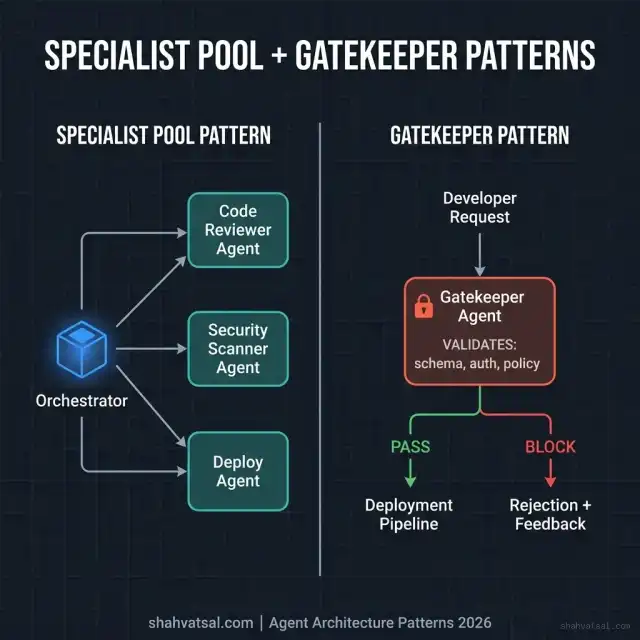
The Specialist Pool Pattern
The specialist pool pattern solves the problem of trying to make one agent context do everything well. Instead:
- An Orchestrator agent handles conversation and task planning
- Domain-specialist subagents handle isolated work:
CodeReviewAgent,SecurityScanAgent,TestGenerationAgent,DocumentationAgent - Each specialist has its own CLAUDE.md, its own Rules, and its own Skills
- Results flow back to the Orchestrator as structured output
Real implementation sketch:
# Orchestrator receives: "Review this PR and run security scan"
# Orchestrator spawns two parallel subagents:

review_result = spawn_subagent(
    skill="code-review",
    context=pr_diff,
    rules=["review-standards.md"]
)

security_result = spawn_subagent(
    skill="security-scan",
    context=changed_files,
    rules=["owasp-top10.md", "cwe-critical.md"]
)

# Each runs in isolation; results merged and presented
The isolation means neither subagent's intermediate reasoning pollutes the other's context. A 500-file PR review and a dependency security scan running simultaneously don't interfere with each other.
The Gatekeeper Pattern
The Gatekeeper pattern is essential for deployment workflows in regulated environments. It places a validation agent in front of every execution path:
Developer Request
      ↓
Gatekeeper Agent
  [validates: schema compliance, auth checks, policy adherence]
      ↓ PASS               ↓ BLOCK
Deployment Pipeline    Rejection + Explanation
The Gatekeeper runs as a Skill (gatekeeper/SKILL.md) with explicit allowed-tools restrictions. It can read, validate, and report — but it cannot write or deploy. This prevents a compromised or hallucinating model from bypassing compliance checks.
Gatekeeper SKILL.md excerpt:
---
name: deployment-gatekeeper
description: >
  Validates all deployment requests against schema, auth, and compliance
  policy. Must be invoked before any production deployment.
allowed-tools:
  - read_file
  - bash
disable-model-invocation: false
---
## Validation Checklist
- [ ] Schema drift detected (auto-check migrations against models)
- [ ] Auth permissions match deployment target environment
- [ ] No hardcoded credentials in changed files
- [ ] Test coverage threshold ≥ 80% maintained
- [ ] Change log entry exists for this version
The pattern works because the Gatekeeper's tool restrictions are enforced at the harness level — combined with a PreToolUse hook, you get deterministic gating that survives model pressure.
Pitfalls and Anti-Patterns
Anti-pattern 1: The Monolithic CLAUDE.md
Stuffing everything — facts, procedures, style guides, troubleshooting runbooks — into one file. Context window fills up, instructions drift to the bottom, model starts ignoring them. Fix: keep CLAUDE.md under 100 lines, migrate procedures to Skills.
Anti-pattern 2: Skipping Hooks for Compliance
Using CLAUDE.md constraints to enforce security rules. "Never write plaintext credentials" in CLAUDE.md is a suggestion the model can be talked out of under pressure. A PostToolUse hook that scans write output for credential patterns is enforcement. The difference matters in regulated environments.
Anti-pattern 3: One Subagent For Everything
Spawning a single subagent for a complex task and then adding more and more context to it over time. Subagent context windows have the same pressure problems as any context window. Use multiple smaller, focused subagents rather than one large one.
Anti-pattern 4: No AGENTS.md Symlink
Using Claude Code's native CLAUDE.md in a team that also uses Cursor or GitHub Copilot. Team members on different tools get different context. Symlink AGENTS.md to CLAUDE.md and you solve this in 30 seconds.
# One-time setup
ln -s CLAUDE.md AGENTS.md
Anti-pattern 5: Skills With No Frontmatter Description
Skills without a well-written description field don't auto-trigger on natural language. The agent can't match "I need to release" to a Skill named release if the description doesn't capture the intent vocabulary your team uses. Treat description as search index copy.
2027–2030 Roadmap: Where Steering Goes Next
The 7-method system reflects 2026's reality. Three evolutionary shifts are already visible:
2027 — Cross-Session Skill Memory
Skills currently reset completely between sessions. Expect persistent Skill state — a deploy Skill that remembers your last 5 deploys, surfaces relevant context, and flags deviations from baseline behavior automatically.
2028 — Adaptive Context Pricing
Dynamic token budgeting based on task type. The harness will automatically tier instructions into different context zones — always-on, standby, and archived — without manual developer configuration. The 7-method system will become automated.
2029 — Multi-Model Routing Inside Subagent Pools
Subagent pools routing to different models based on task type: fast cheap models for code formatting, expensive powerful models for architecture review, specialized fine-tuned models for security scanning. Orchestrators will manage model selection, not developers.
2030 — Organizational Memory Layer
Team-wide Skill libraries with version control, governance policies, and automatic drift detection. AGENTS.md becomes the cross-organization interchange format for sharing proven agent configurations between companies and open-source projects.
Key Takeaways
- 7 methods, 3 variables. Every steering method differs on load timing, compaction behavior, and token cost. Match instruction type to those variables, not to what's familiar.
- CLAUDE.md is not the only file. It's the foundation, not the entire system. Procedures belong in Skills. Compliance belongs in Hooks. Security non-negotiables belong in System Prompt appends.
- AGENTS.md is a cross-tool standard. 60,000+ repos use it. If your team uses more than one AI IDE, AGENTS.md gives you one source of truth via symlink.
- Hooks are the only deterministic enforcement. Model-based constraints can be overridden under context pressure. Hooks cannot. Use them for anything compliance-critical.
- Specialist pool = faster, cheaper, more accurate. Smaller isolated contexts outperform one large shared context for complex parallel tasks.
- Gatekeeper pattern is essential for regulated deployments. It's not optional in healthcare, finance, or any environment where a bad deploy has real consequences.
- Keep CLAUDE.md under 100 lines. Everything past 100 lines should probably be a Skill, a Rule, or a subdirectory CLAUDE.md.
FAQ
About the Author
Vatsal Shah is an AI engineering strategist and full-stack architect with deep experience building production agentic systems for enterprise clients. He helps engineering leaders move from experimental AI tooling to reliable, cost-efficient agentic workflows. His work spans Claude Code implementations, multi-agent orchestration architectures, and AI-native SDLC transformation. He writes at shahvatsal.com and consults on AI infrastructure strategy for scale-stage technology companies.
Conclusion
The 7-method steering system is Anthropic's answer to a real architectural problem: one instruction file does not fit all instruction types. Get the mapping wrong and you'll have expensive, unreliable, context-bloated agent sessions. Get it right and you'll have a predictable, cost-efficient system where each instruction method carries exactly the cost and persistence profile it needs.
Start with the CLAUDE.md audit: is it under 100 lines? Is everything in it actually session-persistent? Move procedures to Skills this week. Add one PreToolUse hook for your most critical compliance rule. Symlink AGENTS.md if your team uses multiple AI IDEs.
That's three concrete changes. They'll produce measurable improvements in token cost, instruction adherence, and development velocity within the first sprint.
When you're ready to go further — specialist pools, gatekeeper patterns, full monorepo scope hierarchy — the architecture is already there. You're just wiring it together.
Ready to design your agent steering architecture? Let's talk about your engineering context →
