STRATEGIC OVERVIEW
Learn how to build next-generation autonomous App Intents agents in iOS 20 and Swift 6, leveraging strict concurrency actors and secure Private Cloud.
iOS 20 + Swift 6: Building App Intents Agents That Actually Ship
By Vatsal Shah · June 26, 2026 · AI Tools
1. Introduction: The Mobile Agent Paradigm Shift
Mobile application development has entered the cognitive era. For nearly two decades, the mobile experience was defined by the multi-touch screen, visual layouts, and sandboxed apps. Users interacted with software through explicit manual actions—tapping buttons, typing inside text fields, scrolling through collections, and switching between siloed applications. The developer's job was to build clean, static user interfaces and map user input events directly to backend API calls.
With the release of iOS 20 and the maturation of the App Intents Agent SDK in 2026, this app-centric paradigm has been replaced by a system-level agentic workspace. Mobile operating systems are transitioning from passive launchers into proactive, autonomous agents. Instead of manually navigating through five different apps to coordinate a meeting, book travel, and log expenses, users query a unified assistant.
Siri AI, backed by on-device foundation models and Private Cloud Compute (PCC), acts as the orchestrator. It reasons over user intent, maps the query to the available tool schemas exposed by installed applications, coordinates execution across app boundaries, and presents the consolidated result.
+---------------------------------------------------------+
|                  Traditional Mobile                     |
|  [User] -> [Open App A] -> [Copy] -> [Open App B]       |
+---------------------------------------------------------+
                             |
                             v
+---------------------------------------------------------+
|                    Agentic Mobile                       |
|  [User Prompt] -> [Siri AI / On-Device Agent]           |
|                         |                               |
|                         v                               |
|            [Executes App Intents (App A & B)]           |
+---------------------------------------------------------+
For developers, this transition represents a fundamental change in software design. The graphical user interface (GUI) is no longer the sole entry point of an application. Instead, the application's core capabilities must be exposed as a semantic interface layer—a registry of structured tools, properties, and handlers that system-level models can query and invoke.
This is accomplished using the iOS 20 App Intents Agent SDK. By declaring structured metadata and mapping business logic to intent handlers, developers turn their applications into modular toolsets for Apple Intelligence.
However, building mobile agents that actually ship requires solving significant engineering challenges. In contrast to cloud-based agent systems that run on massive server clusters, mobile agents operate within strict memory and compute boundaries. We must write thread-safe, low-latency code to run on-device, navigate strict App Store privacy reviews, and manage enterprise security rules under Mobile Device Management (MDM).
To achieve this, developers must master two core pillars: the Swift 6 strict concurrency model and the App Intents framework.
2. The iOS Agent Model: App Intents, Shortcuts, and Private Cloud Compute
The foundation of the iOS 20 agent architecture is a tiered execution model. When a user issues a command, the operating system must decide where to process the query. Low-latency, privacy-sensitive, and context-dependent tasks are executed directly on the device using local small language models (SLMs). As detailed in our guide on the rise of small language models (SLMs) and cost-effective edge AI, local execution ensures microsecond latency and absolute data privacy.
However, queries requiring large context windows or deep reasoning exceed on-device capabilities. These are routed securely to Apple's Private Cloud Compute (PCC) cluster.
Regardless of where the reasoning model runs, it communicates with the local application through the App Intents framework. App Intents act as the standardized interface that bridges the gap between natural language prompts and executable code. An App Intent defines:
- Parameters: The structured inputs required to perform the action (e.g., date, amount, recipient).
- Validation: Rules to ensure the inputs are safe and complete before execution.
- Result: The structured output returned to the system-level agent.CODE
+-------------------------------------------------------------+
|                        Siri AI / PCC                        |
+-------------------------------------------------------------+
                           |
                           | Dispatches Intent
                           v
+-------------------------------------------------------------+
|                      App Intents SDK                        |
|  - Parameter Extraction                                     |
|  - Input Validation (AppIntent)                             |
+-------------------------------------------------------------+
                           |
                           | Executes
                           v
+-------------------------------------------------------------+
|                     App Intent Handler                      |
|  - Swift 6 Actor-Isolated Logic                             |
|  - Local/Remote Data Operations                             |
+-------------------------------------------------------------+
By defining these properties, developers allow Siri AI to extract the necessary parameters from a user's natural language request and invoke the corresponding code handler. This design represents a clean separation of concerns: the system model handles intent parsing and scheduling, while the local application retains control over the execution of the business logic.
3. App Intents, Agent, and Backend Orchestration Flow
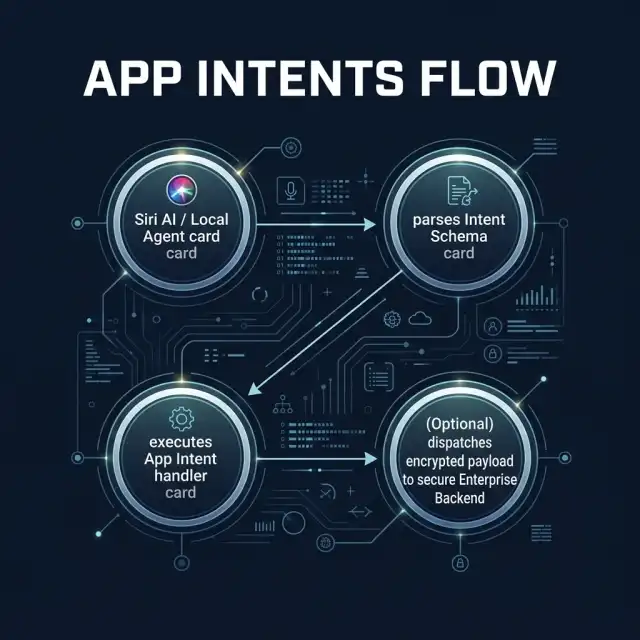
To build a secure App Intents agent, developers must map out the path of execution from the user's voice command to the backend database. In many enterprise scenarios, the App Intent handler does not run completely in isolation. It must pull data from local database stores, validate the parameters against remote schemas, execute business operations, and update corporate APIs.
Figure 1 outlines the complete execution flow of an App Intent query, showing how Siri AI parses the natural language request, executes the intent locally, and communicates with the enterprise backend.
4. Swift 6 Strict Concurrency: Actor-Isolated Agent State Machines
Operating-system-level agents execute asynchronously in the background. An agent might be triggered while the host application is suspended, requiring it to run tasks, handle network requests, and modify local databases concurrently. Under this environment, traditional multithreading patterns can lead to data races, state corruption, and random crashes.
Swift 6 resolves these issues by enforcing strict concurrency check gates at compile-time. The compiler verifies that all data shared between concurrent tasks is either immutable or wrapped inside thread-safe structures, preventing data races.
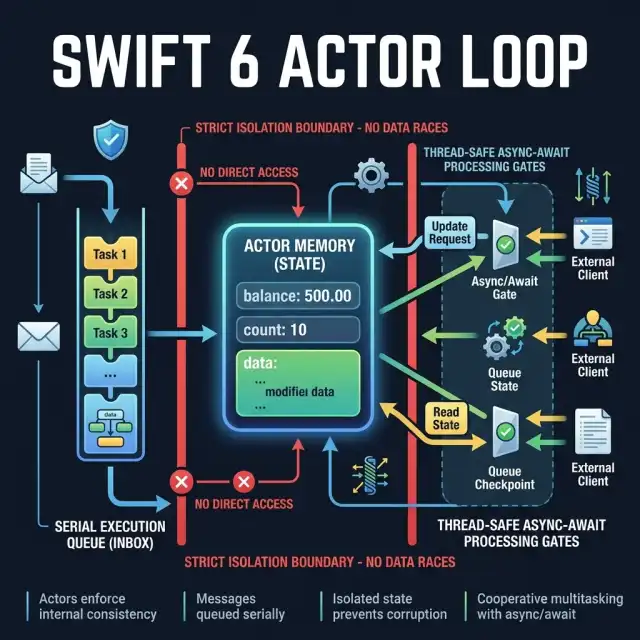
To implement a thread-safe agent on iOS 20, developers should model the agent's state machine inside a Swift 6 Actor. Actors isolate their internal state, ensuring that only one task can modify their properties at any given time. Other tasks must use the await keyword to access the actor's methods, creating a serial queue of operations.
Figure 2 illustrates how an actor-isolated agent loop manages concurrent tasks. The state is held securely inside the actor's memory boundary, forcing all external tasks to access it through async gates:
Below is a complete, compile-ready Swift 6 actor implementation for managing an autonomous agent's execution loop. This codebase demonstrates state isolation, input validation, and asynchronous execution within the strict concurrency model:
import Foundation
import AppIntents

/// Represents the status states of the mobile agent
public enum AgentState: String, Sendable {
    case idle
    case parsing
    case executing
    case validating
    case completed
    case failed
}

/// A thread-safe, actor-isolated state machine for managing mobile agent tasks in Swift 6
public actor MobileAgentStateMachine {
    private var currentState: AgentState = .idle
    private var taskLog: [String] = []

    public init() {}

    /// Transitions the agent state safely, preventing concurrent modification
    public func transition(to newState: AgentState) {
        let timestamp = Date().ISO8601Format()
        currentState = newState
        taskLog.append("[\(timestamp)] State transitioned to: \(newState.rawValue)")
        print("Agent state change: \(newState.rawValue)")
    }

    /// Returns the current state of the agent
    public func getStatus() -> AgentState {
        return currentState
    }

    /// Logs custom execution steps within the actor's boundary
    public func logStep(_ step: String) {
        let timestamp = Date().ISO8601Format()
        taskLog.append("[\(timestamp)] Step: \(step)")
    }

    /// Fetches all logged execution details
    public func getExecutionLogs() -> [String] {
        return taskLog
    }
}

/// An App Intent that triggers the thread-safe Mobile Agent State Machine
public struct ProcessExpenseIntent: AppIntent {
    public static var title: LocalizedStringResource = "Process Corporate Expense"
    public static var description = IntentDescription("Validates and submits corporate expenses autonomously.")

    @Parameter(title: "Amount")
    public var amount: Double

    @Parameter(title: "Merchant")
    public var merchant: String

    public init() {}

    public func perform() async throws -> some IntentResult & ReturnsValue<String> {
        // Instantiate the actor state machine
        let stateMachine = MobileAgentStateMachine()

        // Asynchronously transition state through actor gates
        await stateMachine.transition(to: .parsing)
        await stateMachine.logStep("Parsed expense: \(amount) USD from \(merchant)")

        await stateMachine.transition(to: .executing)
        // Perform local validation check
        if amount <= 0 {
            await stateMachine.transition(to: .failed)
            await stateMachine.logStep("Validation failed: amount must be positive")
            return .result(value: "Failed: Invalid Amount")
        }

        await stateMachine.transition(to: .validating)
        // Simulate secure API sync
        try await Task.sleep(nanoseconds: 1_000_000_000) # 1 second delay

        await stateMachine.transition(to: .completed)
        await stateMachine.logStep("Expense successfully synced to corporate ledger")

        return .result(value: "Success: Expense logged for \(merchant)")
    }
}
5. Decision Trees: Local On-Device vs. Private Cloud Compute Routing
One of the most complex design decisions when architecting iOS 20 agents is managing model routing. Developers must choose between local on-device processing and remote Private Cloud Compute processing.
While PCC provides access to larger, more capable foundation models, routing data over the network introduces latency, consumes cellular bandwidth, and raises compliance issues.
Figure 3 maps the routing logic that Siri AI and the App Intents framework use to determine the execution environment for an incoming query:
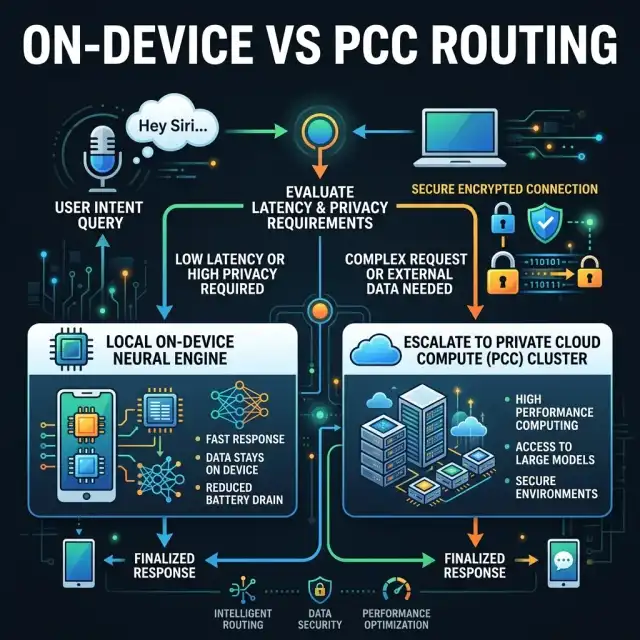
To guide this routing logic, developers decorate their App Intents with explicit metadata. By declaring properties like isSensitiveData or restricting execution domains, you ensure that high-security data (such as personal medical records or financial access tokens) never leaves the physical device.
For a comparison of this security model with other platforms, see our overview of sovereign architecture guidelines.
6. Enterprise Governance: MDM Constraints & DLP Boundaries
When deploying mobile agents in an enterprise environment, security and governance are the highest priorities. Because autonomous agents can execute actions, access databases, and make network requests in the background, they represent a high-value target for attackers.
Under iOS 20, enterprise governance is enforced through two primary mechanisms:
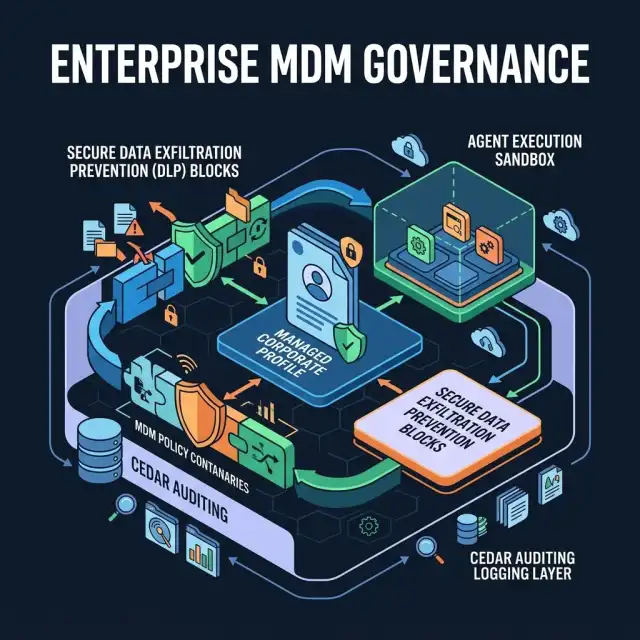
- MDM Profile Segmentation: Mobile Device Management profiles isolate managed enterprise applications and datasets from personal, unmanaged spaces. Enterprise agents can only interact with apps and databases that reside within the same managed profile container.
- Data Loss Prevention (DLP) Boundaries: App Intents can be tagged with security classifications that restrict data sharing. The operating system ensures that data returned by an enterprise App Intent cannot be copy-pasted or redirected into personal apps (like social media or personal messaging).
Figure 4 outlines the security containment layers that enforce these boundaries on an enterprise device:
7. Comparative Analysis: iOS App Intents vs. Android Neural Sandbox
The two dominant mobile operating systems have taken fundamentally different paths to support autonomous agents. Apple’s architecture relies on tight integration between local Apple Silicon Neural Engines, the standardized App Intents framework, and Private Cloud Compute (PCC).
Google’s Android 17 architecture, as discussed in our Android 17 AI-first OS analysis, centers on AICore, the Neural Sandbox, and open model architectures.
The table below contrasts these two agent platforms across core technical dimensions:
| Technical Dimension | Apple iOS 20 App Intents & PCC | Android 17 AICore & Neural Sandbox |
|---|---|---|
| Semantic Interface | Standardized App Intents framework compiled directly into the binary. | Dynamic AI intents and semantic schema registrations. |
| Execution Security | Strict sandbox container execution with Private Cloud Compute nodes. | Neural Sandbox isolating agent tasks from direct OS access. |
| Concurrency Control | Swift 6 compiler checks forcing actor isolation and async-await. | Kotlin Coroutines and Flow engines managing async state. |
| Remote Fallback | Proprietary Private Cloud Compute (PCC) running on Apple Silicon. | Google Cloud Vertex AI endpoints or custom enterprise models. |
| Data Privacy | Cryptographically guaranteed privacy with PCC, verified by auditors. | Isolated local partitions with user-controlled cloud sync options. |
8. Monday Morning Implementation Roadmap
Transitioning your mobile engineering stack to support autonomous App Intents requires a phased approach. Rather than refactoring your entire application codebase at once, begin by defining simple, high-value intents and establishing compile-time thread-safety.
Here is the three-step roadmap to implement this Monday morning:
Step 1: Define Your Core App Intents
Identify three high-value user journeys in your application that would benefit from voice-activated or agentic automation. Define their parameters, validation requirements, and result schemas using the App Intents framework.
Step 2: Enforce Actor-Isolated State
Migrate your application's state machines to Swift 6 Actors. Run compiler audits to identify and resolve any concurrency warnings, ensuring all background execution loops are thread-safe and free from data races.
Step 3: Configure Privacy Nutrition Labels
Update your App Store privacy declarations to document how your App Intents interact with user data. Verify that any sensitive user information is tagged with local-only execution flags, blocking it from exiting the device boundary.
