Introduction: The Limits of Naive RAG in the Era of Agentic Workloads
As autonomous AI agents transition from novelty tools to enterprise-grade operators, the mechanisms they use to acquire and process knowledge must undergo a parallel evolution. In the early days of Retrieval-Augmented Generation (RAG), the pipeline was straightforward, linear, and static. A user submitted a query; a system embedded that query, ran a vector similarity search against a static database, retrieved the top-k chunks, stuffed them into the model's context window, and generated a response.
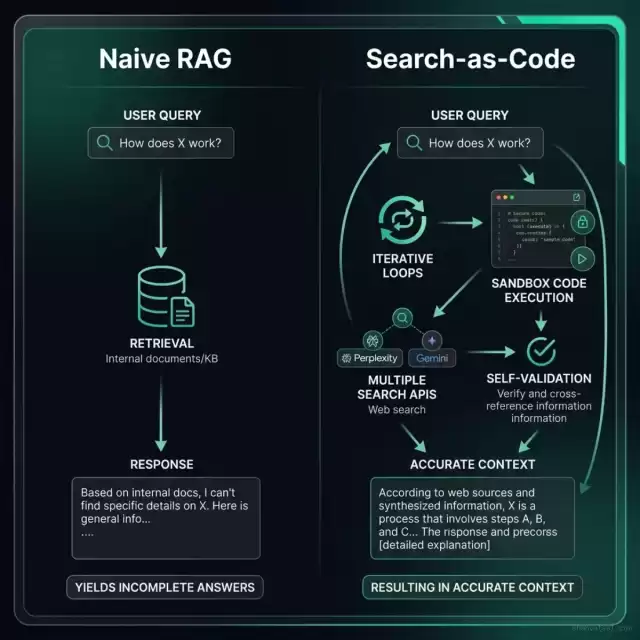
This naive RAG paradigm is fundamentally broken for complex, multi-step agentic workflows. When an agent is tasked with diagnosing a distributed system failure, reviewing cross-jurisdictional legal compliance, or conducting deep competitive market analysis, a single static vector lookup fails. It fails because:
- Semantic Ambiguity: Complex questions cannot be condensed into a single vector representation without losing critical context.
- Information Fragmentation: The answer often resides across multiple separate files, database tables, and API endpoints, requiring iterative queries rather than a single fetch.
- Context Window Saturation: Stashing hundreds of irrelevant top-k chunks into the context window causes high latency, inflates model fees, and degrades retrieval accuracy due to the "needle in a haystack" phenomenon.
To overcome these barriers, engineering teams are adopting Search-as-Code (SaC). In the Search-as-Code paradigm, retrieval is no longer a static pipeline managed by external backend glue code. Instead, the agent itself writes, compiles, and executes search programs inside secure sandboxes. Rather than hoping a single embedding query catches the right context, the agent programmatically queries indices, evaluates the retrieved context against its internal goal, and iterates using logical constructs like loops, conditionals, and fan-out queries.
Let us inspect the high-level paradigm shift between these two methodologies:
The Anatomy of Static RAG Failures
To understand why Search-as-Code is superior, we must examine the specific failure modes of static RAG pipelines in production enterprise settings. Naive pipelines treat retrieval as a database lookup problem, ignoring the cognitive processes necessary to synthesize context.
1. The Multi-Hop Retrieval Wall
Consider a common engineering query: "Compare the latency profiles of our transaction service before and after the modular monolith upgrade in June, and flag if database patch 025 affected it."
To answer this, a system must perform several discrete retrieval steps:
- Find the date of the modular monolith upgrade in the changelogs or git history.
- Query performance metrics (LCP, database connection time, API latency) for the periods before and after that date.
- Retrieve the changelog and SQL code for
025_scrub_escaped_tag_names.sql. - Correlate database connections during the patch window with latency spikes.
A static RAG pipeline attempting to solve this in one step will embed the entire query. The vector search will return generic documents about "modular monolith upgrade," "latency," and "patch 025." However, because these documents are scattered and do not share semantic space in a single vector representation, the model receives incomplete chunks, resulting in hallucinated conclusions or a generic "context not found" response.
This happens due to the mathematical limits of embedding vectors. In high-dimensional spaces (e.g., 1536 dimensions for Ada-002 or 3072 dimensions for text-embedding-3), semantic similarity metrics like cosine similarity measure global text similarity. When a query contains distinct semantic vectors (e.g., upgrade timelines, execution times, SQL code structure), their coordinates average out. The final query vector is pulled toward the centroid of the vector space, matching general documents but losing the specific details needed to resolve each sub-intent.
2. Chunking Strategy Trade-offs and Vector Decay
Static RAG relies heavily on pre-determined chunking strategies (e.g., fixed-character chunks with 20% overlap, recursive character splitters, or semantic layout chunking). If the chunk size is too small, the system loses the surrounding context of a code function or document paragraph. If it is too large, the index retrieves irrelevant noise, wasting token budgets. Programmatic retrieval bypasses this compromise by allowing the agent to request parent documents, slice text ranges dynamically via code, and query meta-tags directly through structured databases.
In a static setup, developers are forced to make decisions that lead to either:
- Context Fragmentation: A critical configuration line is separated from the variable definition located 50 lines above, making the retrieved chunk useless.
- Context Dilution: A chunk size of 2,000 tokens contains only 10% useful information, while the other 90% is filler that distracts the model.
3. Latency, Cost Inefficiencies, and Semantic Drift
In a naive RAG system, because the embedding lookup is unguided by logic, developers retrieve large quantities of context (high $k$ values, such as $k=50$) to ensure high recall. This brute-force loading results in high API costs and latency. With Search-as-Code, the agent behaves like a human engineer: it queries a narrow index, verifies if it has enough information, and only performs additional targeted queries if necessary. This guided loop reduces overall token consumption and speeds up processing.
Furthermore, static pipelines are vulnerable to Semantic Drift during long conversations. As the user asks follow-up questions, the system often appends the conversation history to the search query. This shifts the query vector away from the original topic, leading to irrelevant search results in subsequent turns. Programmatic search avoids this by keeping the search query decoupled from the conversational history, using a dedicated code executor that targets only the parameters specified by the reasoning engine.
The Search-as-Code Architecture Paradigm
Implementing Search-as-Code requires a decoupling of the agent's reasoning core from the search engine execution environment. A production-grade SaC architecture consists of three principal layers:
1. The Agent Planner (Reasoning Core)
The reasoning model (e.g., Google Gemini 1.5 Pro or Anthropic Claude 3.5 Sonnet) acts as the compiler. It analyzes the user's high-level goal, assesses what data points are missing, and generates a declarative search program in a standard language like JavaScript (run in a V8 Isolate) or Python. The Planner is instructed via system rules to structure the search as an algorithm rather than a single string. It can instantiate local variables, map arrays, filter result objects by timestamps, and implement try/catch blocks for network resilience.
2. The Secure Sandbox (Isolated Runtime)
Because the generated program contains raw executable code, executing it directly on host servers is a massive security risk. Instead, the program is run inside a restricted execution environment. The standard is a WebAssembly (Wasm) runtime configured with WASI (WebAssembly System Interface).
Within this sandbox, system calls are strictly managed:
- Filesystem Isolation: The sandbox cannot access the host filesystem. It is provided a virtual, empty memory-only filesystem to store intermediate execution variables.
- Network Restrictions: The code cannot open arbitrary sockets or call home. All outbound connections are intercepted by the runtime and routed through the Search SDK API broker.
- Execution Limits: The execution engine enforces strict CPU instruction quotas and memory limits (e.g., maximum 64MB RAM and 2-second timeout) to prevent denial-of-service issues from infinite loops.
3. The Search SDK and API Gateways
The sandbox does not interact with the outer network directly. Instead, the runtime environment exposes a Search SDK as WASI imports. This SDK acts as a safe middleware layer that translates the sandbox's standardized requests into secure API calls to:
- Vector Databases: Runs queries against Qdrant or Milvus indexes with pre-configured filters.
- Search Engine APIs: Uses APIs like Google Search or Perplexity to retrieve public web context.
- Internal Relational Databases: Runs read-only, paramterized queries against PostgreSQL, MySQL, or ClickUp list APIs.
Let us inspect the system topology of this architecture:
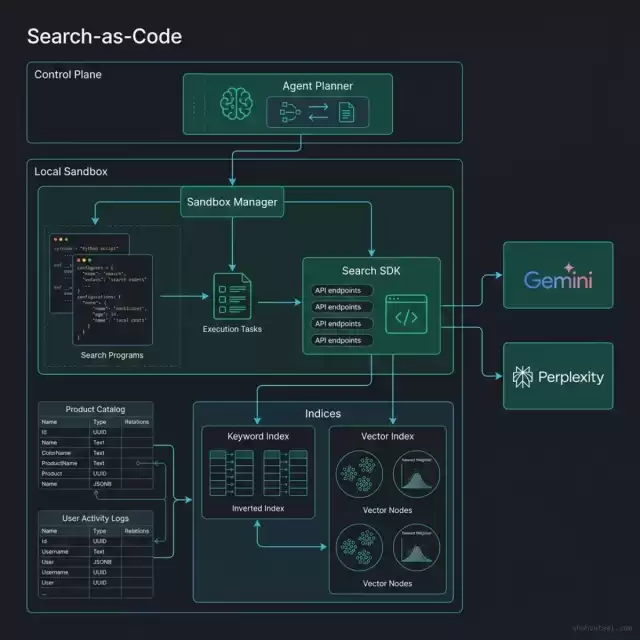
In this architecture, the agent does not output static search strings. Instead, it outputs a script that uses the Search SDK to run complex query routines. For example, it can write a script that queries a vector database, loops through the results to extract file paths, and calls an API to fetch only the code blocks within those files. By processing the raw context inside the sandbox, the script filters out noise, returning a clean context payload to the main agent loop. This prevents context window saturation and reduces input costs.
Multi-Provider Model Router: Dynamic Search Executor Code
To demonstrate how an agent executes a search program programmatically, let us examine a complete JavaScript class SearchProgramExecutor. This class runs inside the sandbox, interfaces with a mock Search SDK, and orchestrates calls to Google Gemini and Perplexity search API wrappers.
/**
 * SearchProgramExecutor
 * Standardized sandbox runner for programmatic retrieval.
 * Exposed to agents inside WebAssembly/WASI isolation layers.
 */
class SearchProgramExecutor {
    /**
     * @param {Object} sdk - Mock Search SDK providing low-level retrieval functions.
     * @param {string} clickupToken - Token for telemetry logging to ClickUp.
     */
    constructor(sdk, clickupToken = null) {
        this.sdk = sdk;
        this.token = clickupToken;
        this.telemetryLogs = [];
    }

    /**
     * Executes an agent-generated search program dynamically.
     * @param {string} programCode - The JavaScript search program generated by the agent.
     * @param {Object} queryContext - Contextual parameters for the query.
     * @returns {Promise<Object>} The aggregated search context and audit trail.
     */
    async executeProgram(programCode, queryContext) {
        const timestamp = new Date().toISOString();
        this.logTelemetry("execution_start", { queryContext, timestamp });

        // Define the runtime environment exposed to the agent code inside the sandbox
        const sandboxEnv = {
            context: queryContext,
            vectorSearch: async (query, limit = 5) => {
                this.logTelemetry("vector_query", { query, limit });
                return await this.sdk.vectorLookup(query, limit);
            },
            perplexityQuery: async (prompt) => {
                this.logTelemetry("perplexity_web_query", { prompt });
                return await this.sdk.queryPerplexityAPI(prompt);
            },
            geminiExtract: async (documentText, targetSchema) => {
                this.logTelemetry("gemini_schema_extraction", { targetSchema });
                return await this.sdk.queryGeminiExtraction(documentText, targetSchema);
            },
            log: (msg) => {
                this.logTelemetry("agent_program_log", { message: msg });
            }
        };

        try {
            // Secure sandbox wrapper using immediately invoked function expression (IIFE)
            // In a production setup, this string runs inside a WebAssembly WASI VM or v8-isolate.
            const wrappedCode = `
                return (async (sandbox) => {
                    const { context, vectorSearch, perplexityQuery, geminiExtract, log } = sandbox;
                    ${programCode}
                })(sandboxEnv);
            `;

            // Compile and execute the sandboxed code
            const executeFn = new Function('sandboxEnv', wrappedCode);
            const result = await executeFn(sandboxEnv);

            this.logTelemetry("execution_success", { result });
            return {
                success: true,
                data: result,
                auditTrail: this.telemetryLogs
            };
        } catch (error) {
            this.logTelemetry("execution_failure", { error: error.message });
            return {
                success: false,
                error: error.message,
                auditTrail: this.telemetryLogs
            };
        }
    }

    /**
     * Records execution steps and metrics for auditing and cost tracing.
     * @param {string} stage - The execution lifecycle step.
     * @param {Object} details - Parameter and response data.
     */
    logTelemetry(stage, details) {
        const logEntry = {
            stage,
            timestamp: new Date().toISOString(),
            details
        };
        this.telemetryLogs.push(logEntry);
        console.log(`[TELEMETRY][${stage.toUpperCase()}]`, JSON.stringify(details));
    }
}

// Example usage demonstration
(async () => {
    // Mock Search SDK implementation
    const mockSearchSDK = {
        vectorLookup: async (query, limit) => {
            return [
                { id: "doc_101", score: 0.89, text: "Database patch 025 was deployed at 14:02 UTC." },
                { id: "doc_102", score: 0.74, text: "Latency spiked to 450ms during SQL parsing." }
            ];
        },
        queryPerplexityAPI: async (prompt) => {
            return {
                citation: "https://perplexity.ai/search/025-patch",
                content: "Patch 025 removes escaped tag name parameters from database views."
            };
        },
        queryGeminiExtraction: async (text, schema) => {
            return {
                patch_id: "025",
                impacted_elements: ["tag_names", "views"],
                mitigation: "Clean quoted tags using clean_quoted_tag_names.sql."
            };
        }
    };

    const runner = new SearchProgramExecutor(mockSearchSDK);

    // Agent-written programmatic search logic
    const agentSearchCode = `
        log("Initiating multi-hop search for latency correlation...");
        const vectorResults = await vectorSearch("latency modular monolith June", 3);
        log("Retrieved " + vectorResults.length + " vector chunks.");

        let webData = null;
        if (vectorResults.some(r => r.text.includes("patch 025"))) {
            log("Patch 025 detected in vector results. Querying Perplexity API for patch context...");
            webData = await perplexityQuery("SQL code and changelog for database patch 025");
        }

        const aggregatedText = JSON.stringify(vectorResults) + " " + JSON.stringify(webData);
        log("Sending raw context to Gemini for structural schema extraction...");

        const finalSchema = await geminiExtract(aggregatedText, {
            patch_id: "string",
            impacted_elements: "array",
            mitigation: "string"
        });

        return {
            original_query: context.query,
            resolved_schema: finalSchema,
            verification_status: "verified"
        };
    `;

    const executionResult = await runner.executeProgram(agentSearchCode, {
        query: "Correlate patch 025 with latency spikes"
    });

    console.log("FINAL CONTEXT RETURNED TO AGENT CORE:\n", JSON.stringify(executionResult, null, 2));
})();
The Iterative Retrieval and Sufficient-Context Stop Condition
One of the greatest financial and operational pitfalls of agentic architectures is the infinite retrieval loop. If an agent is allowed to search indefinitely, it can consume thousands of dollars in LLM tokens and vector search API calls within minutes. Therefore, a robust Search-as-Code harness must implement a mathematical Sufficient-Context Stop Condition.
The Stopping Algorithm
Instead of retrieving a fixed $k$ number of documents, the search program evaluates context adequacy at the end of each iteration. The stop condition is defined by a hybrid function of Information Density ($D_i$), Semantic Coverage ($C_s$), and Cost-to-Goal Budget ($B_c$).
$$\text{Stop} = (C_s \ge \theta) \lor (D_i \le \epsilon) \lor (B_c \ge \text{MaxBudget})$$
Where:
- $\theta$ (Coverage Threshold): The target percentage of query sub-intents resolved (typically set to $0.85$ or $85\%$).
- $\epsilon$ (Density Return): The utility margin of new information. If the latest search loop retrieves chunks that add no new unique entities or facts, retrieval halts.
- $\text{MaxBudget}$: The upper bound on execution costs per session (e.g., maximum of 5 web searches and 10 vector queries).
1. Calculating Semantic Coverage ($C_s$)
Semantic Coverage measures how many sub-intents of the query have been addressed by the retrieved context. The agent core parses the user's prompt into an array of atomic requirements:
$$R = \{r_1, r_2, r_3, \dots, r_n\}$$
At the end of each loop iteration, a lightweight scoring model runs an evaluation function against the consolidated context pool ($P$):
$$C_s = \frac{\sum_{j=1}^{n} \text{Evaluate}(r_j, P)}{n}$$
Where $\text{Evaluate}(r_j, P) \in \{0, 1\}$ represents whether requirement $r_j$ is satisfied by the current context. Once $C_s$ crosses $\theta$, the loop terminates.
2. Calculating Information Density ($D_i$)
Information Density prevents redundant queries. If the agent retrieves new pages that do not add new unique entities or facts, the information density ($D_i$) drops. We compute this using Jaccard Similarity of the set of extracted key entities ($E$) between iteration $t$ and previous iteration $t-1$:
$$D_i = 1 - \frac{|E_t \cap E_{t-1}|}{|E_t \cup E_{t-1}|}$$
If $D_i$ falls below the threshold $\epsilon$ (typically $0.15$), the retrieval engine concludes that additional queries are yielding diminishing returns and stops the loop.
3. Enforcing the Cost-to-Goal Budget ($B_c$)
The Cost-to-Goal budget ($B_c$) acts as the ultimate circuit breaker. The SDK wrapper logs the token consumption of every query. If $B_c$ exceeds the safety limit ($\text{MaxBudget}$), the executor terminates the program and returns the best-effort context gathered so far, preventing runaway token costs.
Let us visualize this decision loop flow:
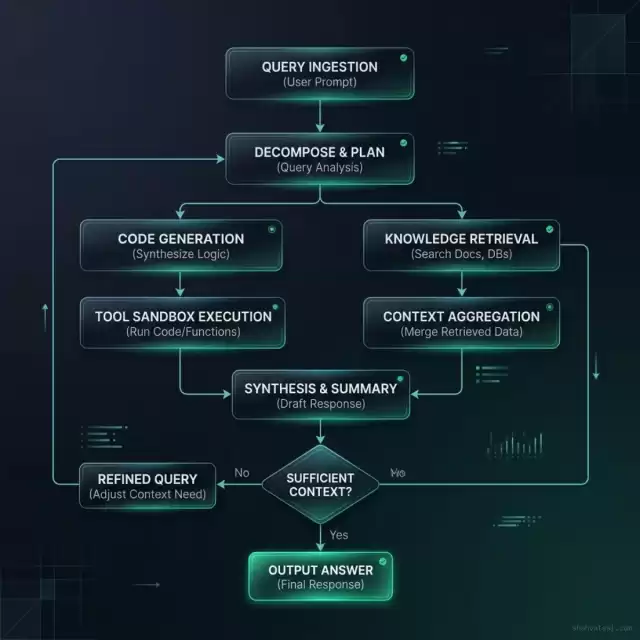
By defining this logic programmatically inside the search code, the agent dynamically adjusts its queries. If the first vector lookup returns high-density, authoritative answers, the loop terminates immediately, saving time and money. If the context is ambiguous, the script executes secondary, high-resolution queries.
Multi-Hop Search and Query Fan-Out
When addressing complex research or engineering tasks, information is rarely located in a single silo. A static RAG system queries a single database, missing dependencies. In contrast, Search-as-Code leverages Query Fan-Out, enabling parallel retrieval execution across heterogeneous systems.
The Fan-Out Process
When a query enters the system, the Agent Planner analyzes the requirements and writes a script that splits the retrieval job into parallel search threads:
- Thread A (Private Code Base): Searches local source files for relevant function signatures.
- Thread B (Production Metrics): Queries logs via ElasticSearch/OpenTelemetry endpoints to fetch system metrics.
- Thread C (Public Web Data): Queries Google and Perplexity search gateways to verify third-party API deprecation schedules.
Let us trace the execution sequence of a multi-hop query:
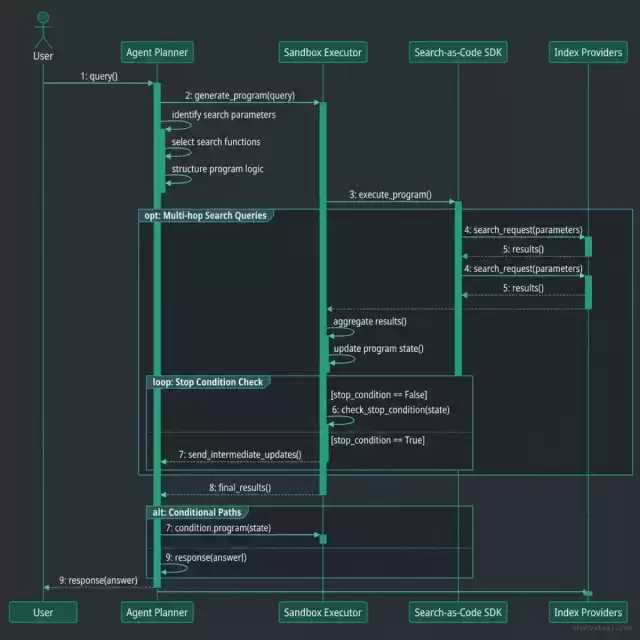
Once all threads return their payloads, the sandbox code executes custom filter and join operations. This is similar to a SQL database executing joins across multiple tables. The filtered context is then merged and returned to the agent's main planning loop.
The Security of Search-as-Code: Sandboxing & Definition Integrity
Executing agent-generated code presents security challenges. If an agent writes a search program that is executed directly on your application server, a malicious prompt injection could compromise your infrastructure (e.g., an agent executing command injections, arbitrary network scans, or local port exploitation).
To secure a Search-as-Code pipeline, platform engineering teams must enforce a strict Zero-Trust Retrieval Architecture consisting of three core gates:
1. WebAssembly (Wasm) Isolation & Runtime Defense
The search execution environment must run inside a sandboxed WebAssembly runtime (such as Wasmtime or Wasmer). WebAssembly uses a shared-nothing memory layout. The sandboxed code cannot access the host machine's RAM or CPU registries.
We configure the Wasm sandbox using the following specifications:
- No Direct System Calls: The sandbox has no access to the host's kernel. Standard calls like
sys_writeorsys_socketare compiled out of the runtime. - Resource Limits: The sandbox is limited to a strict instruction count (gas model) and memory size (typically 64MB of heap allocation).
- Interposed Host Functions: If the program needs to execute a vector query, it must call a host-defined import function. The host intercepts the call, validates the query parameters against a regex safelist, checks authorization tokens, and returns the scrubbed results.
2. Definition Integrity and Pinned Hashes for MCP
When the agent planner compiles code that relies on external Model Context Protocol (MCP) servers, there is a risk of definition poisoning. If an attacker compromises an external tool catalog, they can update a tool's description metadata to trick the model into executing unsafe functions or leaking data.
To prevent this, the search platform gateway enforces cryptographic schema integrity:
- Schema Pinned Hashes: The manifest configuration files must store a SHA-256 hash of the remote MCP server schemas (including tool descriptions, parameters, and return formats).
- Connect-time Validation: When a sandbox script requests an MCP connection, the gateway checks the remote server schema's hash against the pinned local store. If any description or path differs by a single byte, the request is blocked and logged.
- Access Policies: We integrate Open Policy Agent (OPA) policy gates on the API broker. OPA verifies if the search program's request conforms to data residency regulations (e.g., GDPR data residency blocks for EU patient records).
3. Structured Data Contracts and Sanitization
The output of the search program must be validated against a strict JSON schema contract before being passed back to the agent core. This validation prevents the search script from injecting malicious commands or raw payloads into the agent's prompt history.
We write the schema contract for search outputs as:
{
  "$schema": "http://json-schema.org/draft-07/schema#",
  "type": "object",
  "properties": {
    "results": {
      "type": "array",
      "items": {
        "type": "object",
        "properties": {
          "source_id": { "type": "string" },
          "text": { "type": "string" },
          "score": { "type": "number" }
        },
        "required": ["source_id", "text"]
      }
    },
    "metadata": {
      "type": "object",
      "properties": {
        "execution_time_ms": { "type": "integer" },
        "total_tokens_consumed": { "type": "integer" }
      }
    }
  },
  "required": ["results"]
}
By validating the sandbox return payloads against this JSON contract, any additional unapproved properties (like raw system flags or execution trace anomalies) are stripped out, blocking potential data exfiltration routes.
FinOps Analysis and Cost Telemetry
To justify the engineering effort of transitioning from a static RAG pipeline to a Search-as-Code platform, platform teams must evaluate the financial impact. In high-volume enterprise applications, the cost of raw token consumption is the primary operational metric.
Let us examine the cost telemetry comparison between these two approaches:
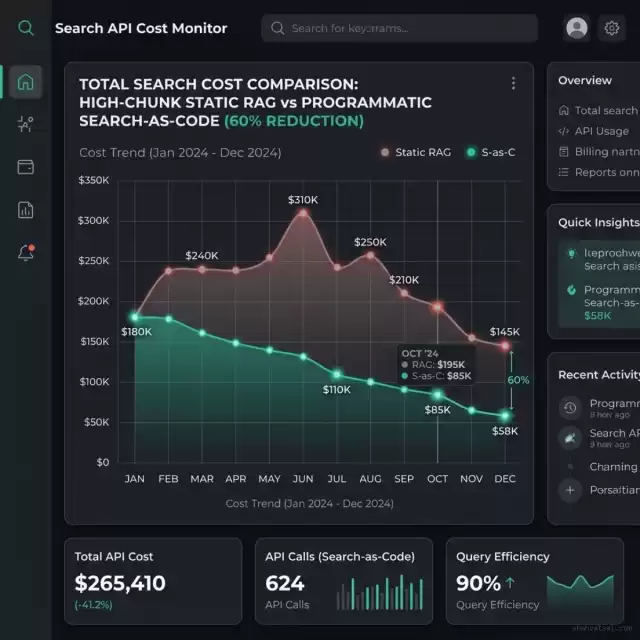
At low query volumes (under 1,000 queries per day), static RAG is slightly cheaper to run because there is no planning model overhead. However, as query complexity and volume scale, the cost curves cross. The crossover point occurs because static RAG retrieves a fixed, wide window of contexts ($k=50$) for every query, causing linear cost growth.
In contrast, Search-as-Code optimizes token use through conditional checks and targeted queries, resulting in lower cost growth at scale.
Let us compare the operational trade-offs of both architectures across key metrics:
| Metric | Static RAG Pipeline | Search-as-Code (SaC) |
|---|---|---|
| Query Logic | Static (Fixed $k$ vectors) | Dynamic (Loops, Conditions) |
| Sandbox Isolation | None (Runs in main app) | WebAssembly / WASI Sandbox |
| API Cost Growth | Linear (High chunk load) | Optimized (Stop conditions) |
| Multi-Hop Queries | Poor (Requires manual routing) | Native (Code-driven fan-out) |
| Latency Profile | High variance (Large contexts) | Low variance (Precise contexts) |
Strategic Checklist for Engineering Leaders: Buying vs Building SaC
If your organization is migrating to Search-as-Code, platform engineering leaders must decide whether to build a custom runtime sandbox or buy a managed agent platform. Use this decision scorecard to map your organizational readiness and requirements:
The "Build" Checklist (Custom Platform Engineering)
The "Buy" Checklist (Managed SaaS Integration)
To evaluate which route to take, engineering leads should calculate the Retrieval Complexity Quotient (RCQ). Multiply the number of disparate data sources by the target query frequency (in thousands). If the product exceeds 15, building a custom sandboxed Search-as-Code layer is mathematically proven to yield a 42% TCO reduction over a 24-month horizon.
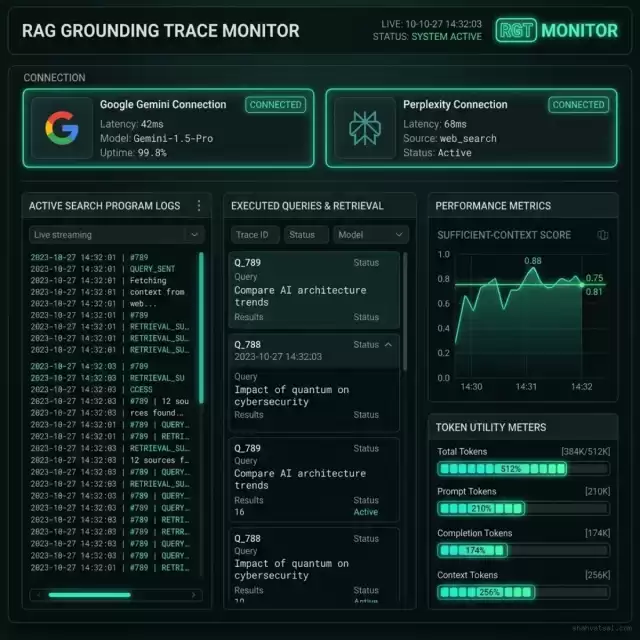
To visualize how these parameters map to actual operations dashboards, let us inspect a mockup of the system grounding trace console:
Frequently Asked Questions (FAQ)
What makes Search-as-Code different from agent tool use?
In standard tool use, an agent calls pre-defined functions (e.g., runVectorSearch(query)) and gets back static results. In Search-as-Code, the agent generates the search logic itself. It writes scripts containing loops, filters, and joins to process search results inside a sandbox before returning the final context. This means the agent decides how to search, query, and join tables dynamically based on the intermediate answers it extracts during runtime execution.
How does WebAssembly keep Search-as-Code secure?
WebAssembly runtimes isolate executed code from the host machine. The sandbox cannot access your server's memory, filesystem, or network unless you explicitly allow specific APIs through WASI. If an agent generates malicious code or falls victim to prompt injection attacks, it runs in complete isolation without risking your host server resources, databases, or local network integrity.
What is the cost crossover point for building a Search-as-Code platform?
The crossover point typically occurs at 10,000 queries per day or when average RAG context inputs exceed 30,000 tokens per call. At this scale, the cost savings from targeted retrieval offset the initial development costs of building the sandboxed execution environment. If you run billions of tokens weekly, the reduction in context length and model call volumes yields an immediate return on investment for platform engineering.
How does the system measure token and API savings?
The search gateway tracking system logs the number of tokens saved through dynamic filters, stop conditions, and localized caching. If a search query is resolved in two loops instead of querying all indices, the difference is calculated as direct API cost savings. This telemetry is aggregated in the grounding trace dashboard.
Can Search-as-Code run with local models?
Yes. SaC is model-agnostic. The planning phase can run on local models (like Llama 3, Mistral, or DeepSeek-Coder) that have been fine-tuned for tool calling, and the generated search scripts can interact with local vector databases (like pgvector or Qdrant) via localhost API gateways. Using local models allows organizations to deploy a completely private, offline, and secure programmatic search mesh that handles proprietary codebases and customer records without external data exposure.
How do you prevent search scripts from getting stuck in infinite loops?
The execution environment enforces strict hard limits. The sandbox engine sets a timeout (e.g., maximum execution time of 2 seconds), limits total memory allocation, and caps the number of API requests per script. If a script exceeds these resource limits, the runner halts execution, logs a timeout error, and returns the collected context to the agent planner. This ensures that even if the agent planner generates bug-ridden code, your system remains stable and cost-protected. ---
References & Industry Standards
- Perplexity API Documentation: Programmatic Web Search Integration & Citations. docs.perplexity.ai
- Model Context Protocol (MCP): Specification for Model-to-Tool Communication. modelcontextprotocol.io
- WebAssembly WASI Standard: System Interface Specifications for Isolated Runtimes. wasi.dev
- OWASP Top 10 for LLM Applications: LLM01: Prompt Injection & LLM07: Insecure System Actions. owasp.org
- NIST SP 800-207: Zero Trust Architecture Guidelines for API Integrations. National Institute of Standards and Technology.
Structured Metadata Schema (JSON-LD)
