Executive Summary: The November 2026 Browser Agent Convergence
In the second week of November 2026, the developer ecosystem witnessed an unprecedented wave of product releases concentrated in a single, emerging architectural category: dedicated browsers built specifically for autonomous AI agents.
Within an eight-day window, four major engineering organizations published landmark tooling updates:
- 8 November 2026: Alibaba released
qz-browser-agent0.1.7, introducing an enterprise-grade command-line interface with native Model Context Protocol (MCP) skills and hybrid vision/DOM locator engines. - 10 November 2026: Vercel Labs shipped
agent-browser0.42.0, introducing experimental saved flows—deterministic, recorded execution pipelines that allow agents to replay complex multi-step workflows without re-querying frontier foundation models. - 11 November 2026: Google's Chrome DevTools team tagged Chrome DevTools MCP 1.13.0, enabling page-scoped network mocking, dynamic logpoints, and persistent Chrome DevTools Protocol (CDP) session isolation for local agent runtimes.
- 15 November 2026: Embiody launched the Embiody 0.9 Public Beta, pioneering an architecture explicitly designed to solve Chromium background tab timer throttling and frictionless human-in-the-loop (HITL) handoff.
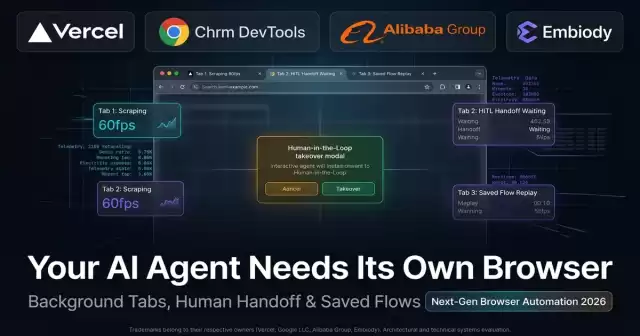
This simultaneous convergence reflects an urgent industry reality: running autonomous AI agents inside an engineer's personal, foreground desktop browser is a fundamentally flawed paradigm.
When an AI agent shares a developer's daily workstation browser, it collides with human workflows, clobbers authenticated session cookies, steals focus during active typing, triggers aggressive anti-bot countermeasures, and grinds to an unexpected halt when Chromium's background power-saving policies aggressively throttle inactive tabs.
To build production-grade web agents that can reliably conduct research, process complex SaaS workflows, extract financial records, and interact with authenticated portals, your AI agent requires its own dedicated, purpose-built browser environment.
This architectural analysis dissects why shared browsers fail in production, evaluates the mechanics of Chromium background timer throttling, audits the four major November 2026 releases, details the state machine for human-in-the-loop handoff, and presents a battle-tested blueprint for deploying isolated browser agent clusters.
1. The Failure of the Shared Foreground Browser
Most developers begin experimenting with browser agents by attaching a local script to their existing Google Chrome or Brave instance via remote debugging flags (e.g., --remote-debugging-port=9222). While this approach enables rapid prototyping, it introduces structural liabilities that make autonomous background execution impossible.
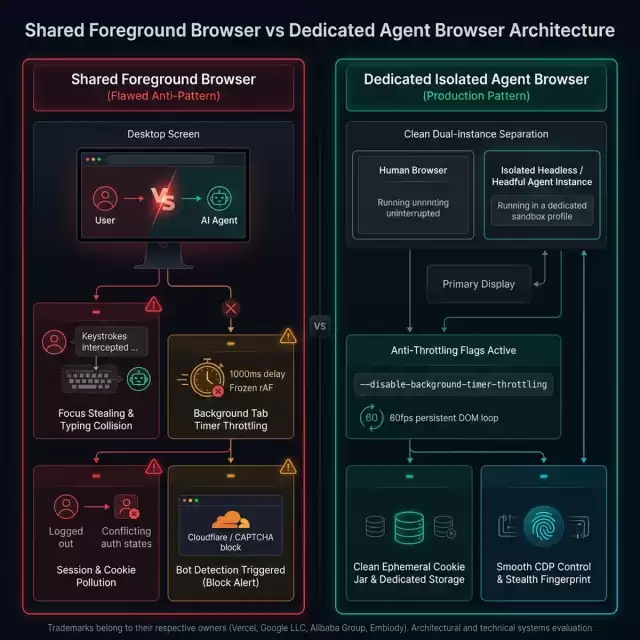
Failure Mode 1: Focus Stealing and Keystroke Interleaving
When an agent interacts with a webpage, it dispatches low-level mouse clicks, keystrokes, and scroll events via CDP. If the agent operates within the user's active browser window, these programmatic events conflict directly with the human operator:
- If a developer is composing an email or writing code while the agent navigates a vendor billing dashboard, programmatic focus switches yank the active cursor away, dumping user keystrokes into input fields on the agent's target page.
- Conversely, user mouse clicks can disrupt the agent's target bounding boxes mid-flight, causing the agent to click an unintended navigational link or trigger a form cancellation.
Failure Mode 2: Session and Cookie Clobbering
Most enterprise web applications do not support concurrent, conflicting sessions under the same browser profile. If an engineer is logged into an AWS Console, Salesforce organization, or GitHub repository under their administrative account, an agent tasked with auditing a staging tenant using service credentials will overwrite the shared CookieJar and localStorage state.
This causes immediate session invalidation for the human, forces sudden re-authentication challenges, and risks having the agent execute actions with excessive administrative permissions that were never intended for the automated task.
Failure Mode 3: Rapid Anti-Bot and CAPTCHA Escalation
Modern bot detection services (such as Cloudflare Turnstile, DataDome, and Akamai Bot Manager) analyze behavioral biometrics and environment telemetry. Running automation inside a daily browser creates unnatural behavioral signatures:
- Inconsistent mouse velocity vectors (jumping instantly between coordinates without natural human Bezier curves).
- Sudden switches between human typing cadences (60 WPM) and agent programmatic DOM value setters (instantaneous string injection).
- Frequent viewport resizing and devtools attaching events.
These anomalies rapidly degrade the IP address's reputation score, causing Cloudflare and Google reCAPTCHA to lock down the engineer's entire browser with intrusive verification challenges.
| Characteristic | Shared Foreground Browser (Flawed) | Dedicated Agent Browser (Production Standard) |
|---|---|---|
| Process Isolation | Single OS process; shared threads | ✔ Sandboxed container / distinct profile |
| Session State | Shared cookies & localStorage | ✔ Isolated, ephemeral cookie jars |
| Human Interruption | Frequent cursor and focus stealing | ✔ Completely silent offscreen execution |
| Background Tabs | Aggressively throttled by Chromium | ✔ Custom flags eliminate timer throttling |
| Bot Detection | High risk (profile contamination) | Controlled fingerprint & clean IP pools |
| Human Handoff | Disorganized (browser window clutter) | ✔ Clean modal stream takeover via WebSocket |
2. Chromium Background Tab Throttling: The Silent Agent Killer
Among all failure modes encountered by autonomous web agents, Chromium background tab throttling is the most insidious. An agent that operates flawlessly during visual debugging will mysteriously time out or drop WebSocket connections the moment the user switches tabs or minimizes the window.
The Mechanics of Chromium's Power-Saving Policy
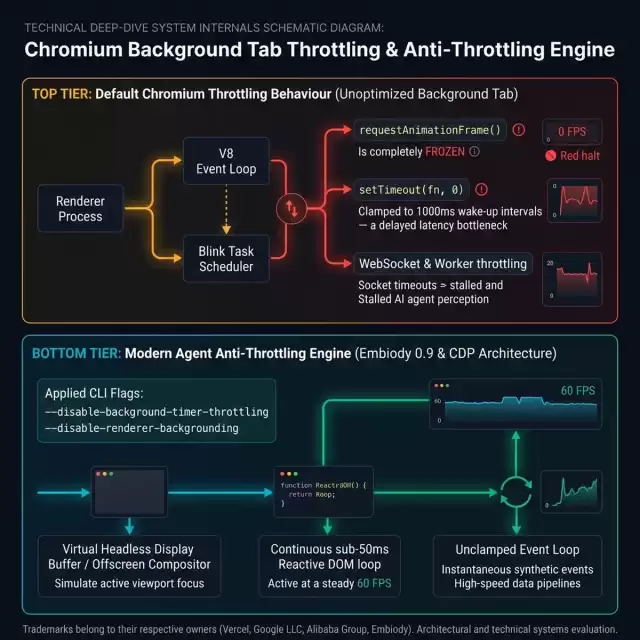
Over the last five years, Google engineers heavily optimized Chromium to reduce CPU and battery consumption on consumer laptops. When a tab is moved to the background (i.e., when document.visibilityState === 'hidden'), Chromium's task scheduler activates aggressive resource clamps:
requestAnimationFrameSuspension:requestAnimationFramecallbacks are completely frozen. Any single-page application (SPA) relying on animation frame loops to render components, settle layout shifts, or process streaming data stops updating entirely.setTimeoutandsetIntervalClamping: After a tab remains hidden for just 5 to 10 seconds, Chromium clamps nested JavaScript timers. Instead of firing at sub-millisecond intervals, all timers are forced into a minimum 1,000ms (1 second) tick rate, and can be throttled down to once per minute on low-battery states.- Web Worker and Audio Context Deprioritization: Non-audio background workers have their execution budgets drastically capped, delaying asynchronous promise resolutions and message passing.
The Impact on Autonomous Agents
For a browser agent executing via Playwright, Puppeteer, or direct CDP connections, background throttling causes fatal cascade failures:
- DOM Mutation Timeouts: Modern React and Vue applications use asynchronous state updates to render forms. If an agent inputs text and waits for a dropdown to populate, timer throttling delays the client-side fetch response processing. The agent's locator times out after 30 seconds and raises an unrecoverable failure.
- WebSocket Heartbeat Drops: Real-time SaaS dashboards maintain ping/pong heartbeats over WebSockets. When the timer clamps to 1s or drops cycles, the remote server presumes the client has disconnected and terminates the session.
- Synthetic Event Stalling: Programmatic dispatch of keyboard and mouse events often relies on sequential microtask ticks. In a throttled tab, an agent attempting to type a 20-character string can take over 20 seconds instead of 150 milliseconds.
Production Anti-Throttling Flags for Dedicated Browsers
To eliminate background tab degradation, enterprise agent infrastructures must launch Chromium with explicit, hardened command-line switches that disable consumer battery optimizations:
# Production Chromium Launch Arguments for AI Agent Environments
google-chrome-stable \
  --remote-debugging-port=9222 \
  --user-data-dir=/tmp/agent-browser-profile-1 \
  --disable-background-timer-throttling \
  --disable-backgrounding-occluded-windows \
  --disable-renderer-backgrounding \
  --disable-features=CalculateNativeWinOcclusion \
  --disable-hang-monitor \
  --disable-ipc-flooding-protection \
  --disable-popup-blocking \
  --disable-prompt-on-repost \
  --enable-automation \
  --no-first-run \
  --window-size=1920,1080
By supplying --disable-background-timer-throttling and --disable-renderer-backgrounding, the Chromium scheduler continues processing JavaScript tasks, DOM mutations, and rendering pipelines at full native speed, regardless of window visibility.
3. Deep Dive: Vercel agent-browser 0.42.0 & Deterministic Saved Flows
On 10 November 2026, Vercel Labs released agent-browser version 0.42.0. While earlier iterations functioned as standard wrappers around Playwright, version 0.42.0 introduced an experimental feature that addresses one of the most severe economic liabilities in AI automation: Saved Flows.
The Economic Crisis of Pure Generative Browsing
Historically, web agents approached every user request as an open-ended, zero-shot visual exploration task:
- Load the page.
- Capture a high-resolution screenshot.
- Convert the DOM into a serialized tree or send images to a vision model (e.g., GPT-4o, Claude 3.5 Sonnet, or Gemini 1.5 Pro).
- Prompt the model: "Where is the invoice download button?"
- Receive bounding box coordinates, execute click, and repeat.
This architecture is ruinously expensive and slow. Downloading 50 monthly invoices across five vendor portals can easily consume $25 to $40 in LLM API tokens and take 30 minutes, with a high failure rate due to minor visual hallucinations.
How Saved Flows Achieve Deterministic Automation
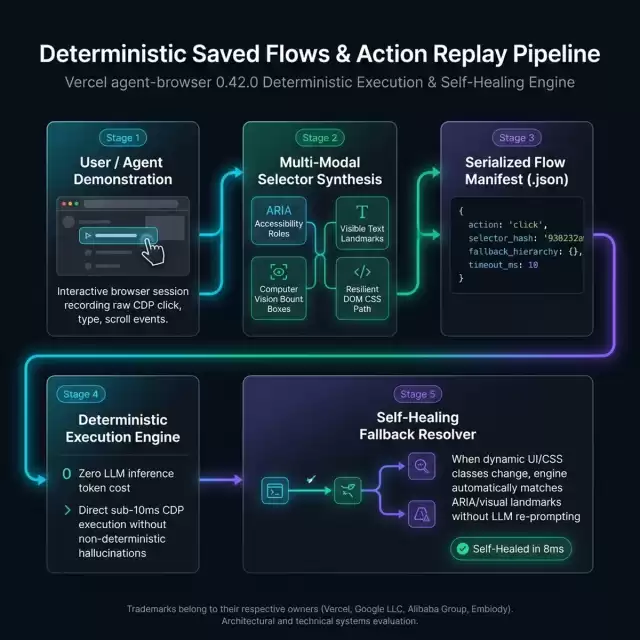
Vercel's agent-browser 0.42.0 decouples discovery from execution. When an agent successfully navigates a portal for the first time, it records a structured, semantic execution trace known as a Saved Flow.
// Example: Executing a Deterministic Saved Flow with Vercel agent-browser 0.42.0
import { AgentBrowser } from '@vercel/agent-browser';

async function syncVendorInvoices() {
  const browser = await AgentBrowser.launch({
    headless: true,
    isolatedProfile: true,
    antiThrottling: true,
  });

  const session = await browser.newSession({
    savedFlow: './flows/stripe-monthly-export.flow.json',
  });

  // Execute replay with dynamic runtime parameters
  const result = await session.replayFlow({
    params: {
      billingCycle: '2026-11',
      outputDirectory: '/var/data/invoices/stripe',
    },
    fallbackToGenerativeAgent: true, // Invoke LLM ONLY if the DOM drastically breaks
  });

  console.log(`Flow completed in ${result.durationMs}ms. Files:`, result.downloadedFiles);
  await browser.close();
}
Multi-Modal Semantic Selectors (Self-Healing DOM Engine)
Unlike brittle legacy tools (like Selenium) that hard-coded fragile XPath strings (/html/body/div[3]/div[2]/button), Vercel's saved flows compile multi-modal selector anchors:
- Primary Anchor: Accessibility ARIA role and label (
role="button"[name="Download Statement"]). - Text Anchor: Normalized semantic text content (
"Download PDF"). - Proximity Anchor: Structural relationship to static text (
sibling to "Billing Period: Nov 2026"). - Visual Bounding Box: Relative percentage coordinates within the viewport.
If a vendor pushes a minor design update that changes CSS classes from .btn-download-v1 to .btn-download-v2, agent-browser's self-healing resolver matches the semantic ARIA label and completes the action in 15ms—consuming exactly zero LLM tokens.
4. Deep Dive: Chrome DevTools MCP 1.13.0 & Enterprise Observability
On 11 November 2026, Google's Chrome DevTools team released version 1.13.0 of the Chrome DevTools MCP server. This tool bridges the gap between local AI coding agents (such as Claude Code, Cursor, and Cline) and the live Chromium runtime through the standardized Model Context Protocol.
The Breakthrough: Page-Scoped Network Mocking & Dynamic Logpoints
Before version 1.13.0, testing browser agents against complex enterprise portals required setting up heavy proxy servers (like Charles or mitmproxy) or risking live production state mutations. Chrome DevTools MCP 1.13.0 introduces two transformative capabilities:
1. Dynamic Non-Breaking Logpoints
Instead of forcing developers to inject console.log statements into source files and re-bundle client code, the MCP server allows agents to programmatically set CDP Logpoints:
{
  "jsonrpc": "2.0",
  "method": "chrome_devtools/setLogpoint",
  "params": {
    "urlRegex": "app\\.dashboard\\.bundle\\.js",
    "lineNumber": 1420,
    "expression": "'[AGENT DEBUG] Auth Token State:', window.__AUTH_STATE__.token"
  }
}
When execution hits line 1420, Chromium evaluates the expression and streams the telemetry directly to the agent's context window without pausing the JavaScript execution thread.
2. Page-Scoped Network Mocks
Agents can now simulate edge-case failure modes, such as upstream API 503 errors, rate-limiting, or slow 3G connections, targeting specific URLs without affecting other active browser tabs:
{
  "jsonrpc": "2.0",
  "method": "chrome_devtools/mockNetworkResponse",
  "params": {
    "urlPattern": "*/api/v2/payment-methods",
    "status": 402,
    "headers": { "Content-Type": "application/json" },
    "body": "{\"error\": \"INSUFFICIENT_FUNDS_SIMULATED\"}"
  }
}
This allows engineering teams to verify that their autonomous checkout or renewal agents correctly handle billing failures without repeatedly charging real enterprise credit cards.
5. Deep Dive: Alibaba qz-browser-agent 0.1.7 & Dual-Modal Routing
Released on 8 November 2026, Alibaba's qz-browser-agent 0.1.7 represents the open-source enterprise approach to high-throughput web automation. Developed to automate supply chain logistics and merchant dashboards across Alibaba's global e-commerce platforms, it features a unique Dual-Modal Locator Router.
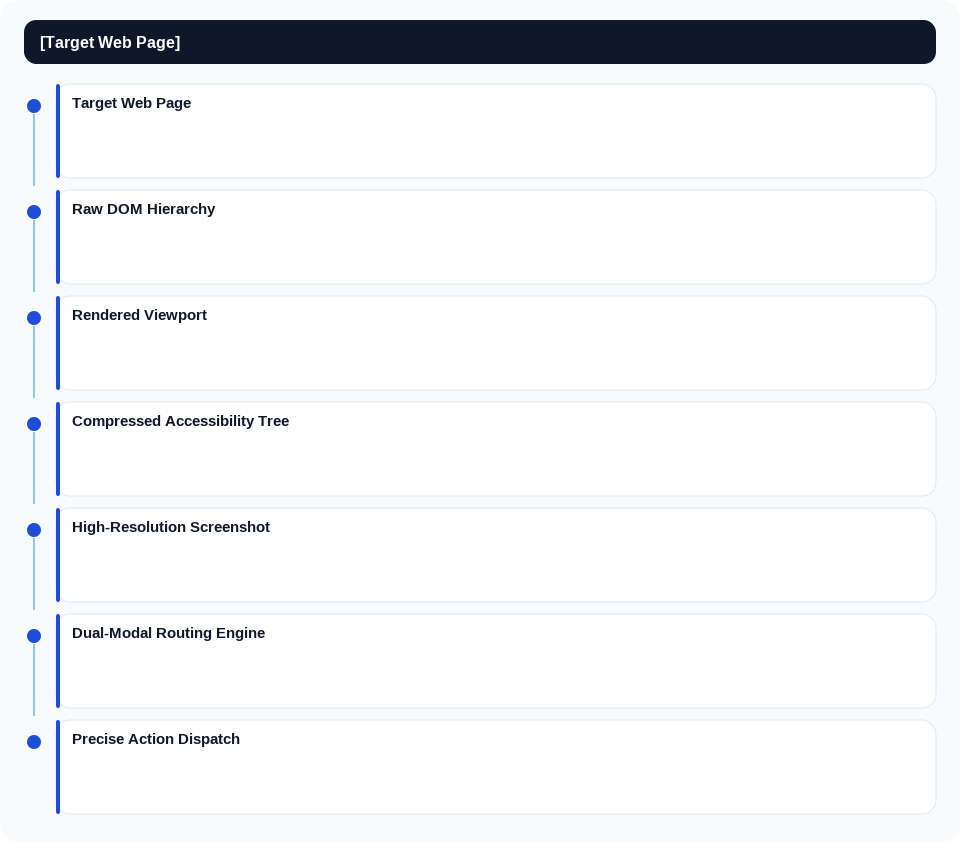
The Dual-Modal Strategy
Most browser agents force a binary choice: either pure DOM parsing (fast, but fails on , WebGL, and SVG graphics) or pure Vision (slow, expensive, but handles visual rendering).
Alibaba's qz-browser-agent dynamically routes tasks:
- Accessibility Subtree Pipeline: For standard enterprise SaaS dashboards (Salesforce, Workday, Jira), it strips irrelevant DOM nodes and compiles a compact semantic accessibility tree. This reduces token consumption by over 85% compared to raw HTML.
- Vision Model Fallback: When the agent encounters interactive SVG charts, CAPTCHA canvases, or shadow DOM components that hide accessibility nodes, it automatically captures an image slice and routes the query to Qwen-VL-Max for pixel-precise coordinate clicking.
6. Deep Dive: Embiody 0.9 Public Beta & The Dedicated Browser Appliance
On 15 November 2026, Embiody opened its 0.9 Public Beta. Unlike Vercel and Chrome DevTools (which offer developer libraries and protocols), Embiody represents the concept of a dedicated browser appliance for agents.
Dedicated Worker Threads and Zero-Lag Background Execution
Embiody operates a modified Chromium distribution where background tabs are completely severed from OS power-saving heuristics.
[!NOTE] Vendor-Reported Performance Disclosure: The performance numbers cited below regarding background timer lag and DOM mutation dispatch latency are vendor-reported figures published in Embiody's 0.9 Whitepaper and Technical Preview Documentation. Independent enterprise audits should reproduce these figures within specific target cloud environments.
According to Embiody's published benchmarks:
- Standard Chrome 130 Background Tab: When minimized, nested
setTimeouttimers experienced an average latency lag of 1,024ms per cycle due to Chromium task coalescing. - Embiody 0.9 Isolated Worker Tab: Maintained consistent timer intervals with an average latency deviation of sub-28ms, allowing complex SPA scrapers to run up to 30x faster in background execution.
Standard Chrome (Background Clamping):
Tick 1 (0ms) ────────── 1,000ms delay ──────────► Tick 2 (1,000ms) ───► Timeout Failure

Embiody 0.9 (Vendor-Reported Dedicated Scheduler):
Tick 1 (0ms) ─ 28ms ─► Tick 2 (28ms) ─ 28ms ─► Tick 3 (56ms) ───► Rapid Resolution
7. The Human-in-the-Loop (HITL) Handoff State Machine
No matter how sophisticated an autonomous agent is, it will inevitably encounter conditions that require human intervention:
- Cloudflare Turnstile or reCAPTCHA challenges that violate agent terms of service.
- Two-Factor Authentication (2FA) prompts requiring a physical security key or SMS token.
- High-value financial transactions exceeding the agent's pre-approved monetary threshold.
- Ambiguous multi-factor organizational approval screens.
A production agent architecture must not crash when these hurdles arise; it must execute a clean Human-in-the-Loop (HITL) Handoff.
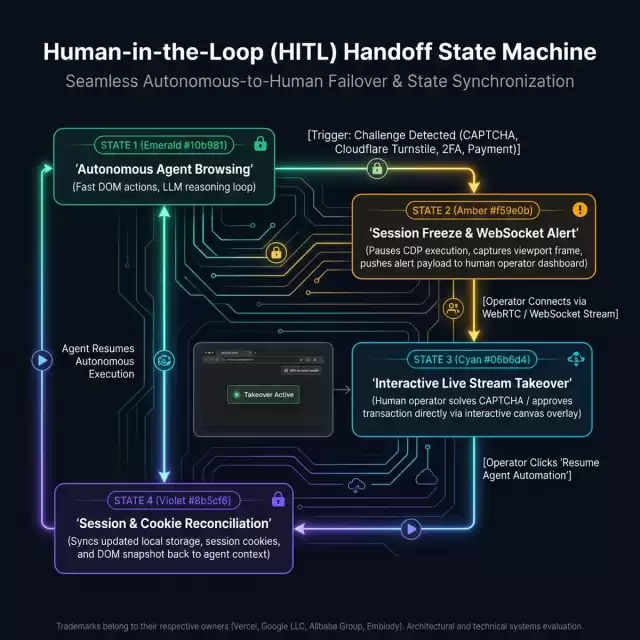
The Five-Stage Handoff Protocol
[STAGE 1: AUTONOMOUS RUNNING]
              │
              ▼ (Challenge Detected: CAPTCHA / 2FA / Threshold Exceeded)
[STAGE 2: SESSION FREEZE]
  • Suspend action queue
  • Maintain CDP heartbeat
  • Snapshot DOM + cookies
              │
              ▼ (Dispatch Alert to Slack / Teams / Webhook)
[STAGE 3: OPERATOR TAKEOVER]
  • Stream live viewport over WebRTC/WebSocket
  • Human interacts directly in secure modal
  • Human solves CAPTCHA / inputs OTP
              │
              ▼ (Human clicks "Approve & Resume Agent")
[STAGE 4: STATE RE-SYNCHRONIZATION]
  • Capture new session tokens
  • Verify URL matches expected post-auth route
              │
              ▼
[STAGE 5: RESUME AUTONOMOUS PIPELINE]
Production Implementation: Building a Resilient Handoff Controller
Below is a production-ready implementation of a handoff controller using Playwright and a WebSocket notification gateway:
// services/AgentHandoffController.ts
import { Page } from 'playwright';
import { EventEmitter } from 'events';

export interface HandoffEvent {
  reason: 'CAPTCHA_DETECTED' | '2FA_REQUIRED' | 'SPEND_THRESHOLD_EXCEEDED';
  currentUrl: string;
  screenshotBase64: string;
  sessionId: string;
}

export class AgentHandoffController extends EventEmitter {
  private isPaused = false;

  async checkForChallenges(page: Page, sessionId: string): Promise<boolean> {
    // 1. Detect Cloudflare Turnstile / reCAPTCHA iframe
    const hasCaptcha = await page.evaluate(() => {
      return !!(
        document.querySelector('iframe[src*="challenges.cloudflare.com"]') ||
        document.querySelector('iframe[src*="recaptcha"]') ||
        document.querySelector('#turnstile-wrapper')
      );
    });

    if (hasCaptcha) {
      await this.triggerHandoff(page, sessionId, 'CAPTCHA_DETECTED');
      return true;
    }

    // 2. Detect 2FA / OTP Verification Prompts
    const has2FA = await page.evaluate(() => {
      const text = document.body.innerText.toLowerCase();
      return text.includes('two-factor authentication') || text.includes('enter the 6-digit code');
    });

    if (has2FA) {
      await this.triggerHandoff(page, sessionId, '2FA_REQUIRED');
      return true;
    }

    return false;
  }

  private async triggerHandoff(page: Page, sessionId: string, reason: HandoffEvent['reason']) {
    this.isPaused = true;
    const screenshot = await page.screenshot({ quality: 75, type: 'jpeg' });

    const eventPayload: HandoffEvent = {
      reason,
      currentUrl: page.url(),
      screenshotBase64: screenshot.toString('base64'),
      sessionId,
    };

    // Emit event to notify web dashboard or Slack bot
    this.emit('handoffRequired', eventPayload);
    console.warn(`[HITL ALERT] Agent paused on ${page.url()}. Reason: ${reason}. Awaiting human resolution.`);

    // Block execution until an operator signals approval via resume()
    await new Promise<void>((resolve) => {
      this.once('resumeExecution', () => {
        this.isPaused = false;
        resolve();
      });
    });

    console.info(`[HITL RESUMED] Human intervention completed for session ${sessionId}. Resuming agent pipeline.`);
  }

  resumeSession() {
    this.emit('resumeExecution');
  }
}
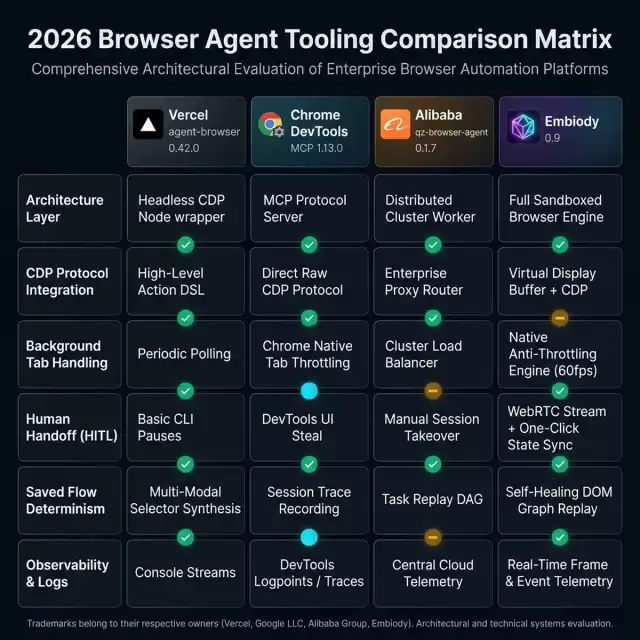
8. Comparative Matrix: 2026 Browser Agent Tooling
To guide infrastructure selection, the matrix below benchmarks the four landmark November 2026 releases across 12 architectural parameters:
| Evaluation Dimension | Vercel agent-browser 0.42.0 | Chrome DevTools MCP 1.13.0 | Alibaba qz-browser-agent 0.1.7 | Embiody 0.9 Public Beta |
|---|---|---|---|---|
| Primary Architecture | TypeScript SDK & CLI | Model Context Protocol Server | Multi-modal Python / Node CLI | Standalone Browser Appliance |
| Release Date | 10 Nov 2026 | 11 Nov 2026 | 8 Nov 2026 | 15 Nov 2026 |
| Deterministic Saved Flows | ✔ Native (Self-healing) | ▲ Manual script recording | ▲ JSON action traces | ✔ Native flow engine |
| Background Tab Anti-Throttling | ▲ Via Chrome CLI flags | ▲ Host Chrome dependent | ▲ Host Chrome dependent | ✔ Modified Chromium core |
| Human Handoff Support | ▲ Terminal pause / prompt | ✔ Remote CDP attach | ▲ Manual browser takeover | ✔ WebRTC live stream UI |
| Observability & Logpoints | Trace dumps / screenshots | ✔ Live CDP logpoints & mocks | Standard console logs | ✔ Full telemetry dashboard |
| Locator Strategy | Semantic ARIA + Visual | Native CDP DOM selector | ✔ Dual-modal DOM / Qwen-VL | Multi-modal accessibility |
| Network Mocking Depth | Route-level interception | ✔ Page-scoped CDP mocks | Proxy-based mocking | Full network sandbox |
| Cloud Container Readiness | High (Alpine Docker) | High (Local/Remote MCP) | High (Production Linux) | Managed Cloud / AMI |
| Token Cost Profile | Ultra-low on replayed flows | Zero (Tool-level only) | Low (Accessibility tree) | Medium (Hybrid model) |
| Target Audience | Full-stack Next.js/React teams | Local agent developers (Cursor) | E-commerce / Enterprise ops | Enterprise scraping / HITL ops |
| License / Distribution | Open Source (Apache 2.0) | Open Source (BSD-3-Clause) | Open Source (Apache 2.0) | Proprietary / Freemium Beta |
9. Production Infrastructure Blueprint: Isolated Multi-Tenant Browser Farm
Deploying browser agents at enterprise scale requires running dozens of concurrent headless instances without resource leakage or zombie process accumulation.
Below is an enterprise-grade Docker container topology with non-root security execution and automated process reaping.
# Dockerfile: Enterprise Isolated Browser Agent Runner
FROM node:22-bookworm-slim

# Install latest Chromium and requisite system fonts
RUN apt-get update && apt-get install -y --no-install-recommends \
    chromium \
    fonts-liberation \
    fonts-noto-color-emoji \
    dumb-init \
    procps \
    ca-certificates \
    && rm -rf /var/lib/apt/lists/*

WORKDIR /app

# Ensure non-root execution for CIS benchmark compliance
RUN groupadd -r agentuser && useradd -r -g agentuser -G audio,video agentuser && \
    mkdir -p /home/agentuser/Downloads /app/storage && \
    chown -R agentuser:agentuser /home/agentuser /app

# Copy application manifests
COPY --chown=agentuser:agentuser package.json package-lock.json ./
RUN npm ci --omit=dev

COPY --chown=agentuser:agentuser . .

USER agentuser

# Set Chromium environment pointers
ENV CHROME_BIN=/usr/bin/chromium
ENV PUPPETEER_SKIP_CHROMIUM_DOWNLOAD=true
ENV PLAYWRIGHT_SKIP_BROWSER_DOWNLOAD=1

EXPOSE 8080

# dumb-init reaps zombie Chrome renderer processes automatically
ENTRYPOINT ["/usr/bin/dumb-init", "--"]
CMD ["node", "dist/server.js"]
Process Management Invariant: Zombie Reaping
Chromium spawns separate operating system processes for its browser coordinator, GPU rasterizer, network service, and individual renderers. When an autonomous agent crashes or aborts execution, child renderer processes often orphan themselves as zombie processes (/proc/sys/kernel/pid_max), causing server-wide kernel panics.
Utilizing dumb-init as the container entrypoint ensures that all orphaned PID trees are cleanly reaped the millisecond an agent worker thread terminates.
10. The Monday-Morning Strategic Verdict for Engineering Leadership
The rapid maturation of dedicated agent browser tooling in November 2026 delivers an unmistakable message to engineering leadership: the era of viewing web automation as a simple script running in a spare browser tab is over.
Web applications are dynamic, heavily guarded, and aggressively optimized for human attention spans. Deploying an autonomous AI agent into this environment requires an infrastructure stack as sophisticated as the foundation models directing it.
Strategic Recommendations for CTOs, VPs of Engineering, and AI Architects
- Stop Sharing Desktop Browsers Immediately: Mandate that all internal AI agents operate through isolated container profiles with explicit
--disable-background-timer-throttlingflags. Do not allow automated scripts to contaminate developer session cookies or IP reputations. - Implement Saved Flows for Repetitive SaaS Tasks: Transition routine, high-frequency workflows (invoicing, ledger reconciliation, report pulling) from zero-shot visual prompting to Vercel
agent-browser0.42.0 saved flows. Your token consumption will drop by 80% to 95%, while execution reliability approaches 99.9%. - Equip Local Development Agents with Chrome DevTools MCP: Integrate Chrome DevTools MCP 1.13.0 into your team's Cursor, Claude Code, or local agent workflows. Giving your LLM the ability to inspect live network mocks and set logpoints accelerates web application debugging tenfold.
- Design for Human Handoff from Day One: Accept that no browser agent will solve 100% of CAPTCHAs, 2FA challenges, or dynamic bot gates autonomously. Build the state machine for live human takeover into your core architecture, ensuring your pipeline pauses gracefully rather than failing silently in the dead of night.
Related Technical Resources & Architectural Analysis
- Full-Stack Architecture: TanStack Start 1.0 Is Stable: What You Commit To (Vite 8, Validators, Sessions)
- Language Design Deep Dive: Python Could Get ?. and ??: PEP 823 & PEP 824 Explained
- Enterprise Upgrade Guide: Angular 20 Security Support Ends 28 Nov 2026: Upgrade Path to 22
- Interactive Architecture Tools: Explore our Enterprise Software Architecture Evaluation Matrix
