STRATEGIC OVERVIEW
The AI Gateway Pattern: Multi-Model Routing with LiteLLM, Portkey, and Vercel By Vatsal Shah | June 27, 2026 | 16 min read Table of Contents - The Outage that Cost $14k: Direct Integration is an Anti-Pattern - Why Every Production AI App Needs a Gateway - Centralized API Key.
The AI Gateway Pattern: Multi-Model Routing with LiteLLM, Portkey, and Vercel
By Vatsal Shah | June 27, 2026 | 16 min read
Table of Contents
- The Outage that Cost $14k: Direct Integration is an Anti-Pattern
- Why Every Production AI App Needs a Gateway
- Routing Strategies: Designing Your Traffic Controller
- Self-Hosted Gateways: Owning the Proxy with LiteLLM
- Managed Gateways: Evaluating Portkey and Vercel
- TCO Analysis: Build vs. Buy Managed Gateway
- Enterprise Readiness: Observability, Billing, and Security
- 2027-2030 Transition Roadmap
- Monday Morning Action Plan
- Key Takeaways
- FAQ
- About the Author
- Conclusion
The Outage that Cost $14k: Direct Integration is an Anti-Pattern
A client of mine recently suffered a minor indexing bug that triggered an infinite retry loop on an agentic backend task. Over the course of 36 hours, their backend made 4.2 million raw API calls directly to a primary frontier model endpoint. Because the code integrated directly with the provider SDK using a hardcoded environment token, there was no centralized rate limiter, no anomaly alerting, and no circuit breaker. By the time the billing dashboard alerted the team, they had burned $14,200.
This is a classic symptom of direct integration. When your application codebase communicates directly with OpenAI, Anthropic, or Google Gemini API endpoints, you are implementing an architectural anti-pattern. You are coupling business logic directly to external APIs that are volatile, subject to rate limits, and financially unconstrained.
PAIN POINT ANALYSIS
- Siloed Client Logs
- Debugging latency or trace issues across three separate service providers requires logging into three vendor dashboards.
- Hardcoded Secret Proliferation
- Spreading API secrets across 15+ container workloads increases the credential leak surface area.
- Failover Friction
- Implementing failovers directly in the code results in complex try-catch statements that clutter standard business flows.
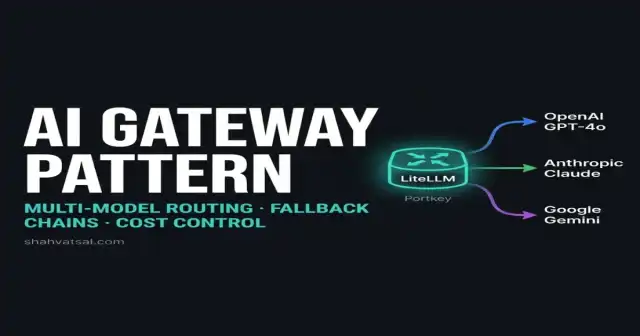
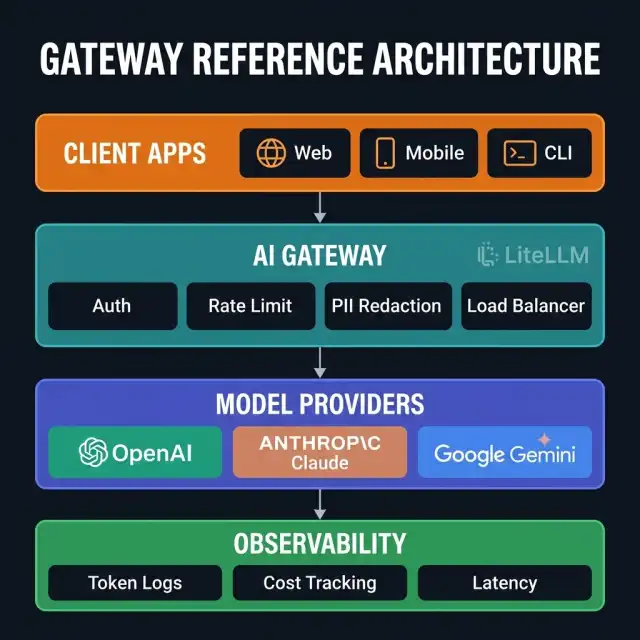
The architectural pattern that resolves these failure modes is the AI Gateway. Much like an API gateway sits in front of your internal microservices to manage traffic, authentication, and logging, an AI Gateway sits as a reverse proxy between your application code and the underlying foundation models. It intercepts all outgoing LLM requests, normalizes them, and directs them dynamically based on routing policies.
Why Every Production AI App Needs a Gateway
Centralized API Key Management
When scaling an enterprise application with dozens of sub-agents or microservices, spreading OpenAI, Anthropic, and Cohere API keys across environment variables in every container is a security liability. A single configuration drift or logs exposure leak puts your enterprise billing at risk.
An AI Gateway acts as a secure vault. Your client microservices only hold a single token authorized against the gateway. The gateway itself manages, rotates, and encrypts the actual upstream keys. This creates a clean boundary:
- Upstream keys are kept in secure, isolated runtime vaults (e.g., HashiCorp Vault or AWS Secrets Manager).
- Clients request models using uniform virtual identifiers.
- Revoking client credentials can be performed instantly at the gateway level without touching model configurations.
Unified Schema Abstraction
OpenAI uses the /v1/chat/completions endpoint format. Anthropic uses its own Messages API. Google Gemini has another separate schema. If your code uses these distinct structures natively, migrating from Claude Sonnet to GPT-4o or Gemini Flash requires refactoring the payload schema, parsing logic, and response handlers.
An AI Gateway exposes a single, normalized OpenAI-compatible interface. A backend client can switch from Anthropic to OpenAI simply by changing a string value:
/* Client POST payload to Gateway */
{
  "model": "enterprise-reasoning",
  "messages": [{"role": "user", "content": "Analyze these logs"}]
}
The gateway parses this generic payload, translates it into the provider-specific layout (handling prompt conversions, temperature mapping, and system message wrappers), forwards it to the endpoint, and returns the response mapped back to a standard format.
Fallback Chains and Retries
Provider endpoints fail. Rate limits are reached. Regions suffer localized outages. If your code is not wrapped in complex resilience logic, user-facing requests drop immediately.
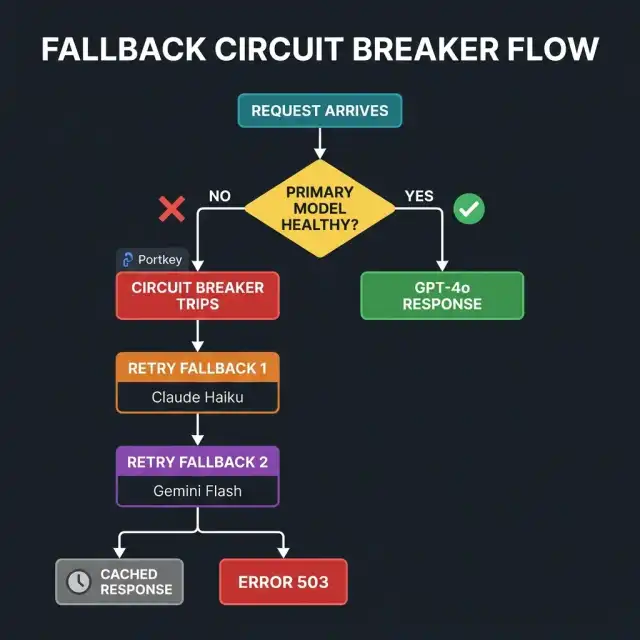
The gateway pattern implements Fallback Chains out of the box. If a call to Anthropic Claude Sonnet returns a 429 (Rate Limit Exceeded) or a 503 (Service Unavailable), the gateway automatically captures the error, falls back to a secondary group (e.g., Azure OpenAI GPT-4o), and returns the successful payload to the client. The client code never sees the error, nor does it require manual retry logic.
Circuit Breakers and Load Balancing
If a particular provider region is degrading (exhibiting rising p99 latency), standard load balancing fails because the endpoint is technically "up" but practically unusable.
An AI Gateway tracks the success-to-failure ratio and latency distribution of upstream models. When an endpoint drops below a defined SLA (e.g., failing >20% of calls over a 60-second window), the Circuit Breaker trips. The gateway stops sending queries to that endpoint for a cool-off period, routing all traffic to healthy backups. Once the endpoint stabilizes, the gateway slowly reintroduces traffic to verify health.
Routing Strategies: Designing Your Traffic Controller
Integrating an AI Gateway enables you to move the routing logic out of static code files into dynamic, declarative runtime policies. Depending on your business model, you can configure three core routing patterns:
Cost-Optimized Routing
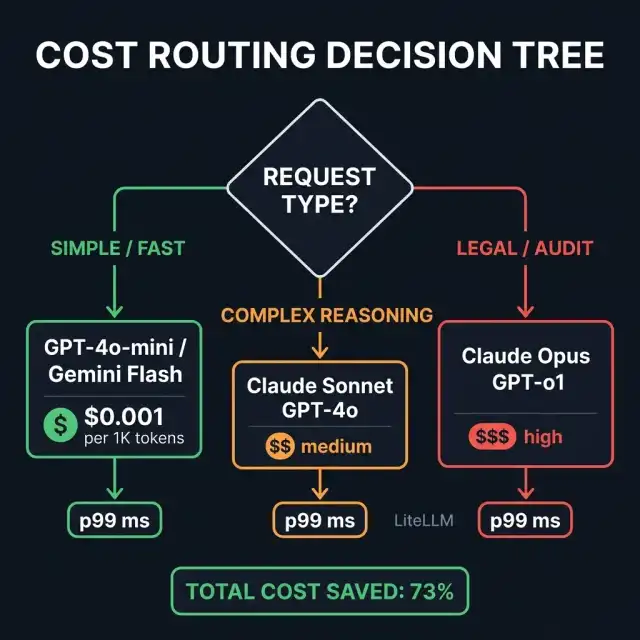
The cost discrepancy between a frontier model (like Claude 3 Opus or GPT-o1) and a fast utility model (like Gemini Flash or Claude Haiku) is up to 50x. Routing every request through a premium model is financially irresponsible.
A cost-routing policy classifies tasks dynamically.
- High-priority, complex tasks (e.g., legal compliance checking, complex code synthesis) are routed to premium model paths.
- Low-priority, high-frequency tasks (e.g., simple summarizations, basic classification, or semantic vector generation) are automatically routed to cheap utility models.
Furthermore, if your application utilizes agentic frameworks (as described in our GitOps for Agentic Code guide), you can route the intermediate execution steps through low-cost models, calling the premium models only for final validation and human-facing synthesis.
Quality-Optimized Routing
For complex reasoning tasks, you want the best possible output quality. The gateway can route requests based on benchmark evaluations. For instance, coding queries can be directed to Claude 3.5 Sonnet, mathematical validation to GPT-o1, and multi-lingual translations to Gemini.
You can also use a Semantic Router at the gateway level. By evaluating the embedding vector of the incoming query, the gateway routes the prompt to the model that has historically performed best for that category of request.
Latency-Sensitive Routing
For real-time applications (e.g., interactive search, chat assistants, or auto-complete), p99 latency is your critical metric. The gateway can measure response latencies across multiple regions and model providers in real-time, dynamically routing traffic to the lowest-latency endpoint currently available.
Self-Hosted Gateways: Owning the Proxy with LiteLLM
For enterprise deployments where data privacy, custom compliance, and zero network hops outside your VPC are non-negotiable, self-hosting your AI Gateway is the optimal choice. LiteLLM is the open-source standard for this pattern, exposing an OpenAI-compatible proxy server for over 100 LLMs.
Production Setup & Docker Compose Configuration
Let's configure a production-ready LiteLLM deployment. This includes an instance of Postgres for storing trace logs, API keys, and rate limits, alongside the LiteLLM proxy itself.
Create the Docker Compose configuration file:
# docker-compose.yml
version: '3.8'

services:
  gateway-db:
    image: postgres:15-alpine
    container_name: litellm-db
    environment:
      POSTGRES_DB: litellm_db
      POSTGRES_USER: gateway_admin
      POSTGRES_PASSWORD: StrongProductionPassword123!
    volumes:
      - pgdata:/var/lib/postgresql/data
    ports:
      - "5432:5432"
    healthcheck:
      test: ["CMD-SHELL", "pg_isready -U gateway_admin -d litellm_db"]
      interval: 5s
      timeout: 5s
      retries: 5
    networks:
      - gateway-network

  litellm-proxy:
    image: ghcr.io/berriai/litellm:main-latest
    container_name: litellm-proxy
    ports:
      - "4000:4000"
    depends_on:
      gateway-db:
        condition: service_healthy
    environment:
      DATABASE_URL: "postgresql://gateway_admin:StrongProductionPassword123!@gateway-db:5432/litellm_db"
      LITELLM_MASTER_KEY: "sk-master-key-2026-xyz-abc"
    volumes:
      - ./litellm-config.yaml:/app/config.yaml
    command: ["--config", "/app/config.yaml", "--detailed_debug"]
    networks:
      - gateway-network

volumes:
  pgdata:

networks:
  gateway-network:
    driver: bridge
Configuring the Model Routing Schema
Next, write the configuration schema that defines your fallback models, model groups, and endpoint credentials:
# litellm-config.yaml
model_list:
  # ─── FRONT END ROUTED GROUP: enterprise-reasoning ──────────────────────────
  - model_name: enterprise-reasoning
    litellm_params:
      model: claude-3-5-sonnet-20241022
      api_key: "os.environ/ANTHROPIC_API_KEY"
      rpm: 2000
      tpm: 80000

  - model_name: enterprise-reasoning
    litellm_params:
      model: azure/gpt-4o-deployment
      api_base: "https://enterprise-eastus2.openai.azure.com/"
      api_key: "os.environ/AZURE_OPENAI_API_KEY"
      api_version: "2024-08-01-preview"
      rpm: 3000

  # ─── FRONT END ROUTED GROUP: enterprise-fast ───────────────────────────────
  - model_name: enterprise-fast
    litellm_params:
      model: gemini/gemini-1.5-flash
      api_key: "os.environ/GEMINI_API_KEY"
      rpm: 5000

  - model_name: enterprise-fast
    litellm_params:
      model: azure/gpt-4o-mini-deployment
      api_base: "https://enterprise-eastus2.openai.azure.com/"
      api_key: "os.environ/AZURE_OPENAI_API_KEY"
      api_version: "2024-08-01-preview"

router_settings:
  routing_strategy: "latency-based-routing"
  redis_url: "redis://gateway-cache:6379"
  fallback_policy:
    enterprise-reasoning: ["enterprise-fast"]
    enterprise-fast: ["azure/gpt-4o-mini-deployment"]

general_settings:
  master_key: "sk-master-key-2026-xyz-abc"
  alerting: ["slack"]
  alerting_threshold: 0.15 # Alert on 15% error rates
Polyglot Client Code Examples
Here is how you initialize backend clients to route traffic through the self-hosted LiteLLM Gateway instead of direct API providers.
Practitioner Note: By defaulting to standard SDK client setup pointing to your gateway host, you preserve compatibility with standard dev tooling. You only swap out the base URL and internal credentials.
Python Client Setup
# client_orchestrator.py
import os
from openai import OpenAI

# Initialize client to target our self-hosted Gateway proxy
client = OpenAI(
    api_key="sk-master-key-2026-xyz-abc", # Internal Gateway key
    base_url="http://localhost:4000/v1"   # Pointing to LiteLLM instance
)

def run_reasoning_task(prompt: str) -> str:
    try:
        response = client.chat.completions.create(
            model="enterprise-reasoning", # Route mapped in Gateway config
            messages=[{"role": "user", "content": prompt}],
            temperature=0.2,
            max_tokens=1500
        )
        return response.choices[0].message.content
    except Exception as e:
        print(f"Inference error captured: {e}")
        raise

if __name__ == "__main__":
    result = run_reasoning_task("Synthesize code for pgvector search integration.")
    print(f"Response: {result[:120]}...")
TypeScript / Node.js Client Setup
// clientOrchestrator.ts
import { OpenAI } from 'openai';

const gatewayClient = new OpenAI({
  apiKey: 'sk-master-key-2026-xyz-abc', // Mapped Gateway credential
  baseURL: 'http://localhost:4000/v1'   // LiteLLM proxy base path
});

async function runUtilityTask(prompt: string): Promise<string | null> {
  try {
    const response = await gatewayClient.chat.completions.create({
      model: 'enterprise-fast', // Dynamic gateway routed group
      messages: [{ role: 'user', content: prompt }],
      max_tokens: 500
    });
    return response.choices[0].message.content;
  } catch (error) {
    console.error(`Task failure: ${error}`);
    throw error;
  }
}
Managed Gateways: Evaluating Portkey and Vercel
If your team prefers to delegate infrastructure orchestration, scaling, and dashboard management to external vendors, managed options like Portkey and Vercel AI Gateway offer drop-in integration.
Portkey AI Gateway
Portkey is designed specifically for enterprise FinOps and deep observability. It behaves as a complete wrapper around model endpoints, offering:
- Configurable Fallback Graphs: You can design visual, multi-stage fallback routes directly inside their dashboard UI.
- Intelligent LLM Cache: Instantly matches prompt semantics at the gateway edge to resolve queries via cache, bringing latency down to <10ms for repeated requests.
- Detailed Spend Dashboards: Splits cost attributions down to specific organization API keys, project names, and individual user IDs.
Vercel AI Gateway
If your runtime infrastructure is already hosted within Vercel's Edge network, the Vercel AI Gateway is a logical extension. It focuses on:
- Edge Deployment: Extremely fast proxy logic running on Vercel's global edge network, minimizing network latency.
- Streaming Support: Flawless execution of real-time server-sent events (SSE) for streaming model text outputs.
- Simple Configuration: Setup rules are declared directly inside your Vercel project configuration interface, maintaining deployment cohesion.
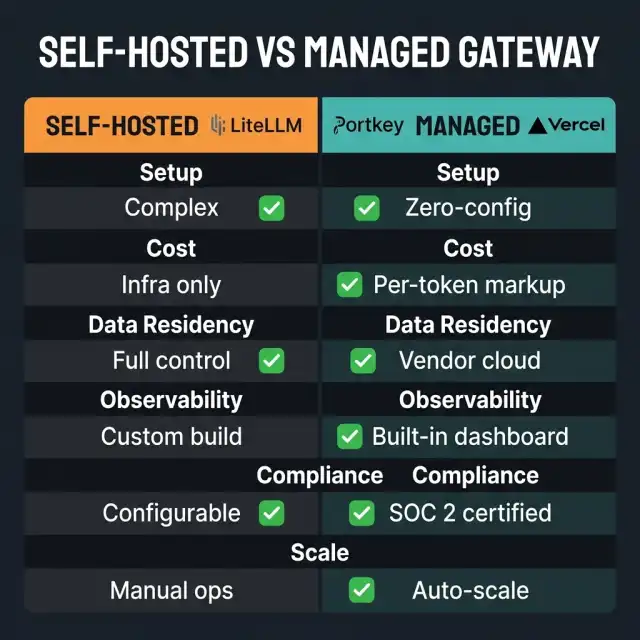
TCO Analysis: Build vs. Buy Managed Gateway
When choosing between a self-hosted implementation (LiteLLM on custom Kubernetes/ECS nodes) and a managed service (Portkey, Vercel), calculate the total cost of ownership (TCO) across your application lifetime:
| Cost Parameter | Self-Hosted (LiteLLM) | Managed (Portkey/Vercel) | Strategic Rationale |
|---|---|---|---|
| Licensing & Base Fee | $0 (Open-Source Apache 2.0) | $99 - $999+ / month flat fee | Managed options charge premium for dashboard access & platform maintenance. |
| Infrastructure Costs | $150 - $600 / month (AWS ECS + RDS Postgres) | $0 (Hosted on provider network) | Self-hosting requires dedicated compute instances and database hosting for trace storage. |
| Token Routing Surcharge | $0 | $0.0005 per 1K tokens (or tier markup) | Some managed proxies charge micro-fees on throughput volume, scaling with usage. |
| Maintenance & Ops | ~4 engineering hours / month ($400 value) | 0 hours (Auto-updates, managed SLA) | Self-hosted instances require manual upgrades, index tuning, and DB backups. |
| Data Privacy Compliance | Sovereign Control (Zero data egress) | Shared Responsibility (SOC 2, third-party) | Self-hosting keeps all prompts, responses, and user credentials inside your private VPC. |
| Custom Code Hooking | Infinite (Custom middleware support) | Restricted to vendor plug-ins | Self-hosted proxies allow you to inject proprietary Python middleware directly into request flows. |
Enterprise Readiness: Observability, Billing, and Security
PII Redaction & Sanitization
An AI Gateway should act as a compliance firewall. Sending customer PII (Personally Identifiable Information, such as social security numbers, emails, names, or addresses) directly to external model vendor clouds can violate HIPAA, GDPR, or SOC 2 regulations.
To mitigate this, you configure a PII sanitization step in your gateway middleware. As requests flow through:
- The gateway executes Regex or Named Entity Recognition (NER) models to flag PII structures.
- The identified strings are redacted or substituted with tokenized placeholders.
- The sanitized text is dispatched upstream.
- When the response arrives back, the placeholders are re-hydrated with original data before returning the payload to your client.
Multi-Tenant Cost Attribution
If you operate a B2B SaaS platform where customers run custom agents, allocating costs is extremely difficult without gateway metadata.
Incoming Request -> Mapped API Key (Tenant A) -> Proxy Tracks Tokens -> Logs Billing DatabaseBy generating tenant-specific API keys at the gateway, every token consumed is recorded against their unique record. You can then configure quota constraints directly at the proxy level:
# Set tenant limit policies
tenant-a-limits:
  max_spend: 150.00 # $150 per month limit
  rate_limit: 100rpm
When Tenant A exceeds $150 in token consumption within their billing cycle, the gateway immediately returns a 429 error with custom header context: {"error": "Enterprise billing quota exceeded"}.
OpenTelemetry-Compliant Observability
Do not rely on vendor logs to reconstruct runtime events. Configure your gateway to export traces directly to your centralized observability backend (Datadog, Dynatrace, or self-hosted OpenTelemetry collector).
By tracking standard metrics (latency, input token volume, output token volume, cache hit rate, and HTTP status codes) alongside traditional APM logs, you can monitor the health of your AI platform using standard dashboards.
gateway_inference_duration_seconds{model="enterprise-reasoning", status="200"} 0.35s
gateway_token_cost_dollars{tenant_id="customer-99", provider="anthropic"} 0.0023
2027-2030 Transition Roadmap
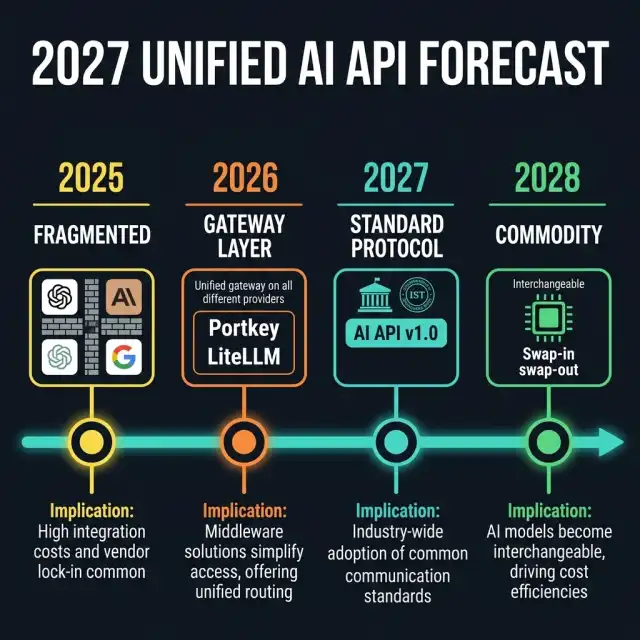
The evolution of the AI Gateway is moving toward standardizing semantic proxies and local-to-cloud mesh networks.
2027 - Hybrid Local-Edge Mesh Networks
By 2027, production applications will use hybrid gateways that automatically route tasks between local edge models (running on mobile devices or local enterprise appliances) and cloud frontier models. The routing decision is based on a real-time computation of network bandwidth, task complexity, and energy cost.
2028 - Universal Semantic Cache Standardization
LLM caching today is simple key-value hashing of exact prompt matches. By 2028, Semantic Caching will become standardized at the network layer. Gateways will maintain high-dimensional vector caches that return accurate answers for semantically equivalent prompts, reducing upstream inference costs by up to 40% across high-traffic applications.
2029 - Automated LLM Cost Negotiation Protocol
Expect model providers to expose dynamic, API-driven bidding endpoints. An AI Gateway will act as a financial negotiator, dynamically requesting quotes from model providers based on current network volume, load, and compute availability. The proxy will dynamically "buy" token capacity from the cheapest provider matching the prompt's required SLA in real-time.
2030 - Decentralized Sovereign Agentic Gateways
As multi-agent networks scale, gateways will transition to decentralized nodes operating on secure mesh networks. Verification of inputs, outputs, and compliance audit logging will be handled by private consensus protocols, ensuring zero centralized single point of failure.
Monday Morning Action Plan
Don't wait for your next billing shock to change your architecture. Implement these three steps next:
1. Intercept client initialization (2 hours)
Review your application's current client instantiation blocks. Move all raw OpenAI() or Anthropic() client initialization logic to route through a single environment-configurable base_url pointing to a local or dev gateway.
2. Setup a local LiteLLM proxy in Docker (1 hour)
Pull the LiteLLM proxy image in your local development stack. Spin it up with a basic config mapping a single OpenAI group and an Anthropic fallback. Verify that your application runs smoothly without noticing the change.
3. Set an alert budget limit at the provider level (30 minutes)
While you build your gateway infrastructure, immediately log into your OpenAI, Anthropic, and GCP consoles to set hard daily and monthly credit spend limits. This prevents run-away agent scripts from scaling your costs before your gateway protections are fully deployed.
Key Takeaways
- Direct integration is architectural debt - routing external API traffic directly from business logic is fragile, insecure, and lacks cost control.
- The AI Gateway acts as a central proxy - handling unified schemas, failover logic, circuit breaking, and secret storage.
- Implement fallback chains to automatically capture upstream errors and route requests to healthy alternative models transparently.
- Self-host LiteLLM if you require complete data privacy, network speed, and zero data egress outside your VPC.
- Set quota limits per tenant directly at the gateway layer to attribution billing and cost structures in multi-tenant systems.
- Secure compliance at the edge by configuring regex-based PII redaction filters directly on the proxy before prompts leave your network.
FAQ
About the Author
Vatsal Shah is an AI systems architect and digital growth leader specializing in high-throughput cloud infrastructure and enterprise agent governance. He builds highly scalable, secure, and cost-controlled agentic platforms for enterprise clients across 40+ countries.
Connect with Vatsal on LinkedIn or discover more blueprints at shahvatsal.com.
Conclusion
Transitioning your systems to the AI Gateway pattern is the single most effective architectural upgrade you can make to secure, optimize, and scale your AI platform in 2026.
If you are currently deploying agentic workflows, read our guide on Stateful Agent Execution: Durable Serverless Workflows for state-management strategies. And to align your code quality standards, check out Clean Code in the Age of Copilot to establish robust engineering metrics.
