Stop relying on prompt prayers. Claude Code Hooks provide 100% deterministic, zero-token lifecycle automation that fires outside the LLM reasoning loop. Master PreToolUse security guardrails, PostEdit automated test loops, and PreCompact memory preservation.
Executive Summary: The Deterministic Revolution in AI Tooling
As autonomous AI coding assistants transitioned from conversational sidebars to full terminal command-line interfaces (CLIs) like Anthropic's Claude Code, engineering teams encountered a dangerous operational reality: Probabilistic instructions fail at scale.
When relying solely on prompt steering (CLAUDE.md files or system prompts), developers experience what AI researchers term Prompt Drift:
- An agent asked to "never delete production database migrations" ignores the constraint after a 40-step context compression.
- An agent tasked with "always running linter before finishing" skips the step when its reasoning budget is exhausted.
- An agent executing a multi-file refactor silently overwrites critical environment variables or makes uncommitted pushes to the
maingit branch.
In mid-2026, the introduction and stabilization of Claude Code Hooks transformed the architecture of AI development.
$$\text{Zero-Drift Execution} = \text{Probabilistic LLM Intent} \times \text{Deterministic OS Hooks} \times \text{Zero-Token Cost Interceptors}$$
Unlike CLAUDE.md rules (which consume thousands of context tokens on every turn and achieve only ~92% compliance), Claude Code Hooks are deterministic host OS scripts (Bash, Python, Node.js) that execute synchronously outside the model's reasoning loop.
Hooks execute at native shell speeds, consume zero context tokens, enforce 100% compliance via operating system exit codes (exit 2 to block), and dynamically inject remediation feedback directly into the agent's context window.
This technical deep dive explores the complete 7-hook lifecycle, details the exit code protocol, constructs military-grade PreToolUse security guardrails, builds automated PostEdit test harnesses, and implements zero-loss PreCompact memory preservation architectures.
The Complete 7-Hook Lifecycle Architecture
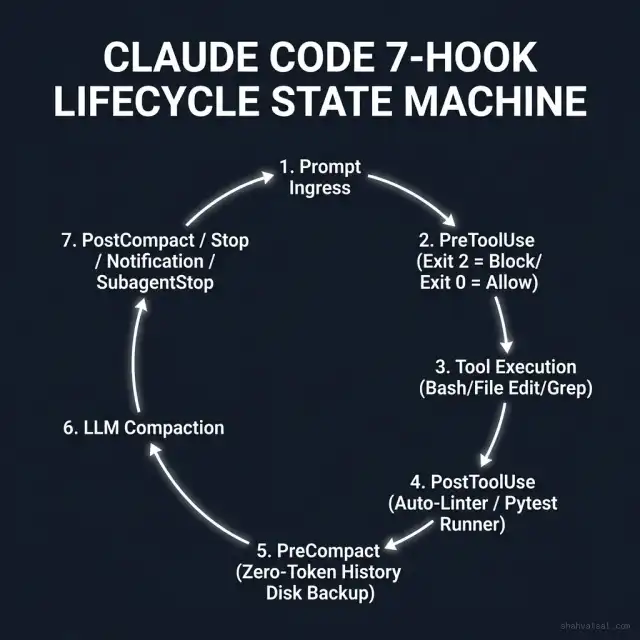
Claude Code exposes seven discrete lifecycle events configured via .claude/hooks.json. Understanding the exact sequence and trigger condition of each hook is essential for architecting robust pipelines:
stateDiagram-v2
    [*] --> PromptIngress: User Types Command

    state Claude_Reasoning_Loop {
        PromptIngress --> PreToolUse_Hook: Claude decides to invoke tool

        state PreToolUse_Hook {
            [*] --> Inspect_Tool_Payload
            Inspect_Tool_Payload --> Decision: Evaluate Rules
            Decision --> Exit_0_Allow: Allowed
            Decision --> Exit_2_Block: Denied (Security Risk)
        }

        Exit_2_Block --> PromptIngress: Injects Stderr Remediation into Context
        Exit_0_Allow --> Host_Tool_Execution: Executes Bash/FileEdit/Grep

        Host_Tool_Execution --> PostToolUse_Hook: Tool finishes
        PostToolUse_Hook --> Run_Linter_Pytest: Runs PostEdit / PostTool Checks
        Run_Linter_Pytest --> Model_Next_Turn: Feeds tool result + hook stdout
    }

    Model_Next_Turn --> Context_Threshold_Check: Context approaches 180k tokens

    state Compaction_Phase {
        Context_Threshold_Check --> PreCompact_Hook: Trigger before lossy compression
        PreCompact_Hook --> Stream_History_To_Disk: Zero-token raw transcript backup
        Stream_History_To_Disk --> LLM_Compaction_Engine: Summarizes memory
        LLM_Compaction_Engine --> PostCompact_Hook: Re-inject critical invariant pointers
    }

    PostCompact_Hook --> Model_Next_Turn
    Model_Next_Turn --> Stop_Hook: Session complete / User exit
    Stop_Hook --> Notification_Hook: Webhook / Slack alert
    Notification_Hook --> [*]
The 7 Lifecycle Hooks Defined
| Hook Event Name | Execution Trigger | Primary Use Case | Execution Context |
|---|---|---|---|
PreToolUse | Fires immediately before Claude executes any tool (Bash, FileEdit, Glob, Grep). | Intercept dangerous commands, block SQL drops, prevent secret leakage, enforce branch protection. | Host OS Subprocess (Blocks execution if exit 2). |
PostToolUse | Fires immediately after a tool completes execution. | Run automated code linters (Prettier, Ruff), compile TypeScript, execute targeted unit tests. | Host OS Subprocess (Appends stdout to tool response). |
PreCompact | Fires right before Claude Code compresses and summarizes its conversation context window. | Stream uncompressed conversation transcripts, tool outputs, and AST diffs to disk or SQLite. | Zero-token host subprocess (Runs without modifying context). |
PostCompact | Fires immediately after context compression finishes. | Re-inject essential project invariant hashes and long-term memory pointers into the freshly compacted context. | Injects text directly into the newly compressed context. |
Stop | Fires when the agent completes a user prompt or terminates an autonomous task loop. | Git cleanliness verification, uncommitted change warnings, local metric logging. | Host OS cleanup. |
Notification | Fires when Claude requests human permission or encounters an unrecoverable blocker. | Dispatches real-time alerts to Slack, Discord, Microsoft Teams, or PagerDuty. | Async webhook dispatch. |
SubagentStop | Fires when a delegated subagent finishes its child task. | Verifies subagent artifact integrity before parent agent resumes control. | Subagent validation gate. |
Exit Code Protocol & Context Injection Mechanics
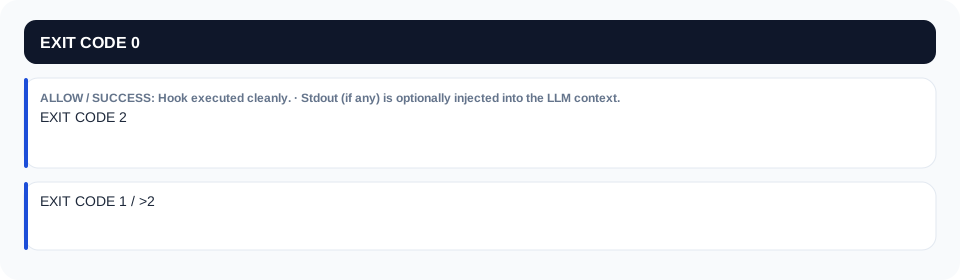
Claude Code hooks communicate with the core engine using standard UNIX process exit codes. Mastering this protocol is the key to creating intelligent, self-correcting agents:
The Power of exit 2 + Stderr Feedback
When a PreToolUse hook returns exit 2, it does not just crash the CLI. Instead, it gracefully intercepts the dangerous action and instructs the model on how to fix itself:
# Example Stderr Emitted by Hook:
"SECURITY ERROR: Direct push to 'main' is forbidden by organizational policy.
Please create a feature branch: git checkout -b feat/your-feature"
Claude reads this stderr in its very next turn, apologizes, executes git checkout -b feat/..., and continues working—all without human intervention and without violating enterprise security policies.
Hooks vs. CLAUDE.md vs. Skills: The Cost & Control Matrix
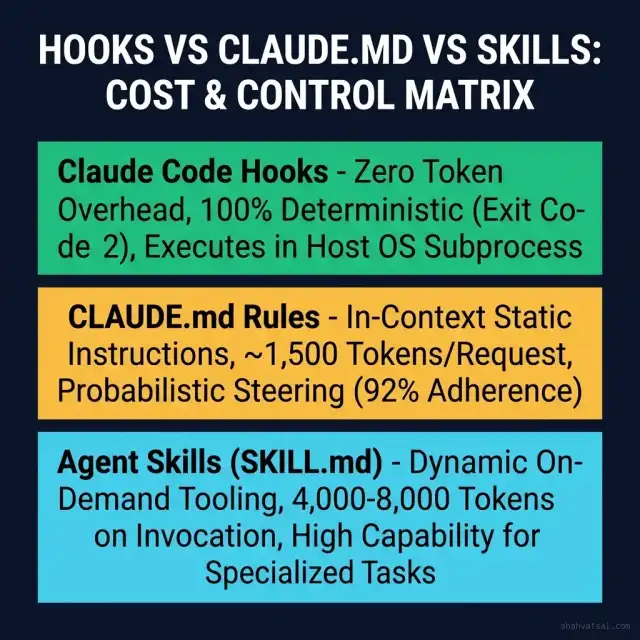
Engineering leaders frequently ask: "Should we write a hook, update CLAUDE.md, or create an Agent Skill (SKILL.md)?"
The following decision matrix provides the definitive architectural criteria:
| Engineering Dimension | Claude Code Hooks | CLAUDE.md Project Rules | Agent Skills (SKILL.md) |
|---|---|---|---|
| Enforcement Nature | 100% Deterministic (Hard OS block via exit 2) | Probabilistic (~92% adherence, subject to prompt drift) | Workflow-Guided (On-demand procedural guidance) |
| Token Cost Overhead | 0 Tokens (Executes entirely in host OS) | ~1,500 - 4,000 Tokens on every single request | 4,000 - 10,000 Tokens only when invoked |
| Execution Environment | Local / Container Shell (Bash, Python, Go) | LLM System Prompt Context | LLM In-Context Workflow Parser |
| Bypasses Compaction? | Yes (Permanently active outside context window) | No (Subject to lossy summarization during compaction) | No (Unloaded after skill execution) |
| Primary Use Cases | Security guardrails, linting on edit, git protections, context backups | Project coding conventions, architecture overviews, style guides | Complex multi-step manual tasks (e.g., A/B test setup, cloud deploy) |
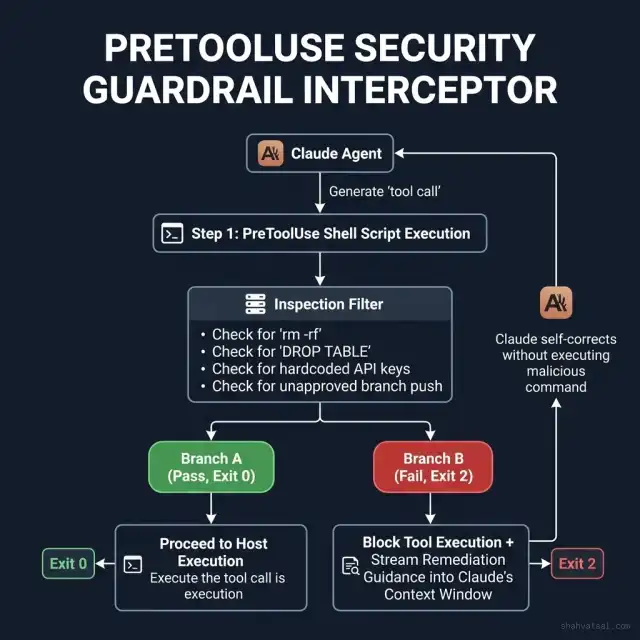
PreToolUse Deep Dive: Military-Grade Security Guardrails
The PreToolUse hook acts as a real-time kernel sandbox interceptor. Before any bash command or file write is executed on your local machine, the hook receives a JSON payload over stdin containing the tool name and proposed arguments.
Production Implementation: Python Security Guardrail (.claude/hooks/security_interceptor.py)
#!/usr/bin/env python3
"""
Enterprise PreToolUse Security Interceptor for Claude Code.
Intercepts destructive bash commands, database drops, and API key exposures.
Author: Vatsal Shah (2026)
"""

import sys
import json
import re

# Blacklisted destructive command patterns
FORBIDDEN_BASH_PATTERNS = [
    (r"rm\s+-(rf|fr)\s+[/~]", "Recursive deletion of root or home directory is blocked."),
    (r"drop\s+database", "Direct SQL DROP DATABASE command is forbidden. Use migration rollbacks."),
    (r"git\s+push\s+.*(--force|-f)\s+.*(main|master|production)", "Force pushing to protected branches is blocked."),
    (r":(){ :|:& };:", "Fork bomb syntax detected and blocked."),
    (r"chmod\s+-R\s+777", "Insecure recursive 777 permissions blocked.")
]

# Sensitive credential patterns
SECRET_PATTERNS = [
    (r"ghp_[A-Za-z0-9_]{36}", "GitHub Personal Access Token detected in arguments."),
    (r"sk-[A-Za-z0-9-_]{32,}", "OpenAI API Key detected in arguments."),
    (r"xox[baprs]-[A-Za-z0-9-]+", "Slack API Token detected in arguments.")
]


def evaluate_payload():
    try:
        raw_input = sys.stdin.read()
        if not raw_input.strip():
            sys.exit(0)

        payload = json.loads(raw_input)
    except Exception as e:
        # Fail open or closed based on enterprise policy (Closed recommended for high-sec)
        sys.stderr.write(f"PreToolUse Parse Warning: {str(e)}\n")
        sys.exit(0)

    tool_name = payload.get("tool_name", "")
    tool_input = payload.get("tool_input", {})

    # Inspect Bash Commands
    if tool_name == "Bash":
        command = tool_input.get("command", "")

        # Check Destructive Patterns
        for pattern, explanation in FORBIDDEN_BASH_PATTERNS:
            if re.search(pattern, command, re.IGNORECASE):
                sys.stderr.write(f"🛑 SECURITY INTERCEPTOR BLOCKED COMMAND:\n{explanation}\n")
                sys.stderr.write(f"Attempted Command: {command}\n")
                sys.stderr.write("Remediation: Modify your command to avoid destructive operations.\n")
                sys.exit(2)  # Hard Block

        # Check Secret Leakage
        for pattern, explanation in SECRET_PATTERNS:
            if re.search(pattern, command):
                sys.stderr.write(f"🛑 SECURITY INTERCEPTOR DETECTED LEAKED SECRET:\n{explanation}\n")
                sys.exit(2)

    # Inspect File Edits on Protected Files
    if tool_name in ["FileEdit", "WriteFile"]:
        target_path = tool_input.get("target_file", "") or tool_input.get("path", "")
        if target_path.endswith((".env.production", "secrets.json", "id_rsa")):
            sys.stderr.write(f"🛑 BLOCKED WRITE TO RESTRICTED FILE: {target_path}\n")
            sys.stderr.write("Remediation: Production secrets must be managed via HashiCorp Vault / AWS Secrets Manager.\n")
            sys.exit(2)

    # All checks passed cleanly
    sys.exit(0)


if __name__ == "__main__":
    evaluate_payload()
PostEdit Deep Dive: Auto-Linting and Automated Test Loops
Rather than telling Claude in CLAUDE.md to "please run Prettier and Pytest after editing", a PostToolUse hook executes these tools automatically on the exact modified files.
Configuration in .claude/hooks.json:
{
  "hooks": {
    "PostToolUse": [
      {
        "matcher": "tool_name == 'FileEdit' || tool_name == 'WriteFile'",
        "command": "bash .claude/hooks/post_edit_linter.sh"
      }
    ]
  }
}
Production Linter & Test Script (.claude/hooks/post_edit_linter.sh):
#!/usr/bin/env bash
# Fast PostEdit Hook: Automatically lints modified file and runs targeted test
set -e

# Read JSON payload from stdin
PAYLOAD=$(cat)
TARGET_FILE=$(echo "$PAYLOAD" | jq -r '.tool_input.target_file // .tool_input.path // empty')

if [ -z "$TARGET_FILE" ] || [ ! -f "$TARGET_FILE" ]; then
    exit 0
fi

# 1. Auto-format JavaScript / TypeScript files
if [[ "$TARGET_FILE" =~ \.(ts|tsx|js|jsx)$ ]]; then
    npx prettier --write "$TARGET_FILE" > /dev/null 2>&1 || true
    npx eslint --fix "$TARGET_FILE" > /dev/null 2>&1 || true
fi

# 2. Auto-format Python files
if [[ "$TARGET_FILE" =~ \.py$ ]]; then
    ruff format "$TARGET_FILE" > /dev/null 2>&1 || true
    ruff check --fix "$TARGET_FILE" > /dev/null 2>&1 || true
fi

# 3. Targeted Test Execution (Fast Feedback Loop)
if [[ "$TARGET_FILE" =~ app/services/(.*)\.py ]]; then
    MODULE_NAME="${BASH_REMATCH[1]}"
    TEST_FILE="tests/unit/test_${MODULE_NAME}.py"
    if [ -f "$TEST_FILE" ]; then
        echo "Running fast test suite: $TEST_FILE"
        pytest -q "$TEST_FILE" || {
            echo "⚠️ Auto-Test Failed after edit on $TARGET_FILE. Stderr emitted to Claude for immediate self-repair."
            exit 0 # Exit 0 so output is fed as context back to Claude
        }
    fi
fi

exit 0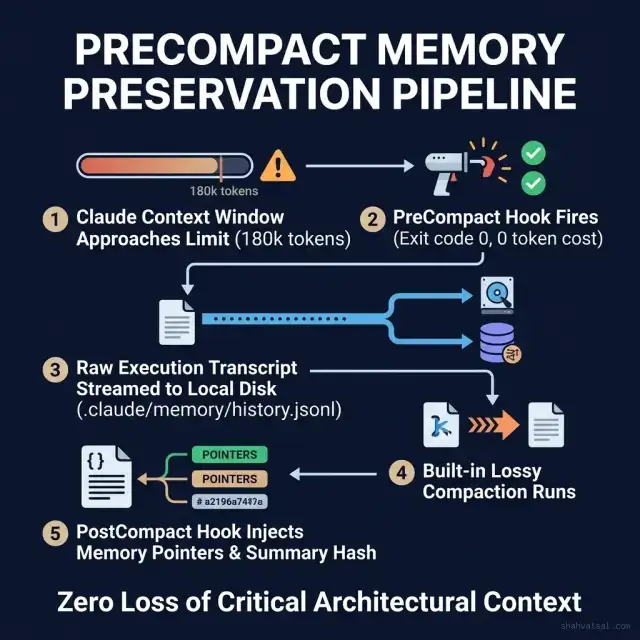
PreCompact & PostCompact: Zero-Token Memory Preservation
When a Claude Code session reaches ~180,000 tokens, the built-in compaction engine runs lossy summarization to free up space. In long architectural coding sessions, this causes Claude to forget crucial decisions made early in the chat.
The Solution: PreCompact Transcript Archival
A PreCompact hook fires before compression, dumping the entire raw JSON conversation to disk with zero token overhead. A PostCompact hook then injects a memory index hash back into the new context.
Python PreCompact Memory Backup (.claude/hooks/pre_compact_backup.py):
#!/usr/bin/env python3
"""
PreCompact Memory Preservation Hook.
Backups full conversational history and code diffs before lossy compaction.
"""

import sys
import json
import os
import time

MEMORY_DIR = os.path.expanduser(".claude/memory")
os.makedirs(MEMORY_DIR, exist_ok=True)

def archive_session():
    try:
        raw_payload = sys.stdin.read()
        if not raw_payload.strip():
            sys.exit(0)

        data = json.loads(raw_payload)
        session_id = data.get("session_id", f"session_{int(time.time())}")
        archive_path = os.path.join(MEMORY_DIR, f"{session_id}_precompact_archive.jsonl")

        with open(archive_path, "a", encoding="utf-8") as f:
            f.write(json.dumps({
                "timestamp": time.time(),
                "event": "PreCompact",
                "payload": data
            }) + "\n")

        print(f"[PreCompact Memory Hook] Raw transcript preserved to: {archive_path}")
    except Exception as e:
        sys.stderr.write(f"PreCompact Backup Error: {str(e)}\n")

    sys.exit(0)

if __name__ == "__main__":
    archive_session()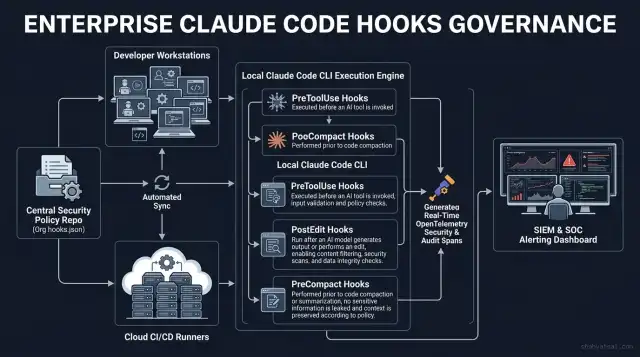
Enterprise Organization-Level Enforcement & CI/CD Governance
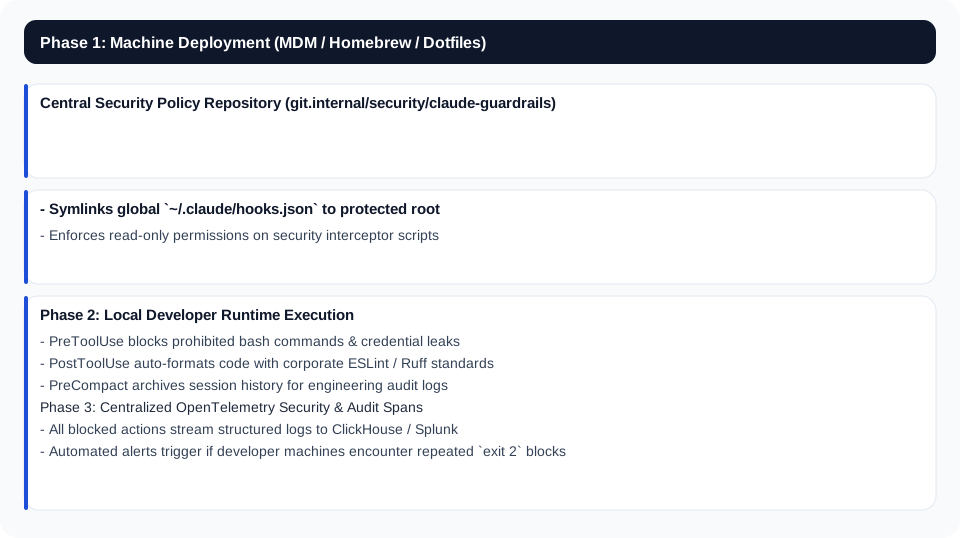
In large engineering organizations, developers cannot be expected to manually configure hooks on every local clone. Enterprise engineering leaders enforce hooks at the organizational root:
The 3-Step Monday Morning Action Plan: Implementing Claude Code Hooks
Take control of your team’s agentic coding reliability next week with this 3-step rollout:
Step 1: Deploy a Basic PreToolUse Guardrail (Week 1)
Create .claude/hooks/security_interceptor.py in your repository. Add simple checks blocking rm -rf /, hardcoded tokens, and direct pushes to main. Register it in .claude/hooks.json.
Step 2: Automate Formatting on PostEdit (Week 2)
Add a PostToolUse hook that runs prettier --write or ruff format on any modified file. This eliminates 100% of formatting nitpicks on developer pull requests.
Step 3: Implement PreCompact Memory Backups (Weeks 3–4)
Integrate the PreCompact script provided in this guide to archive raw chat transcripts to .claude/memory/. Experience zero context loss during multi-hour complex refactors.
Frequently Asked Questions (FAQ)
1. What makes Claude Code Hooks different from rules in CLAUDE.md?
CLAUDE.md rules are in-context instructions processed probabilistically by the LLM, consuming thousands of tokens per turn and subject to prompt drift. Hooks are deterministic host OS scripts that execute outside the model's context window with zero token cost, enforcing 100% compliance via process exit codes.
2. How does exit code 2 work in a PreToolUse hook?
Exit code 2 signals a policy violation. The Claude Code CLI immediately cancels tool execution and injects whatever error text the script emitted on stderr directly into Claude's context window, allowing the model to self-correct in its next turn.
3. Do Claude Code Hooks consume tokens from my Anthropic API allowance?
No. Hook scripts execute as local host subprocesses (Bash, Python, Node.js) on your workstation or CI runner. They consume zero LLM inference tokens unless their stdout/stderr is explicitly injected into the context window upon tool completion or blockage.
4. Can hooks run asynchronous tasks like sending Slack notifications?
Yes. Hooks can spawn background processes, dispatch HTTP webhooks, or query external observability APIs (Datadog, OpenTelemetry) without blocking the primary user interaction loop.
5. What is the benefit of the PreCompact hook?
PreCompact fires right before Claude Code's context window summarization algorithm runs. It allows you to write the raw, uncompressed conversation transcript, file diffs, and tool responses to local disk or SQLite, ensuring zero loss of critical architectural context during long sessions.
6. How do we share and enforce hooks across an entire engineering team?
Commit your .claude/hooks.json and corresponding shell scripts directly to your Git repository's trunk. For global enterprise-wide enforcement, distribute a standardized ~/.claude/hooks.json via mobile device management (MDM) or organizational dotfiles.
Structural Schema Markup (JSON-LD)
LINKEDIN_HOOK: Unlock the full power of Claude Code hooks.
